安裝 Bootstrap 非常容易。以下整理自己的學習歷程,方便日後查閱,也希望對剛入門的人有幫助。
一、下載
到 https://getbootstrap.com/ 可以取得最新版本,頁面上有兩個按鈕:
Download Bootstrap:下載預先編譯並壓縮好的 CSS、JavaScript 與字型,不含文件與原始碼。
Download Source:下載 Bootstrap 的 LESS 與 JavaScript 原始碼。若使用未編譯的版本,需要自行編譯 LESS 才能產生可用的 CSS;官方當時主要支援 Recess(Twitter 開發、基於 less.js 的 CSS 工具鏈)。
為了快速上手,本節採用預編譯版本。由於檔案已編譯壓縮,開發時不必逐個引入獨立檔案。
二、檔案結構
預編譯版本解壓後大致如下:
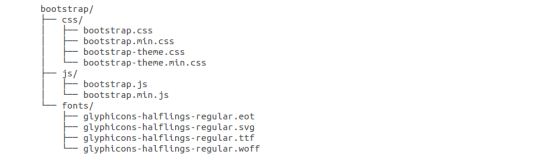
可以看到已編譯的 CSS 與 JS(bootstrap.*)、對應的壓縮版(bootstrap.min.*),以及 Glyphicons 字型——後者屬於可選的主題資源。
原始碼版本的結構不同:
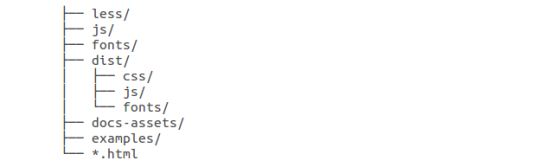
less/、js/、fonts/ 分別是樣式、腳本與圖示字型的來源檔;dist/ 放的是前述預編譯產物;docs-assets/、examples/ 與各 *.html 則是官方文件。
三、HTML 模板
 <!DOCTYPE html>
<html>
<head>
<title>Bootstrap 模板</title>
<meta name="viewport" content="width=device-width, initial-scale=1.0">

<!-- 引入 Bootstrap -->
<link href="https://apps.bdimg.com/libs/bootstrap/3.3.0/css/bootstrap.min.css" rel="stylesheet">

<!-- HTML5 Shim 與 Respond.js 讓 IE8 支援 HTML5 元素與媒體查詢 -->
<!-- 注意:以 file:// 協定引入 Respond.js 不會生效 -->
<!--[if lt IE 9]>
<script src="https://oss.maxcdn.com/libs/html5shiv/3.7.0/html5shiv.js"></script>
<script src="https://oss.maxcdn.com/libs/respond.js/1.3.0/respond.min.js"></script>
<![endif]-->
</head>
<body>
<h1>Hello, world!</h1>

<!-- jQuery 必須先於 bootstrap.min.js -->
<script src="https://code.jquery.com/jquery.js"></script>
<!-- 包含所有已編譯的插件 -->
<script src="js/bootstrap.min.js"></script>
</body>
</html>
三個檔案到位,一個普通 HTML 就變成 Bootstrap 頁面了:bootstrap.min.css 負責樣式、jquery.js 是插件依賴、bootstrap.min.js 提供互動行為。
四、跑第一個實例
 <!DOCTYPE html>
<html>
<head>
<title>在線嘗試 Bootstrap 實例</title>
<link href="https://apps.bdimg.com/libs/bootstrap/3.3.0/css/bootstrap.min.css" rel="stylesheet">
<script src="https://apps.bdimg.com/libs/jquery/2.0.0/jquery.min.js"></script>
<script src="https://apps.bdimg.com/libs/bootstrap/3.3.0/js/bootstrap.min.js"></script>
</head>
<body>
<h1>Hello, world!</h1>
</body>
</html>
各行的用途:
 <!-- 新的 Bootstrap 核心 CSS -->
<link href=".../bootstrap/3.3.0/css/bootstrap.min.css" rel="stylesheet">

<!-- 可選的主題檔,一般不使用 -->
<link href=".../bootstrap/3.3.0/css/bootstrap-theme.min.css" rel="stylesheet">

<!-- jQuery 務必在 bootstrap.min.js 之前 -->
<script src=".../jquery/2.0.0/jquery.min.js"></script>

<!-- Bootstrap 核心 JavaScript -->
<script src=".../bootstrap/3.3.0/js/bootstrap.min.js"></script>
幾個實務提醒
載入順序不能顛倒。Bootstrap 的 JS 插件全部建立在 jQuery 之上,順序錯了會直接拿到 $ is not defined。
viewport 是響應式的開關。少了那行 meta,行動裝置上的欄位配置完全不會如預期。
範例中的 CDN 請自行替換。文中引用的幾個網址年代久遠,可能已失效。正式專案建議下載檔案自行託管,或改用仍在維護的 CDN 服務,並加上 integrity 與 crossorigin 屬性以防資源被篡改。
用本地伺服器開啟。直接雙擊以 file:// 開啟,部分插件與字型載入會失敗,前面那段 Respond.js 的註解就是在講這件事。
相關文章
-
Windows 8 下搭建 Node.js 開發環境全流程教程 Windows 下 Node.js 安裝與環境配置入門教程 JavaScript + DeviceOne 開發實戰(一):環境配置與起步 學習使用 Bootstrap3 柵格系統 讓 Bootstrap 3 在 IE8 下正常運作:完整設定步驟 Bootstrap 3 與 Foundation 5:兩種設計哲學的碰撞 Bootstrap 3 在 input 輸入框中嵌入 glyphicon 圖標 Bootstrap 3 建站教學:表單元素排版實作 Bootstrap 3 搭配 typeahead.js 與 Bloodhound 實作自動完成 Bootstrap 3 快速做出搜尋框