基於 javascript 實現簡單的抽獎系統
編輯:關於JavaScript
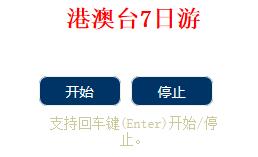
抽獎系統常用於活動頁。最簡單的版本可以用陣列保存獎項,再用定時器快速切換顯示內容,按下停止後決定結果。
var mytype = ['iPhone6s', 'iPad Air2', '鍵鼠套裝', '購物卡', '話費卡', '謝謝參與'];
var timer = null;
var count = 0;
window.onload = function () {
  var start = document.getElementById('start');
  var stop = document.getElementById('stop');
  start.onclick = startFun;
  stop.onclick = stopFun;
  document.onkeyup = function (e) {
    e = e || window.event;
    if (e.keyCode === 13) {
      if (count === 0) {
        startFun();
        count = 1;
      } else {
        stopFun();
        count = 0;
      }
    }
  };
};
function startFun() {
  clearInterval(timer);
  var title = document.getElementById('title');
  timer = setInterval(function () {
    var num = Math.floor(Math.random() * mytype.length);
    title.innerHTML = mytype[num];
  }, 50);
}
function stopFun() {
  clearInterval(timer);
}
這個範例支援按 Enter 開始與停止。核心概念是:
1. 用 setInterval 製造滾動效果。
2. 用 clearInterval 停止計時器。
3. 用亂數決定顯示內容。
若要應用在正式活動,建議後端也要參與抽獎邏輯,避免前端結果被竄改。
- 上一篇文章: 基於 javascript 實現 tab 切換特效
- 下一篇文章: 基於 javascript 實現九宮格大轉盤效果