本文要介紹的是一個自定義的 Bootstrap 級聯下拉菜單,最典型的應用場景就是省、市關聯選擇,其他需要聯動的菜單同樣適用。說實話,把一個組件封裝得通用並不容易,既要考慮數據加載的時機,也要兼顧選中態的還原,還得讓使用方接入足夠簡單。這次整理的關聯 select 就牽涉到 jQuery、Ajax、SpringMVC 等一系列知識點。
先讓這個組件自我介紹一下:
「你好,我叫 yunm.combox.js。用法很簡單:給 select 加兩個自定義屬性,就能完成聯動數據加載。數據請求走 Ajax,後端用 SpringMVC 返回 JSON 即可,換成別的技術棧也沒問題。」
一、界面效果
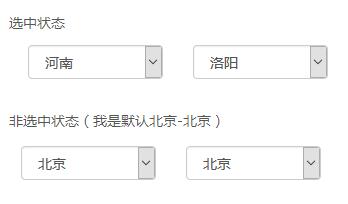
光看界面其實看不出封裝水平,但至少它簡潔清爽,讓人願意繼續看下去。
二、使用方法
① procity.jsp
先在頁面加載 yunm.combox.js(Bootstrap 自身的 css/js 這裡略過),然後寫兩個 select:
<script type="text/javascript" src="${ctx}/components/yunm/yunm.combox.js"></script>

<div class="form-group">
  <div class="row">
    <div class="col-md-6">
      <select name="province_code" class="form-control combox"
              ref="city_select"
              refUrl="${ctx}/procity?pro_code={value}&city_code=HSLY">
      </select>
    </div>
    <div class="col-md-6">
      <select name="city_code" id="city_select" class="form-control"></select>
    </div>
  </div>
</div>

<script type="text/javascript">
$(function () {
  if ($.fn.combox) {
    $("select.combox").combox();
  }
});
</script>
逐項說明:
· 兩個 select 分別對應 province_code 與 city_code
· 省級菜單上加了兩個自定義屬性:ref 指定關聯的市級菜單 id(city_select);refUrl 指定拉取數據的地址
· refUrl 中的 pro_code 是查詢市級數據的關鍵因子,{value} 是通配符,運行時會被替換成省級菜單的當前選中值
· city_code=HSLY 用於回顯時選中指定省市(示例中是河南、洛陽);不傳則 city_code 為空
· class="combox" 用來掛上 jQuery 選擇器,頁面加載完成後調用組件方法完成初始化
② yunm.combox.js
(function ($) {

  // 省級菜單變化時,重新拉取市級菜單
  var _onchange = function (event) {
    var $ref = $("#" + event.data.ref);
    if ($ref.size() === 0) return false;

    var refUrl = event.data.refUrl;
    var value = encodeURIComponent(event.data.$this.val());

    $.ajax({
      type: 'POST',
      dataType: "json",
      url: refUrl.replace("{value}", value),
      cache: false,
      data: {},
      success: function (response) {
        $ref.empty();
        addHtml(response, $ref);
        $ref.trigger("change").combox();   // 支持三級及更多層聯動
      },
      error: YUNM.ajaxError
    });
  };

  // 把後端返回的數據渲染成 option
  var addHtml = function (response, $this) {
    var json = YUNM.jsonEval(response);
    if (!json) return;

    var html = '';
    $.each(json, function (i) {
      if (json[i]) {
        html += '<option value="' + json[i].value + '"';
        if (json[i].selected) {
          html += ' selected="' + json[i].selected + '"';
        }
        html += '">' + json[i].name + '</option>';
      }
    });
    $this.html(html);
  };

  // 掛載 combox 方法
  $.extend($.fn, {
    combox: function () {
      return this.each(function () {
        var $this = $(this);
        var value = $this.val() || '';
        var ref = $this.attr("ref");
        var refUrl = $this.attr("refUrl") || "";

        if (refUrl) {
          refUrl = refUrl.replace("{value}", encodeURIComponent(value));
        }
        if (!refUrl) return;

        $.ajax({
          type: 'POST',
          dataType: "json",
          url: refUrl,
          cache: false,
          data: {},
          success: function (response) {
            addHtml(response, $this);

            if (ref && $this.attr("refUrl")) {
              $this.unbind("change", _onchange).bind("change", {
                ref: ref,
                refUrl: $this.attr("refUrl"),
                $this: $this
              }, _onchange).trigger("change");
            }
          },
          error: YUNM.ajaxError
        });
      });
    }
  });

})(jQuery);
逐段解讀:
· $.extend($.fn, {...}) 為 jQuery 原型掛上一個底層方法 combox。
· 外層的 (function($){...})(jQuery) 立即自執行函數把 _onchange、addHtml 兩個私有方法封閉起來,不污染全局。
· combox 方法:讀取 ref、refUrl,異步請求省級數據,成功後用 addHtml 填充 option;接著為省級菜單綁定 change 事件,通報 ref、refUrl 和自身;最後用 trigger 主動觸發一次,把市級菜單也填好。
· _onchange 方法:由省級菜單變化觸發,取出選中值作為 {value} 去請求市級列表,先 empty() 清空舊數據,再填充新數據,並再次 trigger 以支持更深層級。
· addHtml 方法:先對返回內容做一次 eval 解析(eval('(' + data + ')')),否則容易出錯;再遍歷生成 option 節點。
③ ProcityController
package com.honzh.spring.controller;

import java.util.ArrayList;
import java.util.List;
import javax.servlet.http.HttpServletResponse;
import org.apache.log4j.Logger;
import org.springframework.stereotype.Controller;
import org.springframework.web.bind.annotation.RequestMapping;
import org.springframework.web.bind.annotation.RequestParam;
import com.honzh.biz.database.entity.City;
import com.honzh.biz.database.entity.Option;
import com.honzh.biz.database.entity.Provincial;
import com.honzh.common.util.JsonUtil;
import com.honzh.spring.service.CityService;
import com.honzh.spring.service.ProvincialService;

@Controller
@RequestMapping(value = "/procity")
public class ProcityController extends BaseController {

    private static Logger logger = Logger.getLogger(ProcityController.class);

    /** 傳入 city_code 表示需要回顯選中項 */
    @RequestMapping("")
    public void index(@RequestParam(value = "city_code", required = false) String city_code,
                      @RequestParam(value = "pro_code", required = false) String pro_code,
                      HttpServletResponse response) {
        try {
            logger.debug("獲取所在地區" + city_code + ", 省" + pro_code);

            // pro_code 為空 -> 返回省級菜單;否則返回對應市級菜單
            if (pro_code != null && !pro_code.equals("")) {
                Integer pro_id = ProvincialService.getInstance().getByProvincialcode(pro_code).getId();
                List<City> citys = CityService.getInstance().getCitysByProvincialId(pro_id);
                List<Option> coptions = new ArrayList<Option>(citys.size());

                for (City city : citys) {
                    Option coption = new Option();
                    coption.setId(city.getId());
                    coption.setName(city.getCname());
                    coption.setValue(city.getCode());
                    if (city_code != null && !city_code.equals("")
                            && city.getCode().equals(city_code)) {
                        coption.setSelected("selected");
                    }
                    coptions.add(coption);
                }
                renderJson(response, coptions);
            } else {
                List<Provincial> provincials = ProvincialService.getInstance().getProvincials();
                List<Option> options = new ArrayList<Option>(provincials.size());

                if (city_code != null && !city_code.equals("")) {
                    // 展示頁:由市反推省,確定省級菜單選中項
                    Provincial selected = ProvincialService.getInstance().getProvincialByCitycode(city_code);
                    pro_code = selected.getProcode();
                } else {
                    pro_code = provincials.get(0) == null ? "" : provincials.get(0).getProcode();
                }

                for (Provincial provincial : provincials) {
                    Option option = new Option();
                    option.setId(provincial.getId());
                    option.setName(provincial.getProname());
                    option.setValue(provincial.getProcode());
                    if (!pro_code.equals("") && provincial.getProcode().equals(pro_code)) {
                        option.setSelected("selected");
                    }
                    options.add(option);
                }
                renderJson(response, JsonUtil.toJson(options));
            }
        } catch (Exception e) {
            logger.error(e.getMessage(), e);
            renderJson(response, null);
        }
    }
}
· @RequestParam(required = false) 在參數個數固定的場景下很好用,能讓代碼更易維護。
· ProvincialService、CityService 採用單例並把數據緩存在記憶體,避免反覆查庫。
· Option 類單純封裝前端 option 所需的三個屬性(name、value、selected),是組件通用化的關鍵。
· 最後統一通過 renderJson 輸出 JSON。
④ ProvincialService.java
只貼代碼,不做逐行解釋,畢竟不是重點。
package com.honzh.spring.service;

import java.util.ArrayList;
import java.util.List;
import com.honzh.biz.database.entity.City;
import com.honzh.biz.database.entity.Provincial;
import com.honzh.biz.database.mapper.ProvincialMapper;
import com.honzh.common.spring.SpringContextHolder;

public class ProvincialService {

    private static Object lock = new Object();
    private static ProvincialService config = null;
    private List<Provincial> provincials = null;

    private ProvincialService() {
        provincials = new ArrayList<Provincial>();
        ProvincialMapper mapper = SpringContextHolder.getBean(ProvincialMapper.class);
        provincials.addAll(mapper.getProvincials());
    }

    public static ProvincialService getInstance() {
        synchronized (lock) {
            if (null == config) {
                config = new ProvincialService();
            }
        }
        return config;
    }

    public List<Provincial> getProvincials() {
        return provincials;
    }

    public Provincial getByProvincialcode(String provincial_code) {
        for (Provincial p : provincials) {
            if (p.getProcode().equals(provincial_code)) return p;
        }
        return null;
    }

    public Provincial getProvincialByCitycode(String city_code) {
        City city = CityService.getInstance().getCityByCode(city_code);
        for (Provincial p : provincials) {
            if (p.getId().intValue() == city.getProid().intValue()) return p;
        }
        return null;
    }
}
⑤ renderJson 方法
/** 出錯時直接返回 404 */
protected void renderJson(HttpServletResponse response, Object responseObject) {
    PrintWriter out = null;
    try {
        if (responseObject == null) {
            response.sendError(404);
            return;
        }
        String responseStr = JsonUtil.toJson(responseObject);
        response.setCharacterEncoding("UTF-8");
        response.setContentType("application/json; charset=utf-8");
        out = response.getWriter();
        out.append(responseStr);
        logger.debug("返回是:" + responseStr);
    } catch (IOException e) {
        logger.error(e.getMessage(), e);
    } finally {
        if (out != null) out.close();
    }
}
三、可改進之處
這套實現的擴展性不錯——只要後端返回 {name, value, selected} 結構的 JSON,就能複用到任何聯動場景。若在新專案中重寫,有兩點值得調整:一是用 JSON.parse 取代 eval,更安全也更高效;二是把 refUrl 的拼接改成顯式傳參函數,避免 {value} 這種字符串佔位在複雜 URL 下出錯。
- 上一篇文章: 用 HTML5 Canvas 繪製時鐘效果(二)
- 下一篇文章: JavaScript 跨瀏覽器事件處理程序詳解