用 HTML5 Canvas 繪製時鐘效果(二)
編輯:關於JavaScript
Canvas 大概是 HTML5 裡最具標誌性的能力之一,有了它,我們可以在頁面上自由繪製圖形,做小動畫、小遊戲都不在話下。網上關於 canvas 基礎用法的教程很多,這裡不再贅述,直接動手做一個時鐘。完整程式碼可參考 GitHub 上的 HTML5-Clock 專案。
一、雙 canvas 分層的思路
頁面裡放兩個 canvas:一個負責繪製靜態的表盤與刻度,另一個只畫三根指針,再用絕對定位讓它們完全重合。這樣做的好處很直接——指針每毫秒刷新一次,但表盤不必重畫,性能開銷小得多。
<canvas id="plate">畫表盤</canvas>
<canvas id="needles">畫時針</canvas>
var plate = document.getElementById('plate');
var needles = document.getElementById('needles');
// chrome 裡 body 默認 margin 為 8px,這裡保持與之一致
needles.setAttribute('style', 'position:absolute;top:8px;left:8px;');

var cntP = plate.getContext('2d');
var cntH = needles.getContext('2d');

plate.width = needles.width = 800;
plate.height = needles.height = 500;
二、繪製靜態表盤
封裝一個構造函數,把半徑、刻度長度、線寬等參數全部外置,方便調整樣式:
function drawclock(cnt, radius, platelen, linewidth, numLen, NUMLEN) {
  this.cnt = cnt;
  this.radius = radius;
  this.platelen = platelen;
  this.linewidth = linewidth;
  this.numLen = numLen;
  this.NUMLEN = NUMLEN;

  // 計算刻度與數字的座標
  this.getCalibCoor = function (i) {
    // 刻度起點(表盤邊緣)與終點
    var X = 200 + this.radius * Math.sin(6 * i * Math.PI / 180);
    var Y = 200 - this.radius * Math.cos(6 * i * Math.PI / 180);
    var x = 200 + (this.radius - this.platelen) * Math.sin(6 * i * Math.PI / 180);
    var y = 200 - (this.radius - this.platelen) * Math.cos(6 * i * Math.PI / 180);
    // 分鐘數字座標
    var numx = 200 + (this.radius - this.platelen - this.numLen) * Math.sin(6 * i * Math.PI / 180);
    var numy = 200 - (this.radius - this.platelen - this.numLen) * Math.cos(6 * i * Math.PI / 180);
    // 小時數字座標
    var numX = 200 + (this.radius - this.platelen - this.NUMLEN) * Math.sin(6 * i * Math.PI / 180);
    var numY = 200 - (this.radius - this.platelen - this.NUMLEN) * Math.cos(6 * i * Math.PI / 180);
    return { X: X, Y: Y, x: x, y: y, numx: numx, numy: numy, numX: numX, numY: numY };
  };

  // 畫刻度與數字
  this.drawCalibration = function () {
    for (var i = 0, coorObj; i < 60; i++) {
      coorObj = this.getCalibCoor(i);
      this.cnt.beginPath();
      this.cnt.moveTo(coorObj.X, coorObj.Y);
      this.cnt.lineTo(coorObj.x, coorObj.y);
      this.cnt.closePath();
      this.cnt.lineWidth = this.linewidth;
      this.cnt.strokeStyle = '#ddd';
      // 每 5 格加粗變深,每 15 格再加重
      if (i % 5 === 0) { this.cnt.strokeStyle = '#aaa'; this.cnt.lineWidth = this.linewidth * 2; }
      if (i % 15 === 0) { this.cnt.strokeStyle = '#999'; this.cnt.lineWidth = this.linewidth * 3; }
      this.cnt.stroke();

      this.cnt.font = '10px Arial';
      this.cnt.fillStyle = 'rgba(0,0,0,.2)';
      this.cnt.fillText(i, coorObj.numx - 7, coorObj.numy + 3);

      if (i % 5 === 0) {
        this.cnt.fillStyle = 'rgba(0,0,0,.5)';
        this.cnt.font = '18px Arial';
        this.cnt.fillText(i / 5, coorObj.numX - 5, coorObj.numY + 5);
      }
    }
  };
}

var clock = new drawclock(cntP, 200, 5, 1, 10, 25);
clock.drawCalibration();
這段程式碼的核心就是座標計算。我把刻度起點放在表盤邊緣,用半徑減去刻度長度得到終點,再配合正弦、餘弦換算成直角座標。數字的位置同理,只是再往里縮一些。表盤圓心固定放在 (200, 200)。
三、繪製指針
function clockNeedle(cnt, R, lineWidth, strokeStyle, lineCap, obj) {
  this.R = R;
  this.cnt = cnt;
  this.lineWidth = lineWidth;
  this.strokeStyle = strokeStyle;
  this.lineCap = lineCap;
  this.obj = obj;   // 0 時針,1 分針,2 秒針

  this.getNeedleCoor = function (i) {
    var X = 200 + this.R * 0.8 * Math.sin(i);    // 起點
    var Y = 200 - this.R * 0.8 * Math.cos(i);
    var x = 200 - 20 * Math.sin(i);              // 終點(尾端)
    var y = 200 + 20 * Math.cos(i);
    return { X: X, Y: Y, x: x, y: y };
  };

  this.drawNeedle = function () {
    var d = new Date().getTime();
    var angle;
    switch (this.obj) {
      case 0: angle = (d / 3600000 % 24 + 8) / 12 * 360 * Math.PI / 180; break;  // 時針
      case 1: angle = d / 60000 % 60 / 60 * 360 * Math.PI / 180; break;           // 分針
      case 2: angle = d / 1000 % 60 / 60 * 360 * Math.PI / 180; break;            // 秒針
    }
    var coorobj = this.getNeedleCoor(angle);
    this.cnt.beginPath();
    this.cnt.moveTo(coorobj.x, coorobj.y);
    this.cnt.lineTo(coorobj.X, coorobj.Y);
    // 若想用 lineCap,這裡不要 closePath
    this.cnt.lineWidth = this.lineWidth;
    this.cnt.strokeStyle = this.strokeStyle;
    this.cnt.lineCap = this.lineCap;
    this.cnt.stroke();
  };
}
有兩個細節值得單獨說明:
1. 由毫秒數換算小時時,對 24 取模得到當天小時數之後要再加上 8,這是時區偏移導致的修正。
2. 如果希望使用 lineCap 讓線端呈圓頭,前面設置路徑時就不要調用 closePath(),否則屬性不生效。
四、驅動指針轉動
function draw() {
  cntH.clearRect(0, 0, needles.width, needles.height);

  var mzneedle = new clockNeedle(cntH, 200, 1, 'rgba(0,0,0,.5)', 'round', 2);  // 秒針
  var fzneedle = new clockNeedle(cntH, 80, 3, 'rgba(0,0,0,.4)', 'round', 0);   // 時針
  var szneedle = new clockNeedle(cntH, 140, 2, 'rgba(0,0,0,.3)', 'round', 1);  // 分針

  mzneedle.drawNeedle();
  fzneedle.drawNeedle();
  szneedle.drawNeedle();

  // 中心軸
  cntH.arc(200, 200, 5, 0, 2 * Math.PI);
  cntH.fillStyle = 'rgba(0,0,0,.5)';
  cntH.fill();
}

setInterval(draw, 1);
效果如下圖:
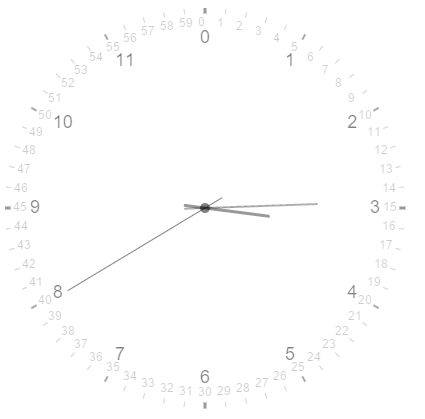
最後提個優化建議:setInterval(draw, 1) 意味著每秒嘗試上千次重繪,實際毫無必要,改成 1000(或 100 以求更順滑)更合理;若追求效率,還可以用 requestAnimationFrame 取代定時器,讓瀏覽器自行匹配刷新節奏。
- 上一篇文章: 結合 easyUI 與 Bootstrap 打造後台工作站
- 下一篇文章: Bootstrap 級聯下拉菜單封裝實踐