一、同域互相呼叫
假設 A.html 與 B.html 的 domain 都是 localhost(同域),A.html 以 iframe 嵌入 B.html(name=myframe),A 有函式 fMain(),B 有函式 fIframe(),目標是雙向呼叫。
A.html:
main window A.html main
B.html:
iframe window B.html iframe
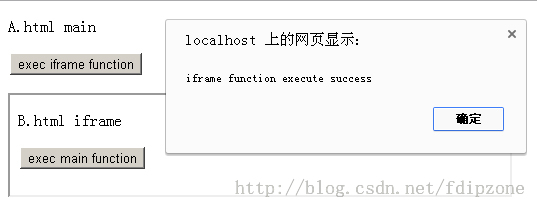
點擊 A 的按鈕,彈出 iframe function execute success:
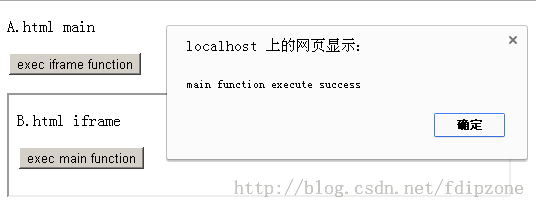
點擊 B 的按鈕,彈出 main function execute success:
二、跨域互相呼叫
若 A 的 domain 是 localhost、B 是 127.0.0.1(跨域),沿用上面的寫法會被瀏覽器攔下:
Uncaught SecurityError: Blocked a frame with origin "https://localhost"
from accessing a frame with origin "https://127.0.0.1".
Protocols, domains, and ports must match.
這裡用 localhost 與 127.0.0.1 只是為了方便測試,兩者已被視為不同源;實務上換成 www.domaina.com 與 www.domainb.com 即可。
實現原理:基於安全性,瀏覽器禁止不同源直接存取。但限制的是「存取者與被存取者必須同域」,因此只要插入一個「與目標同域的執行頁」作為跳板,就能繞過限制。
具體做法:A 要呼叫 B 的 fIframe(),就在 A 中動態建立一個隱藏 iframe,載入與 B 同域的 execB.html;而 execB.html 裡寫著呼叫 B 的程式碼。反向同理。
A.html:
main window A.html main
B.html:
iframe window B.html iframe
execA.html:
exec main function
execB.html:
exec iframe function
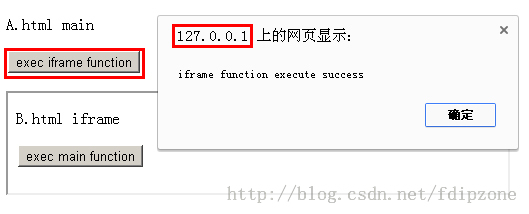
執行結果:
三、封裝成類:主頁面與 iframe 通訊(同域/跨域通用)
把上述手法封裝成類,主要兩個檔案:
FrameMessage.js:對外提供呼叫介面,若為跨域則建立臨時 iframe 交由同域執行者處理。
FrameMessage.class.php:接收跨域請求時,依參數產生要執行的 JS 程式碼。
支援能力:同域與跨域通訊皆可;參數支援字串、JSON、陣列等型別。
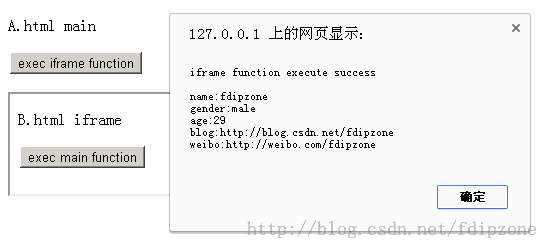
呼叫寫法:
FrameMessage.exec('https://127.0.0.1/execB.php', 'myframe', 'fIframe',
  ['fdipzone', '{"gender":"male","age":"29"}', '["https://blog.csdn.net/fdipzone", "https://weibo.com/fdipzone"]']);
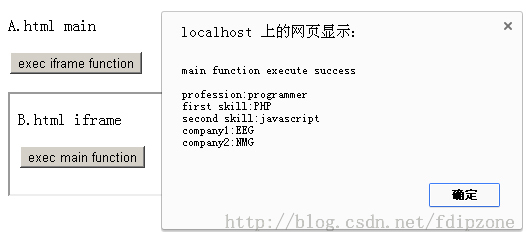
FrameMessage.exec('https://localhost/execA.php', '', 'fMain',
  ['programmer', '{"first":"PHP","second":"javascript"}', '["EEG","NMG"]']);
FrameMessage.js:
/**
 * Main 與 Iframe 相互通訊類,支援同域與跨域通訊
 * Date: 2013-12-29
 * Author: fdipzone
 * Ver: 1.0
 */
var FrameMessage = (function () {
  this.oFrameMessageExec = null; // 臨時 iframe

  /**
   * 執行方法
   * @param executor 執行的頁面,為空則為同域
   * @param frame    要調用的方法的框架名稱,為空則為 parent
   * @param func     要調用的方法名
   * @param args     要調用的方法的參數,必須為陣列 [arg1, arg2, ...],方便 apply 調用
   *                 元素為字串格式,請勿使用 html,考慮注入安全問題會過濾
   */
  this.exec = function (executor, frame, func, args) {
    this.executor = typeof (executor) != 'undefined' ? executor : '';
    this.frame = typeof (frame) != 'undefined' ? frame : '';
    this.func = typeof (func) != 'undefined' ? func : '';
    this.args = typeof (args) != 'undefined' ? (__fIsArray(args) ? args : []) : [];

    if (executor == '') {
      __fSameDomainExec(); // 同域
    } else {
      __fCrossDomainExec(); // 跨域
    }
  };

  /* 同域執行 */
  function __fSameDomainExec() {
    if (this.frame == '') {
      parent.window[this.func].apply(this, this.args);
    } else {
      window.frames[this.frame][this.func].apply(this, this.args);
    }
  }

  /* 跨域執行 */
  function __fCrossDomainExec() {
    if (this.oFrameMessageExec == null) {
      this.oFrameMessageExec = document.createElement('iframe');
      this.oFrameMessageExec.name = 'FrameMessage_tmp_frame';
      this.oFrameMessageExec.src = __fGetSrc();
      this.oFrameMessageExec.style.display = 'none';
      document.body.appendChild(this.oFrameMessageExec);
    } else {
      this.oFrameMessageExec.src = __fGetSrc();
    }
  }

  /* 取得執行的 url */
  function __fGetSrc() {
    return this.executor +
      (this.executor.indexOf('?') == -1 ? '?' : '&') +
      'frame=' + this.frame +
      '&func=' + this.func +
      '&args=' + JSON.stringify(this.args) +
      '&framemessage_rand=' + Math.random();
  }

  /* 判斷是否為陣列 */
  function __fIsArray(obj) {
    return Object.prototype.toString.call(obj) === '[object Array]';
  }

  return this;
}());
FrameMessage.class.php:
A.html:
main window A.html main
B.html:
iframe window B.html iframe
execA.php 與 execB.php:
- 上一篇文章: JS 實現文字列表無縫向上滾動效果
- 下一篇文章: 使用 Bootstrap 快速搭建頁面:從 bower 到模板布局
相關文章
-
HTML5 postMessage 與跨來源溝通 iframe 高度自適應:用三頁代理繞開同源策略限制的完整實作 HTML5 五個簡單實用卻常被忽略的 API HTML5 跨域通訊之 postMessage 用法總結 HTML5 window.postMessage:跨視窗與 iframe 的安全通訊 5 個容易被忽略的 HTML5 API HTML5 通信 API:跨域不再困難,資料推送從此實現 HTML5 Worker 實例(一):為什麼測試不出效果 HTML5 Web Worker 使用攻略:從入門到實戰與限制盤點 HTML5 Web Worker:讓 JavaScript 也能跑背景執行緒