JS 元件系列:為 BootstrapTable 擴充 treegrid 樹形表格功能
編輯:關於JavaScript
上一篇介紹了 bootstrap treegrid 元件的封裝過程,這篇則把重點放在如何直接為 BootstrapTable 加上 treegrid 能力。有興趣的朋友可以一起來看。
一、效果預覽
全部折疊:
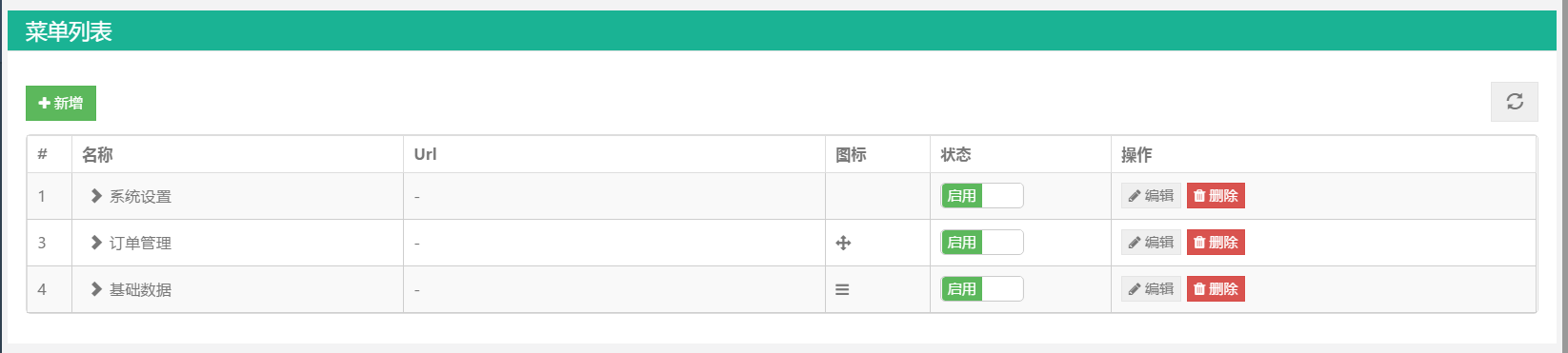
展開一級:
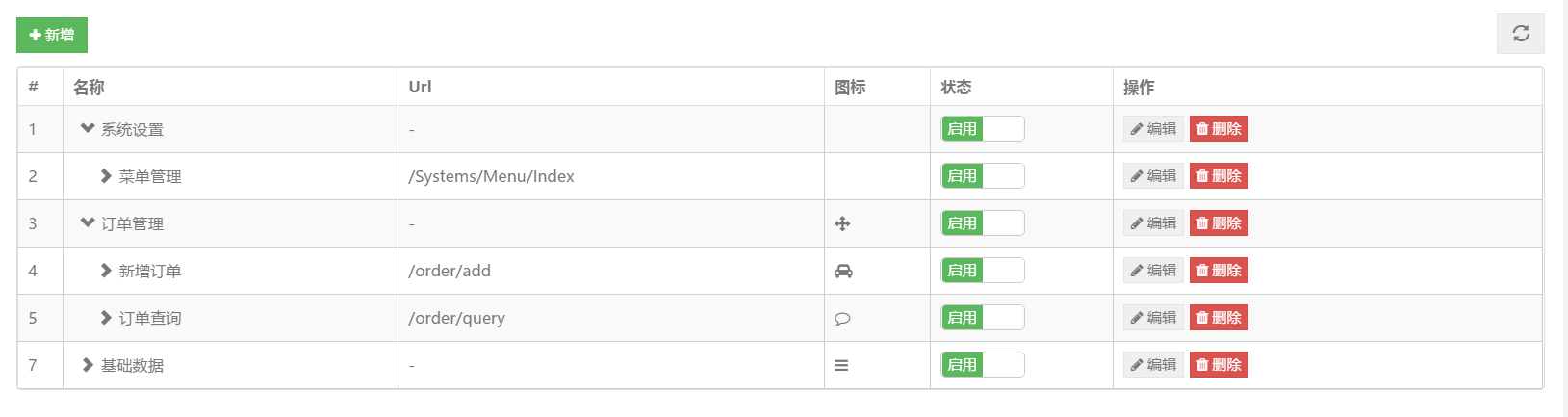
全部展開:
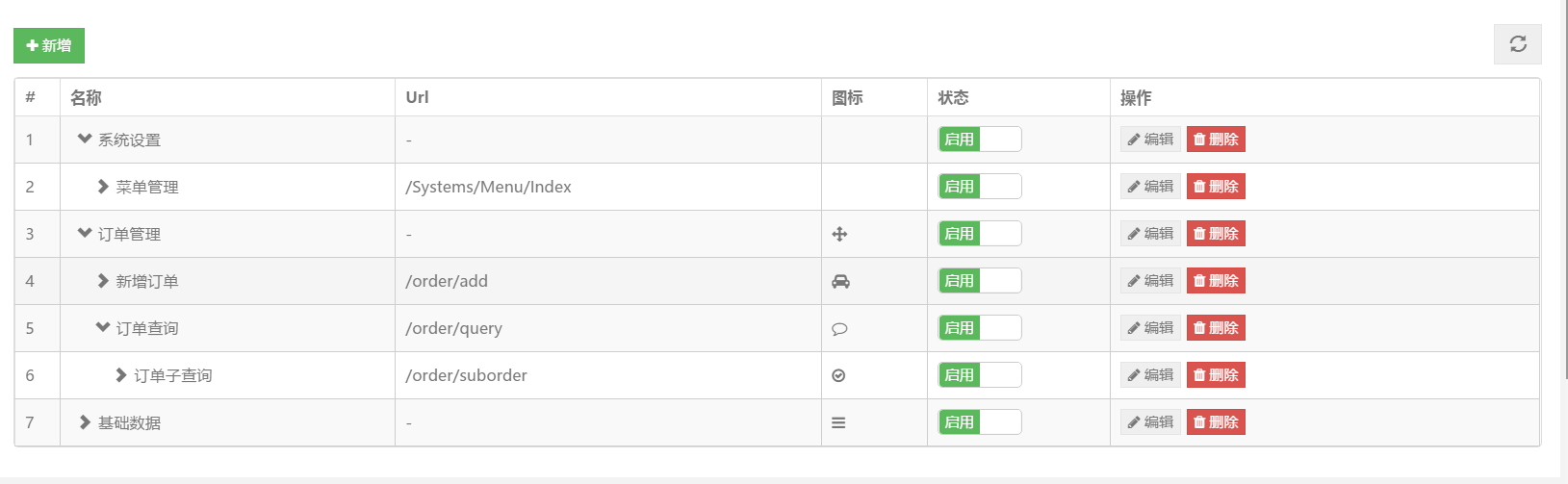
二、原始碼
(function ($) {
  'use strict';

  var sprintf = function (str) {
    var args = arguments, flag = true, i = 1;
    str = str.replace(/%s/g, function () {
      var arg = args[i++];
      if (typeof arg === 'undefined') {
        flag = false;
        return '';
      }
      return arg;
    });
    return flag ? str : '';
  };

  var getFieldIndex = function (columns, field) {
    var index = -1;
    $.each(columns, function (i, column) {
      if (column.field === field) {
        index = i;
        return false;
      }
      return true;
    });
    return index;
  };

  var calculateObjectValue = function (self, name, args, defaultValue) {
    var func = name;

    if (typeof name === 'string') {
      var names = name.split('.');
      if (names.length > 1) {
        func = window;
        $.each(names, function (i, f) { func = func[f]; });
      } else {
        func = window[name];
      }
    }

    if (typeof func === 'object') { return func; }
    if (typeof func === 'function') { return func.apply(self, args); }
    if (!func && typeof name === 'string' && sprintf.apply(this, [name].concat(args))) {
      return sprintf.apply(this, [name].concat(args));
    }
    return defaultValue;
  };

  var getItemField = function (item, field) {
    var value = item;
    if (typeof field !== 'string' || item.hasOwnProperty(field)) {
      return item[field];
    }
    var props = field.split('.');
    for (var p in props) {
      value = value[props[p]];
    }
    return value;
  };

  // 由子節點回溯取得所有上層節點
  var getParent = function (node, source, field) {
    var data = [];
    var items = $.grep(source, function (item, index) {
      return node.ParentId == item[field];
    });
    $.each(items, function (index, item) {
      data.splice(0, 0, item);
      var child = getParent(item, source, field);
      $.each(child, function (i, n) { data.splice(0, 0, n); });
    });
    return data;
  };

  // 取得某節點底下的所有子節點
  var getChild = function (node, source, field) {
    var data = [];
    var items = $.grep(source, function (item, index) {
      return item.ParentId == node[field];
    });
    $.each(items, function (index, item) {
      data.push(item);
      var child = getChild(item, source, field);
      $.each(child, function (i, n) { data.push(n); });
    });
    return data;
  };

  // 取得 bootstrapTable 的構造器,並保存需要重寫的原方法
  var BootstrapTable = $.fn.bootstrapTable.Constructor,
      _initData = BootstrapTable.prototype.initData,
      _initPagination = BootstrapTable.prototype.initPagination,
      _initBody = BootstrapTable.prototype.initBody;

  // 重寫 initData:把扁平資料整理成樹狀順序
  BootstrapTable.prototype.initData = function () {
    _initData.apply(this, Array.prototype.slice.apply(arguments));

    var that = this;
    if (that.options.treeView && this.data.length > 0) {
      var rows = [];
      var roots = $.grep(this.data, function (row, index) {
        return row.Level == that.options.treeRootLevel;
      });

      $.each(roots, function (index, item) {
        rows.push(item);
        var child = getChild(item, that.data, that.options.treeId);
        $.each(child, function (i, n) {
          if (that.options.treeCollapseAll) {
            n.hidden = true;
          }
          rows.push(n);
        });
      });

      that.options.data = that.data = rows;
    }
  };

  // 重寫 initPagination:樹表格不支援分頁
  BootstrapTable.prototype.initPagination = function () {
    // 理論情況下,treegrid 是不支持分頁的,所以默認分頁參數為 false
    this.options.pagination = false;
    // 調用「父類」的「虛方法」
    _initPagination.apply(this, Array.prototype.slice.apply(arguments));
  };

  // 重寫 initBody:加入縮排、展開收合圖示與點擊事件
  BootstrapTable.prototype.initBody = function (fixedScroll) {
    var that = this,
        html = [],
        data = this.getData();

    this.trigger('pre-body', data);

    this.$body = this.$el.find('tbody');
    if (!this.$body.length) {
      this.$body = $('<tbody></tbody>').appendTo(this.$el);
    }

    if (!this.options.pagination || this.options.sidePagination === 'server') {
      this.pageFrom = 1;
      this.pageTo = data.length;
    }

    for (var i = this.pageFrom - 1; i < this.pageTo; i++) {
      var key, item = data[i], style = {}, csses = [], data_ = '',
          attributes = {}, htmlAttributes = [];

      if (item.hidden) { continue; }

      style = calculateObjectValue(this.options, this.options.rowStyle, [item, i], style);
      if (style && style.css) {
        for (key in style.css) { csses.push(key + ': ' + style.css[key]); }
      }

      attributes = calculateObjectValue(this.options, this.options.rowAttributes, [item, i], attributes);
      if (attributes) {
        for (key in attributes) {
          htmlAttributes.push(sprintf('%s="%s"', key, escapeHTML(attributes[key])));
        }
      }

      if (item._data && !$.isEmptyObject(item._data)) {
        $.each(item._data, function (k, v) {
          if (k === 'index') { return; }
          data_ += sprintf(' data-%s="%s"', k, v);
        });
      }

      html.push('<tr',
        sprintf(' %s', htmlAttributes.join(' ')),
        sprintf(' id="%s"', $.isArray(item) ? undefined : item._id),
        sprintf(' class="%s"', style.classes || ($.isArray(item) ? undefined : item._class)),
        sprintf(' data-index="%s"', i),
        sprintf(' data-uniqueid="%s"', item[this.options.uniqueId]),
        sprintf('%s', data_),
        '>'
      );

      if (this.options.cardView) {
        html.push(sprintf('<td colspan="%s">', this.header.fields.length));
      }

      if (!this.options.cardView && this.options.detailView) {
        html.push('<td>',
          '<a class="detail-icon" href="javascript:" rel="external nofollow" >',
          sprintf('<i class="%s %s"></i>', this.options.iconsPrefix, this.options.icons.detailOpen),
          '</a>',
          '</td>'
        );
      }

      $.each(this.header.fields, function (j, field) {
        var text = '', value = getItemField(item, field), type = '',
            cellStyle = {}, id_ = '',
            class_ = that.header.classes[j],
            data_ = '', rowspan_ = '', title_ = '',
            column = that.columns[getFieldIndex(that.columns, field)];

        if (!column.visible) { return; }

        var style = sprintf('style="%s"', csses.concat(that.header.styles[j]).join('; '));
        value = calculateObjectValue(column, that.header.formatters[j], [value, item, i], value);

        if (item['_' + field + '_id'])       { id_ = sprintf(' id="%s"', item['_' + field + '_id']); }
        if (item['_' + field + '_class'])    { class_ = sprintf(' class="%s"', item['_' + field + '_class']); }
        if (item['_' + field + '_rowspan'])  { rowspan_ = sprintf(' rowspan="%s"', item['_' + field + '_rowspan']); }
        if (item['_' + field + '_title'])    { title_ = sprintf(' title="%s"', item['_' + field + '_title']); }

        cellStyle = calculateObjectValue(that.header, that.header.cellStyles[j], [value, item, i], cellStyle);
        if (cellStyle.classes) { class_ = sprintf(' class="%s"', cellStyle.classes); }
        if (cellStyle.css) {
          var csses_ = [];
          for (var key in cellStyle.css) { csses_.push(key + ': ' + cellStyle.css[key]); }
          style = sprintf('style="%s"', csses_.concat(that.header.styles[j]).join('; '));
        }

        if (item['_' + field + '_data'] && !$.isEmptyObject(item['_' + field + '_data'])) {
          $.each(item['_' + field + '_data'], function (k, v) {
            if (k === 'index') { return; }
            data_ += sprintf(' data-%s="%s"', k, v);
          });
        }

        if (column.checkbox || column.radio) {
          type = column.checkbox ? 'checkbox' : type;
          type = column.radio ? 'radio' : type;
          text = [
            that.options.cardView ? '<div class="card-view">' : '<td class="bs-checkbox">',
            '<input'
              + sprintf(' data-index="%s"', i)
              + sprintf(' name="%s"', that.options.selectItemName)
              + sprintf(' type="%s"', type)
              + sprintf(' value="%s"', item[that.options.idField])
              + sprintf(' checked="%s"', value === true || (value && value.checked) ? 'checked' : undefined)
              + sprintf(' disabled="%s"', !column.checkboxEnabled || (value && value.disabled) ? 'disabled' : undefined)
              + ' />',
            that.header.formatters[j] && typeof value === 'string' ? value : '',
            that.options.cardView ? '</div>' : '</td>'
          ].join('');
          item[that.header.stateField] = value === true || (value && value.checked);
        } else {
          value = typeof value === 'undefined' || value === null ? that.options.undefinedText : value;

          var indent, icon;
          if (that.options.treeView && column.field == that.options.treeField) {
            // 依 Level 產生縮排
            var indent = item.Level == that.options.Level
              ? ''
              : sprintf('<span style="margin-left: %spx;"></span>',
                        (item.Level - that.options.treeRootLevel) * 15);

            // 判斷是否有可見子節點,決定顯示展開或收合圖示
            var child = $.grep(data, function (d, i) {
              return d.ParentId == item[that.options.treeId] && !d.hidden;
            });

            icon = sprintf(
              '<span class="tree-icon %s" style="cursor: pointer; margin: 0px 5px;"></span>',
              child.length > 0 ? that.options.expandIcon : that.options.collapseIcon
            );
          }

          text = that.options.cardView
            ? [
                '<div class="card-view">',
                that.options.showHeader
                  ? sprintf('<span class="title" %s>%s</span>', style,
                            getPropertyFromOther(that.columns, 'field', 'title', field))
                  : '',
                sprintf('<span class="value">%s</span>', value),
                '</div>'
              ].join('')
            : [
                sprintf('<td%s %s %s %s %s %s>', id_, class_, style, data_, rowspan_, title_),
                indent, icon, value, '</td>'
              ].join('');

          if (that.options.cardView && that.options.smartDisplay && value === '') {
            text = '';
          }
        }

        html.push(text);
      });

      if (this.options.cardView) { html.push('</td>'); }
      html.push('</tr>');
    }

    if (!html.length) {
      html.push('<tr class="no-records-found">',
        sprintf('<td colspan="%s">%s</td>', this.$header.find('th').length,
                this.options.formatNoMatches()),
        '</tr>'
      );
    }

    this.$body.html(html.join(''));

    if (!fixedScroll) { this.scrollTo(0); }

    this.$body.find('> tr[data-index] > td').off('click dblclick')
      .on('click dblclick', function (e) {
        var $td = $(this),
            $tr = $td.parent(),
            item = that.data[$tr.data('index')],
            index = $td[0].cellIndex,
            field = that.header.fields[that.options.detailView && !that.options.cardView ? index - 1 : index],
            column = that.columns[getFieldIndex(that.columns, field)],
            value = getItemField(item, field);

        if ($td.find('.detail-icon').length) { return; }

        that.trigger(e.type === 'click' ? 'click-cell' : 'dbl-click-cell', field, value, item, $td);
        that.trigger(e.type === 'click' ? 'click-row' : 'dbl-click-row', item, $tr);

        if (e.type === 'click' && that.options.clickToSelect && column.clickToSelect) {
          var $selectItem = $tr.find(sprintf('[name="%s"]', that.options.selectItemName));
          if ($selectItem.length) { $selectItem[0].click(); }
        }
      });

    this.$body.find('> tr[data-index] > td > .detail-icon').off('click')
      .on('click', function () {
        var $this = $(this),
            $tr = $this.parent().parent(),
            index = $tr.data('index'),
            row = data[index];

        if ($tr.next().is('tr.detail-view')) {
          $this.find('i').attr('class',
            sprintf('%s %s', that.options.iconsPrefix, that.options.icons.detailOpen));
          $tr.next().remove();
          that.trigger('collapse-row', index, row);
        } else {
          $this.find('i').attr('class',
            sprintf('%s %s', that.options.iconsPrefix, that.options.icons.detailClose));
          $tr.after(sprintf(
            '<tr class="detail-view"><td colspan="%s">%s</td></tr>',
            $tr.find('td').length,
            calculateObjectValue(that.options, that.options.detailFormatter, [index, row], '')
          ));
          that.trigger('expand-row', index, row, $tr.next().find('td'));
        }
        that.resetView();
      });

    // 展開/收合圖示的點擊行為
    this.$body.find('> tr[data-index] > td > .tree-icon').off('click')
      .on('click', function (e) {
        e.stopPropagation();

        var $this = $(this),
            $tr = $this.parent().parent(),
            index = $tr.data('index'),
            icon = $(this),
            child = getChild(data[index], data, that.options.treeId);

        // 把孩子節點整批隱藏或顯示
        $.each(child, function (i, c) {
          $.each(that.data, function (index, item) {
            if (item[that.options.treeId] == c[that.options.treeId]) {
              item.hidden = icon.hasClass(that.options.expandIcon);
              that.uncheck(index);
              return;
            }
          });
        });

        if (icon.hasClass(that.options.expandIcon)) {
          icon.removeClass(that.options.expandIcon).addClass(that.options.collapseIcon);
        } else {
          icon.removeClass(that.options.collapseIcon).addClass(that.options.expandIcon);
        }

        that.options.data = that.data;
        that.initBody(true);
      });

    this.$selectItem = this.$body.find(sprintf('[name="%s"]', this.options.selectItemName));
    this.$selectItem.off('click').on('click', function (event) {
      event.stopImmediatePropagation();
      var $this = $(this),
          checked = $this.prop('checked'),
          row = that.data[$this.data('index')];

      if (that.options.maintainSelected && $(this).is(':radio')) {
        $.each(that.options.data, function (i, row) {
          row[that.header.stateField] = false;
        });
      }

      row[that.header.stateField] = checked;

      if (that.options.singleSelect) {
        that.$selectItem.not(this).each(function () {
          that.data[$(this).data('index')][that.header.stateField] = false;
        });
        that.$selectItem.filter(':checked').not(this).prop('checked', false);
      }

      that.updateSelected();
      that.trigger(checked ? 'check' : 'uncheck', row, $this);
    });

    $.each(this.header.events, function (i, events) {
      if (!events) { return; }
      if (typeof events === 'string') {
        events = calculateObjectValue(null, events);
      }

      var field = that.header.fields[i],
          fieldIndex = $.inArray(field, that.getVisibleFields());

      if (that.options.detailView && !that.options.cardView) { fieldIndex += 1; }

      for (var key in events) {
        that.$body.find('tr').each(function () {
          var $tr = $(this),
              $td = $tr.find(that.options.cardView ? '.card-view' : 'td').eq(fieldIndex),
              index = key.indexOf(' '),
              name = key.substring(0, index),
              el = key.substring(index + 1),
              func = events[key];

          $td.find(el).off(name).on(name, function (e) {
            var index = $tr.data('index'),
                row = that.data[index],
                value = row[field];
            func.apply(this, [e, value, row, index]);
          });
        });
      }
    });

    this.updateSelected();
    this.resetView();
    this.trigger('post-body');
  };

  // 為元件增加預設參數
  $.extend($.fn.bootstrapTable.defaults, {
    treeView: false,                            // 是否啟用樹表格視圖
    treeField: "id",                            // 要展開的欄位
    treeId: "id",                               // 每一行的唯一 id
    treeRootLevel: 0,                           // 根節點的 Level
    treeCollapseAll: false,                     // 是否全部收合
    collapseIcon: "glyphicon glyphicon-chevron-right", // 收合樣式
    expandIcon: "glyphicon glyphicon-chevron-down"     // 展開樣式
  });

})(jQuery);
元件使用方式
第一步,引入這個 js 檔。第二步,初始化元件:
$('#tb').bootstrapTable({
  url: ActionUrl + 'GetMenuList',
  toolbar: '#toolbar',
  sidePagination: 'client',
  pagination: false,
  treeView: true,        // 啟用樹表格模式
  treeId: "Id",          // 每一行 tree 的 id
  treeField: "Name",     // 要對哪一列進行展開
  treeRootLevel: 1,      // 樹根的級別
  clickToSelect: true
  // collapseIcon: "glyphicon glyphicon-triangle-right",  // 收合樣式
  // expandIcon: "glyphicon glyphicon-triangle-bottom"    // 展開樣式
});
參數意義整理如下:
・treeView: true 表示啟用樹表格模式;
・treeId: 'Id' 指定每一列的唯一識別欄位;
・treeField: 'Name' 指定要套用縮排與展開圖示的欄位;
・treeRootLevel: 1 告訴元件第幾層算根節點。
還有一個關鍵前提:要建立記錄之間的父子關係,資料裡必須有 ParentId 這個欄位,根節點的 ParentId 為 null。後端回傳的 JSON 大致如下:
[
  { Id: 1, Name: "系統設置", Url: null, ParentId: null, Level: 1, CreateTime: null, Status: 1, SortOrder: 1 },
  { Id: 2, Name: "菜單管理", Url: "/Systems/Menu/Index", ParentId: 1, Level: 2, CreateTime: null, Status: 1 },
  { Id: 3, Name: "訂單管理", Url: null, ParentId: null, Level: 1, CreateTime: "2017-05-31 17:05:27" },
  { Id: 4, Name: "基礎數據", Url: null, ParentId: null, Level: 1, CreateTime: "2017-05-31 17:05:55" },
  { Id: 5, Name: "新增訂單", Url: "/order/add", ParentId: 3, Level: 2, CreateTime: "2017-05-31 17:07:03" }
]
三、仍可優化的地方
這套封裝只是提供一個擴充思路,還有幾處可以再打磨:
1、葉子節點前面的圖示其實可以拿掉,視覺上更乾淨;
2、可以補上「全部展開/全部收合」的批次操作;
3、Level 欄位並非必要,改成以 ParentId 是否為 null 來判定根節點即可,能少一筆後端運算。
有興趣的朋友可以自己動手試試。
四、總結
這篇是對上一篇的補充,讓我們能依專案實際狀況挑選方案:如果專案本來就用 BootstrapTable 呈現資料,直接沿用上述擴充最省事;若沒有使用它,則可以考慮上一篇提到的獨立 treegrid 元件。
另外提醒,這套實作是透過覆寫 $.fn.bootstrapTable.Constructor.prototype 來擴充的,屬於侵入式做法。它依賴 BootstrapTable 內部的實作細節,一旦升級版本就可能失效,因此更嚴謹的方式是改用元件本身提供的 events 與 formatter 機制來達成類似效果。
熱門推薦
JavaScript 實現生日年月日三級聯動選擇
用 navigator 判斷客戶端作業系統:platform 與 userAgent 的實作
JavaScript 原生物件方法大全:Array、String、Number、Date、Math、RegExp
用 jQuery 模擬 select 下拉選單,加上 CSS3 箭頭動畫
跨域 Cookie 應用實解:用 JSONP 風格的腳本注入做個性化廣告
JavaScript 學習筆記(一):從封裝理解物件模型
動手打造輕量化的 jQuery:核心原理拆解
JavaScript 和 Java 到底差在哪?八個面向一次說清
JavaScript 字串拼接的幾種實用寫法