用 notie.js 實作純 JavaScript 訊息提示框
編輯:關於JavaScript
notie.js 是一個相當輕巧的純 JS 提示元件,不需要 jQuery,就能做出 Alert 提示框、確認框,甚至帶輸入欄位的訊息框。以下示範如何把它接進頁面。
先看效果:
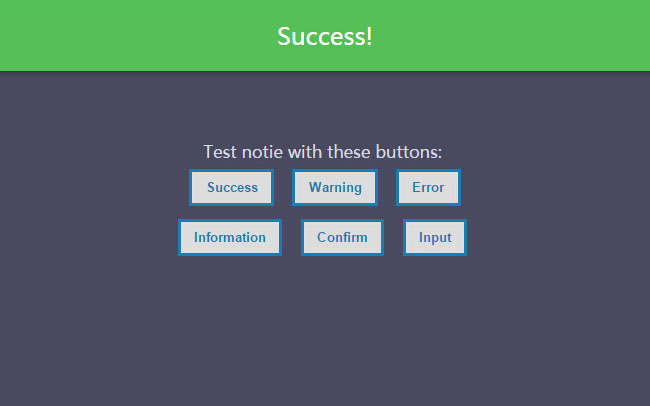
HTML 部分——用幾顆按鈕觸發不同類型的提示:
<article class="zzsc"> <div class="div-ext"> <div class="div-int"> <span>Test notie with these buttons:</span> <br> <button onclick="success();">Success</button> <button onclick="warning();">Warning</button> <button onclick="error();">Error</button><br> <button onclick="info();">Information</button> <button onclick="confirm();">Confirm</button> <button onclick="input();">Input</button> <br> </div> </div> </article>
JS 部分:
function success() { notie.alert(1, 'Success!', 2); } function warning() { notie.alert(2, 'Warning<br><b>with</b><br><i>HTML</i><br><u>included.</u>', 2); } function error() { notie.alert(3, 'Error.', 2); } function info() { notie.alert(4, 'Information.', 2); } function confirm() { notie.confirm('Are you sure you want to do that?<br><b>That\'s a bold move...</b>', 'Yes', 'Cancel', function () { notie.alert(1, 'Good choice!', 2); }); } function input() { notie.input('Please enter your email address:', 'Submit', 'Cancel', 'email', 'name@example.com', function (value_entered) { notie.alert(1, 'You entered: ' + value_entered, 2); }); }
從呼叫方式就能看出它的 API 設計相當直觀:
notie.alert(類型, 內容, 秒數):第一個參數是 1 到 4,分別對應成功、警告、錯誤、資訊四種樣式;第三個參數是自動關閉的秒數。notie.confirm(內容, 確認文字, 取消文字, 回呼):按下確認才會執行回呼,取消則什麼都不做。notie.input(提示文字, 送出文字, 取消文字, 型別, 預設值, 回呼):第四個參數直接吃 HTML5 的 input type(如email、text、number),因此能借用瀏覽器原生的格式驗證;回呼會收到使用者輸入的值。
要提醒的是,alert 的內容參數支援 HTML,這代表它不會自動轉義。如果提示文字中含有使用者輸入或後端回傳的資料,務必先做轉義處理,否則會有 XSS 風險——這是這類「支援 HTML 的提示元件」最常見的安全盲點。
以上就是 notie.js 的基礎用法,希望對大家有所幫助。
- 上一篇文章: JavaScript 設計模式入門:享元模式
- 下一篇文章: JavaScript 設計模式入門:責任鏈模式