為文本框加上字數上限與剩餘字數倒數提示
編輯:關於JavaScript
輸入框通常要設上限,而比較貼心的網站會即時顯示「還可以輸入 20 字」這樣的倒數提示。本文用一個實作示範如何做到,並特別處理中英文字元寬度不同的計算問題。
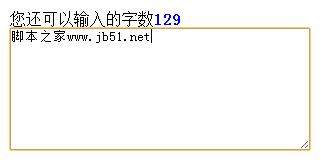
完整程式碼
<html>
<head>
<title>文本框輸入文字倒計效果</title>
<style type="text/css">
* { margin: 0; padding: 0; }
.box { width: 500px; margin: 10px auto; }
p span { color: #069; font-weight: bold; }
textarea { width: 300px; }
.textColor { background-color: #0C9; }
.grey { padding: 5px; color: #FFF; background-color: #CCCCCC; }
</style>
<script type="text/javascript" src="jQuery/jquery-1.8.3.js"></script>
<script type="text/javascript">
$(function () {
  var $tex = $(".tex");
  var $but = $(".but");
  var ie = jQuery.support.htmlSerialize;
  var str = 0, abcnum = 0, maxNum = 280, texts = 0;

  $tex.val("");

  $tex.focus(function () {
    if ($tex.val() == "") {
      $("p").html("您還可以輸入的字數<span>140</span>");
    }
  });

  $tex.blur(function () {
    if ($tex.val() == "") {
      $("p").html("請在下面輸入您的文字:");
    }
  });

  // 依瀏覽器選擇監聽的事件名稱
  if (ie) {
    $tex[0].oninput = changeNum;
  } else {
    $tex[0].onpropertychange = changeNum;
  }

  function changeNum() {
    str = ($tex.val().replace(/\w/g, "")).length;   // 漢字個數
    abcnum = $tex.val().length - str;               // 非漢字個數
    var total = str * 2 + abcnum;                   // 換算後的權重總數

    if (total <= maxNum) {
      $but.removeClass().addClass("but");
      texts = Math.ceil((maxNum - total) / 2);
      $("p").html("您還可以輸入的字數<span>" + texts + "</span>")
             .children().css({ "color": "blue" });
    } else {
      $but.removeClass().addClass("grey");
      texts = Math.ceil((total - maxNum) / 2);
      $("p").html("您輸入的字數超過了<span>" + texts + "</span>")
             .children("span").css({ "color": "red" });
    }
  }
});
</script>
</head>
<body>
<div class="box">
  <p>請在下面輸入您的文字:</p>
  <textarea name="weibao" class="tex" cols="" rows="8"></textarea>
</div>
</body>
</html>
關鍵邏輯說明
字數權重是這段程式碼的核心。它用 \w 把英數底線挑掉,剩下的就是漢字:
str = ($tex.val().replace(/\w/g, "")).length;  // 漢字個數
abcnum = $tex.val().length - str;              // 英數個數
var total = str * 2 + abcnum;                  // 漢字算 2,英數算 1
這麼做的理由是視覺寬度:一個中文字大約佔兩個英文字元的位置。把上限 280 當成「半形字元數」,再除以 2 轉回「字數」顯示,提示就變成「還可以輸入 140 字」。
嚴格來說這個換算並不精確(全形標點、emoji、CJK 擴充字元都不止一個單位),但對多數中文輸入場景夠用。若要求精確,可以改用 Intl.Segmenter 做分詞,或直接以碼元長度為準並在文案中說明規則。
事件選擇那段是歷史包袱。oninput 是標準事件,onpropertychange 是舊 IE 的私有事件。現在只需用 oninput 即可,它涵蓋打字、貼上、剪貼、 Undo 等所有會改變值的操作,比舊的 onkeyup / onchange 都可靠。
現代寫法對照
脫離 jQuery 與舊 IE,同樣的功能可以寫得很短:
<textarea id="t" maxlength="280"></textarea>
<p>還可輸入 <span id="left">140</span> 字</p>

<script>
const t = document.getElementById('t');
const left = document.getElementById('left');
t.addEventListener('input', () => {
  const weight = [...t.value].reduce((n, c) => n + (/[\u4e00-\u9fa5]/.test(c) ? 2 : 1), 0);
  left.textContent = Math.max(0, Math.ceil((280 - weight) / 2));
  left.style.color = weight > 280 ? 'red' : 'blue';
});
</script>
加上 maxlength 屬性可以讓瀏覽器原生阻止超量輸入,JS 只負責顯示提示,職責分得更清楚。注意 maxlength 計算的是 UTF-16 碼元數,與中文權重換算不同,兩者要分開理解。
- 上一篇文章: 理解 Web Worker 與事件 API:讓主線程不再被計算卡住
- 下一篇文章: 用純 JavaScript 做一個可點擊刷新的驗證碼