用 JavaScript + Cookie 統計網站訪問次數
編輯:關於JavaScript
純靜態頁面沒有後端資料庫時,想顯示「您是第 N 位訪客」,可以用 Cookie 記錄同一個瀏覽器的造訪次數。這個做法只能算粗略統計,但正好適合練習 Cookie 的讀寫與過期設定。
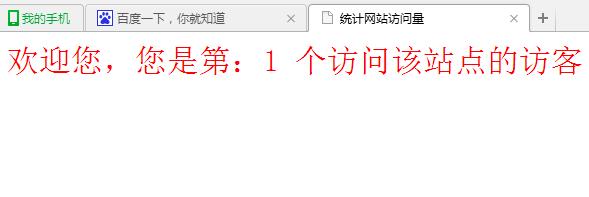
執行結果如下:
完整程式碼
<html>
<head>
<meta http-equiv="Content-Type" content="text/html; charset=gb2312">
<title>New Page 5</title>
<script language="JavaScript">
  var caution = false;

  function setCookie(name, value, expires, path, domain, secure) {
    var curCookie = name + "=" + escape(value) +
      ((expires) ? "; expires=" + expires.toGMTString() : "") +
      ((path)    ? "; path=" + path : "") +
      ((domain)  ? "; domain=" + domain : "") +
      ((secure)  ? "; secure" : "");

    if (!caution || (name + "=" + escape(value)).length <= 4000) {
      document.cookie = curCookie;
    } else if (confirm("Cookie exceeds 4KB and will be cut!")) {
      document.cookie = curCookie;
    }
  }

  function getCookie(name) {
    var prefix = name + "=";
    var cookieStartIndex = document.cookie.indexOf(prefix);
    if (cookieStartIndex == -1) return null;
    var cookieEndIndex = document.cookie.indexOf(";", cookieStartIndex + prefix.length);
    if (cookieEndIndex == -1) cookieEndIndex = document.cookie.length;
    return unescape(document.cookie.substring(
      cookieStartIndex + prefix.length, cookieEndIndex));
  }

  function deleteCookie(name, path, domain) {
    if (getCookie(name)) {
      document.cookie = name + "=" +
        ((path)   ? "; path=" + path : "") +
        ((domain) ? "; domain=" + domain : "") +
        "; expires=Thu, 01-Jan-70 00:00:01 GMT";
    }
  }

  function fixDate(date) {
    var base = new Date(0);
    var skew = base.getTime();
    if (skew > 0) date.setTime(date.getTime() - skew);
  }

  var now = new Date();
  fixDate(now);
  now.setTime(now.getTime() + 730 * 24 * 60 * 60 * 1000); // 兩年後過期

  var visits = getCookie("counter");
  if (!visits) visits = 1;
  else visits = parseInt(visits) + 1;

  setCookie("counter", visits, now);

  document.write("<font size=6 color=red>歡迎您,您是第:" +
                 visits + " 個訪問該站點的訪客");
</script>
</head>
<body>
</body>
</html>
幾個關鍵點與該修正的地方
1. Cookie 的組成。document.cookie 一次只能寫入一筆,格式是 name=value; expires=...; path=...; domain=...; secure。讀取時它回傳的是一整串以分號分隔的字串,所以要自己找 name= 的位置並截取值——這就是 getCookie 在做的事。
2. 刪除 Cookie 的方式。沒有 delete API,把過期時間設成過去即可讓瀏覽器丟掉它。
3. 編碼問題。這裡用的 escape/unescape 已被廢棄,遇到中文或特殊字元容易出錯,建議改用 encodeURIComponent 與 decodeURIComponent。
4. 這個統計只算「同一個瀏覽器」。更換裝置、清除 Cookie、使用無痕模式都會從 1 重新開始,所以它反映的是「造訪次數」而不是「獨立訪客數」。真正的流量統計需要後端紀錄或接入分析服務。
5. 避免使用 document.write。它會阻塞解析,也不利於維護。改成在 HTML 裡預留一個元素再指定 textContent:
<span id="counter"></span>
<script>
document.getElementById("counter").textContent =
  "歡迎您,您是第 " + visits + " 位訪客";
</script>
以上就是這次分享的實作。想理解 Cookie 的讀寫機制,這個小例子已經足夠;若要上正式環境,記得加上 SameSite 與 Secure 等屬性的考量。
- 上一篇文章: 原生 JS 打造淘寶風格購物車:完整專案實戰
- 下一篇文章: JavaScript 動態新增郵件附件列的方法
相關文章
-
Ajax 跨域請求時 Cookie 帶不上的完整解法 Ajax 跨網域 Cookie 遺失的處理方式 JavaScript 操作 Cookie:讀取、寫入與刪除的完整封裝 用 Cookie 做記事提醒:把「行事曆」塞進瀏覽器裡 用 Cookie 與 DOM 實作網頁換膚 HTML5 WebStorage:全面解析本地儲存方案 深入對比 Cookie、LocalStorage 與 SessionStorage JavaScript BOM 全解析:window、location、history、screen 與 Cookie 刷新頁面後讓 select 與 radio 的選取值保持不變 瀏覽器客戶端資料儲存:Cookie、IE 使用者資料與 Web Storage