JavaScript 模擬 Dialog 彈出浮動框:可拖動、可縮放的經典登錄框
編輯:關於JavaScript
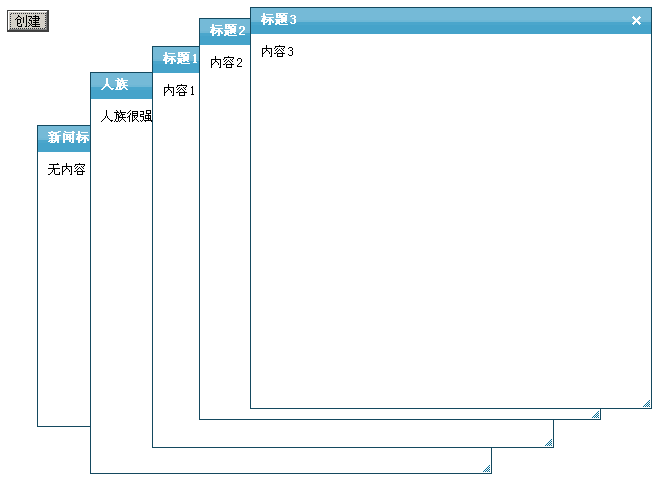
本文分享一個用原生 JavaScript 模擬 Dialog 彈出浮動框的實現。藍色經典風格,可以動態創建新層,支持自定義標題與內容,也能自由拖動和拉伸尺寸,拿來做登錄框或後台提示框都很合適。
運行效果截圖如下:
在線演示地址:
https://demo.jb51.net/js/2015/js-mn-dialog-float-dlg-style-demo/
完整代碼
<!DOCTYPE html PUBLIC "-//W3C//DTD XHTML 1.0 Transitional//EN" "https://www.w3.org/TR/xhtml1/DTD/xhtml1-transitional.dtd">
<html xmlns="https://www.w3.org/1999/xhtml">
<head>
<meta http-equiv="Content-Type" content="text/html; charset=gb2312" />
<title>Dialog浮動窗口</title>
<style type="text/css">
.dialogcontainter{height:400px; width:400px; border:1px solid #14495f; position:absolute; font-size:13px;}
.dialogtitle{height:26px; width:auto; background-image:url(images/103444839_p.gif);}
.dialogtitleinfo{float:left;height:20px; margin-top:2px; margin-left:10px;line-height:20px; vertical-align:middle; color:#FFFFFF; font-weight:bold; }
.dialogtitleico{float:right; height:20px; width:21px; margin-top:2px; margin-right:5px;text-align:center; line-height:20px; vertical-align:middle; background-image:url(images/103419495_p.gif);background-position:-21px 0px}
.dialogbody{ padding:10px; width:auto; background-color: #FFFFFF;}
.dialogbottom{ bottom:1px; right:1px;cursor:nw-resize; position:absolute; background-image:url(images/103419495_p.gif); background-position:-42px -10px; width:10px; height:10px; font-size:0;}
</style>
</head>
<body>
<input value="創建" type="button" onclick="creat()" />
<div id='aa'></div>
<script>
var z=1,i=1,left=10
var isIE = (document.all) ? true : false;
var $ = function (id) { return document.getElementById(id); };
var Extend = function(destination, source) {
    for (var property in source) { destination[property] = source[property]; }
}
var Bind = function(object, fun, args) {
    return function() { return fun.apply(object, args || []); }
}
var BindAsEventListener = function(object, fun) {
    var args = Array.prototype.slice.call(arguments).slice(2);
    return function(event) { return fun.apply(object, [event || window.event].concat(args)); }
}
var CurrentStyle = function(element){
    return element.currentStyle || document.defaultView.getComputedStyle(element, null);
}
function create(elm, parent, fn){
    var element = document.createElement(elm);
    fn && fn(element);
    parent && parent.appendChild(element);
    return element
};
function addListener(element, e, fn){
    element.addEventListener ? element.addEventListener(e, fn, false) : element.attachEvent("on" + e, fn)
};
function removeListener(element, e, fn){
    element.removeEventListener ? element.removeEventListener(e, fn, false) : element.detachEvent("on" + e, fn)
};
var Class = function(properties){
    var _class = function(){
        return (arguments[0] !== null && this.initialize && typeof(this.initialize) == 'function')
            ? this.initialize.apply(this, arguments) : this;
    };
    _class.prototype = properties;
    return _class;
};
var Dialog = new Class({
    options:{
        Width : 400, Height : 400, Left : 100, Top : 100, Titleheight : 26,
        Minwidth : 200, Minheight : 200, CancelIco : true, ResizeIco : false,
        Info : "新聞標題", Content : "無內容", Zindex : 2
    },
    initialize:function(options){
        this._dragobj = null; this._resize = null; this._cancel = null; this._body = null;
        this._x = 0; this._y = 0;
        this._fM = BindAsEventListener(this, this.Move);
        this._fS = Bind(this, this.Stop);
        this._isdrag = null; this._Css = null;
        this.Width = this.options.Width; this.Height = this.options.Height;
        this.Left = this.options.Left; this.Top = this.options.Top;
        this.CancelIco = this.options.CancelIco;
        this.Info = this.options.Info; this.Content = this.options.Content;
        this.Minwidth = this.options.Minwidth; this.Minheight = this.options.Minheight;
        this.Titleheight = this.options.Titleheight; this.Zindex = this.options.Zindex;
        Extend(this, options);
        Dialog.Zindex = this.Zindex;
        // 構造 dialog 的 DOM 結構
        var obj = ['dialogcontainter','dialogtitle','dialogtitleinfo','dialogtitleico','dialogbody','dialogbottom'];
        for(var i = 0; i < obj.length; i++) {
            obj[i] = create('div', null, function(elm){ elm.className = obj[i]; });
        }
        obj[2].innerHTML = this.Info;
        obj[4].innerHTML = this.Content;
        obj[1].appendChild(obj[2]);
        obj[1].appendChild(obj[3]);
        obj[0].appendChild(obj[1]);
        obj[0].appendChild(obj[4]);
        obj[0].appendChild(obj[5]);
        document.body.appendChild(obj[0]);
        this._dragobj = obj[0]; this._resize = obj[5];
        this._cancel = obj[3]; this._body = obj[4];
        // 設置寬高與定位
        with(this._dragobj.style){
            height = this.Height + "px"; top = this.Top + "px";
            width = this.Width + "px"; left = this.Left + "px";
            zIndex = this.Zindex;
        }
        this._body.style.height = this.Height - this.Titleheight - parseInt(CurrentStyle(this._body).paddingLeft) * 2 + 'px';
        // 綁定事件
        addListener(this._dragobj, 'mousedown', BindAsEventListener(this, this.Start, true));
        addListener(this._cancel, 'mouseover', Bind(this, this.Changebg, [this._cancel,'0px 0px','-21px 0px']));
        addListener(this._cancel, 'mouseout', Bind(this, this.Changebg, [this._cancel,'0px 0px','-21px 0px']));
        addListener(this._cancel, 'mousedown', BindAsEventListener(this, this.Disappear));
        addListener(this._body, 'mousedown', BindAsEventListener(this, this.Cancelbubble));
        addListener(this._resize, 'mousedown', BindAsEventListener(this, this.Start, false));
    },
    Disappear:function(e){
        this.Cancelbubble(e);
        document.body.removeChild(this._dragobj);
    },
    Cancelbubble:function(e){
        this._dragobj.style.zIndex = ++Dialog.Zindex;
        document.all ? (e.cancelBubble = true) : (e.stopPropagation())
    },
    Changebg:function(o, x1, x2){
        o.style.backgroundPosition = (o.style.backgroundPosition == x1) ? x2 : x1;
    },
    Start:function(e, isdrag){
        if(!isdrag){ this.Cancelbubble(e); }
        this._Css = isdrag ? {x:"left", y:"top"} : {x:"width", y:"height"}
        this._dragobj.style.zIndex = ++Dialog.Zindex;
        this._isdrag = isdrag;
        this._x = isdrag ? (e.clientX - this._dragobj.offsetLeft || 0) : (this._dragobj.offsetLeft || 0);
        this._y = isdrag ? (e.clientY - this._dragobj.offsetTop || 0) : (this._dragobj.offsetTop || 0);
        if(isIE) {
            addListener(this._dragobj, "losecapture", this._fS);
            this._dragobj.setCapture();
        } else {
            e.preventDefault();
            addListener(window, "blur", this._fS);
        }
        addListener(document, 'mousemove', this._fM)
        addListener(document, 'mouseup', this._fS)
    },
    Move:function(e){
        window.getSelection ? window.getSelection().removeAllRanges() : document.selection.empty();
        var i_x = e.clientX - this._x, i_y = e.clientY - this._y;
        this._dragobj.style[this._Css.x] = (this._isdrag ? Math.max(i_x, 0) : Math.max(i_x, this.Minwidth)) + 'px';
        this._dragobj.style[this._Css.y] = (this._isdrag ? Math.max(i_y, 0) : Math.max(i_y, this.Minheight)) + 'px'
        if(!this._isdrag)
            this._body.style.height = Math.max(i_y - this.Titleheight, this.Minheight - this.Titleheight) - 2 * parseInt(CurrentStyle(this._body).paddingLeft) + 'px';
    },
    Stop:function(){
        removeListener(document, 'mousemove', this._fM);
        removeListener(document, 'mouseup', this._fS);
        if(isIE) {
            removeListener(this._dragobj, "losecapture", this._fS);
            this._dragobj.releaseCapture();
        } else {
            removeListener(window, "blur", this._fS);
        };
    }
})
new Dialog({Width:300, Height:300, Left:300, Top:300});
new Dialog({Info:"人族", Content:"人族很強嗎?"});
function creat(){
    new Dialog({Info:title = "標題" + i, Left:300 + left, Top:300 + left,
                Content:'內容' + i, Zindex:(++Dialog.Zindex)});
    i++; left += 10;
}
</script>
</body>
</html>
代碼裡值得學習的幾個技巧
這個示例雖然年代久遠,但封裝思路很值得借鑒:Class 函數手寫了一套簡易的類實現;Bind 與 BindAsEventListener 解決了事件處理函數中的 this 綁定問題;拖動與縮放共用 Start / Move / Stop 三個方法,僅通過一個 _Css 配置切換操作的是位置還是尺寸;Dialog.Zindex 作為類級別的計數器,保證後彈出的窗口總在最上層。
如今這些能力都有現成的方案(Pointer Events、CSS transform、以及各類成熟 UI 庫),但手寫一遍能真正理解拖拽背後的坐標計算與事件捕獲機制。
希望本文所述對大家的 JavaScript 程序設計有所幫助。
- 上一篇文章: JavaScript 模擬新浪微博首頁:留言列表與發布框實現
- 下一篇文章: 仿騰訊微博無刷新刪除:原生 JS + AJAX 實戰