本文實作一個功能完整的 JavaScript 視窗元件,常用於後臺或桌面式 Web 應用。
功能清單
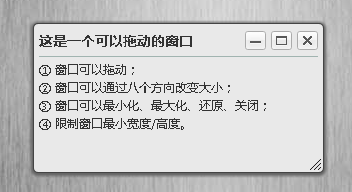
• 按住標題列即可拖動視窗;
• 視窗可從八個方向(四角 + 四邊)縮放;
• 支援最小化、最大化、還原與關閉;
• 限制最小寬高,避免被拖成不可用的形狀。
運行效果截圖如下:
線上演示:
https://demo.jb51.net/js/2015/js-win-drug-cha-close-demo/
設計要點
拖曳的核心是位移差值。按下時記錄 disX = clientX - offsetLeft,移動時用當前座標減掉它,就得到視窗該在的位置,再對四邊做夾擠避免跑出畫面。
縮放把同一套邏輯抽象成一個函式,用四個旗標描述行為:isLeft 代表拖左邊(寬度反向變化,且 left 要跟著移)、isTop 代表拖上邊(高度反向變化,top 要跟著移)、lockX 與 lockY 則用來鎖住單一軸向——拖四邊時鎖住另一軸,拖四角時兩軸都開放。八個把手共用同一支函式,只是傳入的參數不同。
最小化的做法是隱藏視窗並在 body 上動態插一個還原按鈕,點擊後移除該按鈕並顯示視窗。
完整程式碼
 <!DOCTYPE html PUBLIC "-//W3C//DTD XHTML 1.0 Transitional//EN" "https://www.w3.org/TR/xhtml1/DTD/xhtml1-transitional.dtd">
<html xmlns="https://www.w3.org/1999/xhtml">
<head>
<meta http-equiv="Content-Type" content="text/html; charset=utf-8" />
<title>視窗拖曳(縮放/最小化/最大化/還原/關閉)</title>
<style type="text/css">
body,div,h2{margin:0;padding:0;}
body{background:url(images/bg.jpg);font:12px/1.5 微軟雅黑;color:#333;}
#drag{position:absolute;top:100px;left:100px;width:300px;height:160px;background:#e9e9e9;
  border:1px solid #444;border-radius:5px;box-shadow:0 1px 3px 2px #666;}
#drag .title{position:relative;height:27px;margin:5px;}
#drag .title h2{font-size:14px;height:27px;line-height:24px;border-bottom:1px solid #A1B4B0;}
#drag .title div{position:absolute;height:19px;top:2px;right:0;}
#drag .title a,a.open{float:left;width:21px;height:19px;display:block;margin-left:5px;
  background:url(images/tool.png) no-repeat;}
a.open{position:absolute;top:10px;left:50%;margin-left:-10px;background-position:0 0;}
a.open:hover{background-position:0 -29px;}
#drag .title a.min{background-position:-29px 0;}
#drag .title a.min:hover{background-position:-29px -29px;}
#drag .title a.max{background-position:-60px 0;}
#drag .title a.max:hover{background-position:-60px -29px;}
#drag .title a.revert{background-position:-149px 0;display:none;}
#drag .title a.revert:hover{background-position:-149px -29px;}
#drag .title a.close{background-position:-89px 0;}
#drag .title a.close:hover{background-position:-89px -29px;}
#drag .content{overflow:auto;margin:0 5px;}
#drag .resizeBR{position:absolute;width:14px;height:14px;right:0;bottom:0;overflow:hidden;
  cursor:nw-resize;background:url(images/resize.png) no-repeat;}
#drag .resizeL,#drag .resizeT,#drag .resizeR,#drag .resizeB,
#drag .resizeLT,#drag .resizeTR,#drag .resizeLB{position:absolute;background:#000;overflow:hidden;
  opacity:0;filter:alpha(opacity=0);}
#drag .resizeL,#drag .resizeR{top:0;width:5px;height:100%;cursor:w-resize;}
#drag .resizeR{right:0;}
#drag .resizeT,#drag .resizeB{width:100%;height:5px;cursor:n-resize;}
#drag .resizeT{top:0;}
#drag .resizeB{bottom:0;}
#drag .resizeLT,#drag .resizeTR,#drag .resizeLB{width:8px;height:8px;background:#FF0;}
#drag .resizeLT{top:0;left:0;cursor:nw-resize;}
#drag .resizeTR{top:0;right:0;cursor:ne-resize;}
#drag .resizeLB{left:0;bottom:0;cursor:ne-resize;}
</style>
<script type="text/javascript">
/* ---------- 取得 id / class / tagName ---------- */
var get = {
  byId: function(id) { return typeof id === "string" ? document.getElementById(id) : id },
  byClass: function(sClass, oParent) {
    var aClass = [], reClass = new RegExp("(^| )" + sClass + "( |$)");
    var aElem = this.byTagName("*", oParent);
    for (var i = 0; i < aElem.length; i++) reClass.test(aElem[i].className) && aClass.push(aElem[i]);
    return aClass;
  },
  byTagName: function(elem, obj) { return (obj || document).getElementsByTagName(elem) }
};
var dragMinWidth  = 250;
var dragMinHeight = 124;

/* ---------- 拖曳 ---------- */
function drag(oDrag, handle) {
  var disX = disY = 0;
  var oMin    = get.byClass("min", oDrag)[0];
  var oMax    = get.byClass("max", oDrag)[0];
  var oRevert = get.byClass("revert", oDrag)[0];
  var oClose  = get.byClass("close", oDrag)[0];
  handle = handle || oDrag;
  handle.style.cursor = "move";

  handle.onmousedown = function (event) {
    var event = event || window.event;
    disX = event.clientX - oDrag.offsetLeft;
    disY = event.clientY - oDrag.offsetTop;
    document.onmousemove = function (event) {
      var event = event || window.event;
      var iL = event.clientX - disX;
      var iT = event.clientY - disY;
      var maxL = document.documentElement.clientWidth  - oDrag.offsetWidth;
      var maxT = document.documentElement.clientHeight - oDrag.offsetHeight;
      iL <= 0    && (iL = 0);
      iT <= 0    && (iT = 0);
      iL >= maxL && (iL = maxL);
      iT >= maxT && (iT = maxT);
      oDrag.style.left = iL + "px";
      oDrag.style.top  = iT + "px";
      return false;
    };
    document.onmouseup = function () {
      document.onmousemove = null;
      document.onmouseup = null;
      this.releaseCapture && this.releaseCapture();
    };
    this.setCapture && this.setCapture();
    return false;
  };

  // 最大化
  oMax.onclick = function () {
    oDrag.style.top = oDrag.style.left = 0;
    oDrag.style.width  = document.documentElement.clientWidth  - 2 + "px";
    oDrag.style.height = document.documentElement.clientHeight - 2 + "px";
    this.style.display = "none";
    oRevert.style.display = "block";
  };
  // 還原
  oRevert.onclick = function () {
    oDrag.style.width  = dragMinWidth + "px";
    oDrag.style.height = dragMinHeight + "px";
    oDrag.style.left = (document.documentElement.clientWidth  - oDrag.offsetWidth)  / 2 + "px";
    oDrag.style.top  = (document.documentElement.clientHeight - oDrag.offsetHeight) / 2 + "px";
    this.style.display = "none";
    oMax.style.display = "block";
  };
  // 最小化 / 關閉
  oMin.onclick = oClose.onclick = function () {
    oDrag.style.display = "none";
    var oA = document.createElement("a");
    oA.className = "open";
    oA.href = "javascript:;";
    oA.title = "還原";
    document.body.appendChild(oA);
    oA.onclick = function () {
      oDrag.style.display = "block";
      document.body.removeChild(this);
      this.onclick = null;
    };
  };
  // 避免按下按鈕時觸發拖曳
  oMin.onmousedown = oMax.onmousedown = oClose.onmousedown = function (event) {
    this.onfocus = function () { this.blur() };
    (event || window.event).cancelBubble = true;
  };
}

/* ---------- 縮放 ---------- */
function resize(oParent, handle, isLeft, isTop, lockX, lockY) {
  handle.onmousedown = function (event) {
    var event = event || window.event;
    var disX = event.clientX - handle.offsetLeft;
    var disY = event.clientY - handle.offsetTop;
    var iParentTop = oParent.offsetTop,     iParentLeft  = oParent.offsetLeft;
    var iParentWidth = oParent.offsetWidth, iParentHeight = oParent.offsetHeight;

    document.onmousemove = function (event) {
      var event = event || window.event;
      var iL = event.clientX - disX;
      var iT = event.clientY - disY;
      var maxW = document.documentElement.clientWidth  - oParent.offsetLeft - 2;
      var maxH = document.documentElement.clientHeight - oParent.offsetTop  - 2;
      var iW = isLeft ? iParentWidth  - iL : handle.offsetWidth  + iL;
      var iH = isTop  ? iParentHeight - iT : handle.offsetHeight + iT;

      isLeft && (oParent.style.left = iParentLeft + iL + "px");
      isTop  && (oParent.style.top  = iParentTop  + iT + "px");
      iW < dragMinWidth  && (iW = dragMinWidth);
      iW > maxW          && (iW = maxW);
      lockX || (oParent.style.width  = iW + "px");
      iH < dragMinHeight && (iH = dragMinHeight);
      iH > maxH          && (iH = maxH);
      lockY || (oParent.style.height = iH + "px");

      if ((isLeft && iW == dragMinWidth) || (isTop && iH == dragMinHeight)) {
        document.onmousemove = null;
      }
      return false;
    };
    document.onmouseup = function () {
      document.onmousemove = null;
      document.onmouseup = null;
    };
    return false;
  };
}

window.onload = window.onresize = function () {
  var oDrag  = document.getElementById("drag");
  var oTitle = get.byClass("title", oDrag)[0];
  var oL = get.byClass("resizeL", oDrag)[0];
  var oT = get.byClass("resizeT", oDrag)[0];
  var oR = get.byClass("resizeR", oDrag)[0];
  var oB = get.byClass("resizeB", oDrag)[0];
  var oLT = get.byClass("resizeLT", oDrag)[0];
  var oTR = get.byClass("resizeTR", oDrag)[0];
  var oBR = get.byClass("resizeBR", oDrag)[0];
  var oLB = get.byClass("resizeLB", oDrag)[0];

  drag(oDrag, oTitle);

  // 四角
  resize(oDrag, oLT, true,  true,  false, false);
  resize(oDrag, oTR, false, true,  false, false);
  resize(oDrag, oBR, false, false, false, false);
  resize(oDrag, oLB, true,  false, false, false);
  // 四邊
  resize(oDrag, oL, true,  false, false, true);
  resize(oDrag, oT, false, true,  true,  false);
  resize(oDrag, oR, false, false, false, true);
  resize(oDrag, oB, false, false, true,  false);

  oDrag.style.left = (document.documentElement.clientWidth  - oDrag.offsetWidth)  / 2 + "px";
  oDrag.style.top  = (document.documentElement.clientHeight - oDrag.offsetHeight) / 2 + "px";
};
</script>
</head>
<body>
<div id="drag">
  <div class="title">
    <h2>這是一個可以拖動的視窗</h2>
    <div>
      <a class="min" href="javascript:;" title="最小化"></a>
      <a class="max" href="javascript:;" title="最大化"></a>
      <a class="revert" href="javascript:;" title="還原"></a>
      <a class="close" href="javascript:;" title="關閉"></a>
    </div>
  </div>
  <div class="resizeL"></div><div class="resizeT"></div>
  <div class="resizeR"></div><div class="resizeB"></div>
  <div class="resizeLT"></div><div class="resizeTR"></div>
  <div class="resizeBR"></div><div class="resizeLB"></div>
  <div class="content">
    ① 視窗可以拖動;<br />
    ② 視窗可以從八個方向縮放;<br />
    ③ 視窗可以最小化、最大化、還原、關閉;<br />
    ④ 限制視窗最小寬度/高度。
  </div>
</div>
</body>
</html>
值得注意的幾個坑
1. 拖曳時選取到文字。 範例靠標題列上的 cursor:move 提示,但沒有阻擋文字選取。實務上會在 mousedown 時 preventDefault(),或在 CSS 上對標題列設 user-select:none。
2. 直接覆寫 document.onmousemove。 這會蓋掉同頁其他元件的類似處理。改用 addEventListener 並在 mouseup 時移除,才是安全做法。
3. 拖曳與縮放期間沒有移除監聽的風險。 若使用者在拖曳中把游標移出視窗或切換分頁,可能留下游離的監聽器;補上 window.onblur 的善後處理會穩健些。
4. 行動裝置沒有 hover 也沒有把手。 若要支援觸控,得改用 Pointer Events(pointerdown / pointermove / pointerup)並加上 touch-action:none,同時把過小的縮放把手放大到至少 44×44。
5. 無障礙。 建議為視窗加上 role="dialog" 與 aria-label,並讓標題列可聚焦、支援方向鍵移動。
希望本文所述對大家的 JavaScript 設計有所幫助。
- 上一篇文章: 用 DIV + CSS 排版做出視覺清爽的選項卡
- 下一篇文章: 動手做一個 JavaScript 浮動視窗框架:類別、繼承與事件機制