本文實作一個黑色風格的網頁 TAB 選項卡。深色基調配灰色層次,是相當經典耐看的一種組合,放在工具型或開發者導向的網站上特別合適。
核心只有一支函式
setTab(name, cursel, n) 做三件事:迴圈 1 到 n,把每個頁籤的 class 依是否等於 cursel 設為 hover 或空字串;同時把每個內容區的 display 設為 block 或 none。因為頁籤 id 是 one1~one5、內容 id 是 con_one_1~con_one_5,用字串拼接就能組出對應關係。
這種「傳入當前索引 + 總數」的設計有個好處:同一個頁面可以放好幾組獨立的選項卡,只要 name 不同即可,不必複製程式碼。
運行效果截圖如下:
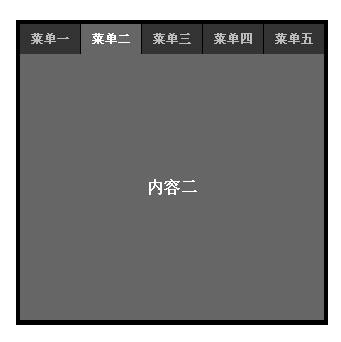
線上演示:
https://demo.jb51.net/js/2015/js-black-style-web-tab-demo/
完整程式碼
 <!DOCTYPE html PUBLIC "-//W3C//DTD XHTML 1.0 Transitional//EN" "https://www.w3.org/TR/xhtml1/DTD/xhtml1-transitional.dtd">
<html xmlns="https://www.w3.org/1999/xhtml">
<head>
<meta http-equiv="Content-Type" content="text/html; charset=utf-8" />
<title>Tab 切換</title>
<script type="text/javascript">
function setTab(name, cursel, n) {
  for (var i = 1; i <= n; i++) {
    var menu = document.getElementById(name + i);
    var con  = document.getElementById("con_" + name + "_" + i);
    menu.className = (i == cursel) ? "hover" : "";
    con.style.display = (i == cursel) ? "block" : "none";
  }
}
</script>
<style type="text/css">
*{margin:0px;padding:0px;list-style:none;}
.main{width:306px;height:299px;float:left;margin:300px;display:inline;background:#000;padding:3px;}
.main .menu{width:306px;height:31px;overflow:hidden;float:left;}
.main .menu span{width:60px;height:30px;line-height:30px;overflow:hidden;text-align:center;
  float:left;margin:1px 0 0 1px;background:#333;color:#BCBCBC;font-weight:bold;
  cursor:pointer;font-size:12px;}
.main .menu .hover{background:#666;color:#FFF;}
.main .content{width:304px;height:266px;overflow:hidden;float:left;margin:1px;
  margin-top:0px;display:inline;background:#333333;}
.main .content div{width:304px;height:266px;line-height:266px;text-align:center;
  color:#FFFFFF;font-weight:bold;background:#666;}
</style>
</head>
<body>
<div class="main">
  <div class="menu">
    <span id="one1" onclick="setTab('one',1,5)" class="hover">菜單一</span>
    <span id="one2" onclick="setTab('one',2,5)">菜單二</span>
    <span id="one3" onclick="setTab('one',3,5)">菜單三</span>
    <span id="one4" onclick="setTab('one',4,5)">菜單四</span>
    <span id="one5" onclick="setTab('one',5,5)">菜單五</span>
  </div>
  <div class="content">
    <div id="con_one_1">內容一</div>
    <div id="con_one_2" style="display:none">內容二</div>
    <div id="con_one_3" style="display:none">內容三</div>
    <div id="con_one_4" style="display:none">內容四</div>
    <div id="con_one_5" style="display:none">內容五</div>
  </div>
</div>
</body>
</html>
幾個該修的地方
1. 用 span 當頁籤不合語意。 選項卡本質上是「可點擊、可聚焦的控制器」,應該用 button 或 a。用 span 加 onclick 的結果是:鍵盤使用者完全無法操作,螢幕閱讀器也不會把它當成互動元素。
2. 補上 ARIA 標記。 容器加 role="tablist"、頁籤加 role="tab" 與 aria-selected、內容區加 role="tabpanel" 與 aria-labelledby,並支援左右方向鍵在頁籤間移動,才是完整的實作。
3. *{list-style:none} 是萬用字重置。 它會把所有 ul / ol 的項目符號清掉,全域套用這種規則很容易在別處造成意外。建議限定範圍,例如 .main ul{list-style:none}。
4. className 直接指派會清掉其他 class。 若 span 上還有其他 class,這行會把它們一起抹掉。改用 classList.toggle('hover', i === cursel) 更安全。
5. 固定高度 266px 很脆弱。 內容一旦超過就會被 overflow:hidden 裁掉。改用 min-height 讓區塊隨內容伸縮,會省去日後一堆排版意外。
6. 切換時要不要更新網址? 若希望使用者能直接連結到某個頁籤、或用瀏覽器上一頁返回,可以搭配 location.hash 或 history.replaceState 把當前索引寫進網址。
希望本文所述對大家的 JavaScript 設計有所幫助。
- 上一篇文章: 告別 Flash:純 JavaScript 也能做複製與剪下
- 下一篇文章: 可折疊又能拖曳的浮動層:JavaScript 事件處理範例