JS + CSS 打造的藍色系 Table 選項卡
編輯:關於JavaScript
這是一個以 table 為骨架的藍色選項卡,做法是把部分標題文字放在 JavaScript 陣列裡,點擊左側儲存格時置換右側內容區的 innerHTML。老實說,把內容寫在 JS 裡並不是好習慣,會讓搜尋引擎與閱讀器難以取得資料,這裡就把當成一個 DOM 操作的練習範例來看,實際使用時建議把文字改回 HTML。
運行結果如下:
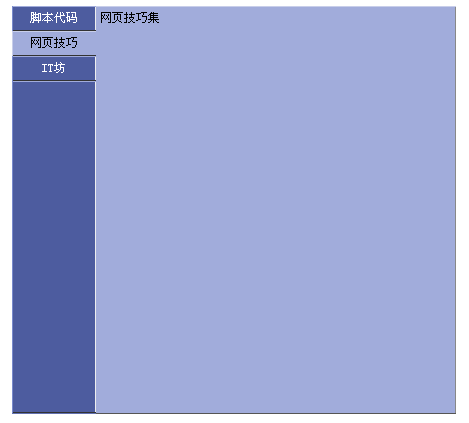
線上演示:https://demo.jb51.net/js/2015/js-css-blue-table-style-nav-demo/
樣式:用三組 class 表達三種狀態
這裡刻意用「聚焦」「失焦」「內容區」三個 class 來區分視覺層次,靠邊框顏色與背景色的細節差異做出立體感。
td, a, body {font-size:9pt;color:#000000;}

/* 選中狀態 */
.DivAround_focus {
    cursor:pointer;background-color:#A1ACDB;
    border-right:solid 1px #A1ACDB;border-bottom:solid 1px #333333;
    border-left:solid 1px #C8CEEA;border-top:solid 1px #C8CEEA;
}
/* 未選中狀態 */
.DivAround_blur {
    cursor:pointer;background:#4D5C9F;
    border-right:solid 1px #eeeeee;border-bottom:solid 1px #333333;
    border-left:solid 1px #798ACC;border-top:solid 1px #A1ACDB;color:#FFFFFF;
}
/* 內容區 */
.DivAround_content {
    background-color:#A1ACDB;
    border-right:solid 1px #888888;border-bottom:solid 1px #555555;
    border-left:0px;border-top:solid 1px #C8CEEA;
}
腳本:一次遍歷完成切換
ChangeFocus 接到被點擊的儲存格後,會跑一輪 rows:等於自己的設為 focus 並更新內容,其餘全部設為 blur。這種「先全部重設、再突出目標」的寫法比維護當前索引更不容易出錯。
var AroundInfoArray = new Array();
AroundInfoArray[0] = "腳本資源";
AroundInfoArray[1] = "網頁技巧集";
AroundInfoArray[2] = "IT資訊坊";

function ChangeFocus(obj) {
    for (var i = 0; i < document.getElementById("leftButtonTAble").rows.length; i++) {
        if (document.getElementById("leftButtonTAble").rows[i].cells[0] == obj) {
            document.getElementById("leftButtonTAble").rows[i].cells[0].className = "DivAround_focus";
            document.getElementById("DivAroundContent").innerHTML = AroundInfoArray[i];
        } else {
            document.getElementById("leftButtonTAble").rows[i].cells[0].className = "DivAround_blur";
        }
    }
}
HTML 結構
<table cellpadding="0" cellspacing="0" border="0" align="center" bgcolor="#6271B1">
<tr>
<td width="84" valign="top">
  <table cellpadding="0" cellspacing="0" border="0" height="407" width="84" id="leftButtonTAble">
    <tr><td height="25" align="center" class="DivAround_focus" onClick="ChangeFocus(this)">腳本代碼</td></tr>
    <tr><td height="25" align="center" class="DivAround_blur" onClick="ChangeFocus(this)">網頁技巧</td></tr>
    <tr><td height="25" align="center" class="DivAround_blur" onClick="ChangeFocus(this)">IT坊</td></tr>
    <tr><td style="border-right:solid 1px #eeeeee"> </td></tr>
  </table>
</td>
<td width="360">
  <table cellpadding="0" cellspacing="0" border="0" width="100%" class="DivAround_content">
    <tr><td height="406" valign="top" style="padding:4px" id="DivAroundContent">內容</td></tr>
  </table>
</td>
</tr>
</table>

<script language="javascript">
// 初始預設選中第一項
ChangeFocus(document.getElementById("leftButtonTAble").rows[0].cells[0]);
</script>
最後一行初始化很重要:它同時完成「第一項高亮」與「內容區填入初始文字」兩件事,省去在 HTML 裡重複寫一次預設值。若要改進這份程式碼,最直接的兩步是把 for 迴圈中的重複 getElementById 提到迴圈外快取,以及改用 data-* 屬性存放內容,讓資料與 DOM 徹底分離。