用 JavaScript 讓元素在指定容器內水平垂直居中
編輯:關於JavaScript
本章節要介紹如何讓一個寬高未知的元素在指定容器內達成水平垂直居中。下面以 span 元素為例,示範如何讓它在 div 中水平垂直居中,程式碼如下:
<!DOCTYPE html> <html> <head> <meta charset=" utf-8"> <style type="text/css"> #box{ width:200px; height:150px; background:blue; position:relative; } #antzone{ background:green; } </style> <script type="text/javascript"> window.onload=function(){ var obox=document.getElementById("box"); var oantzone=document.getElementById("antzone"); var w=oantzone.offsetWidth; var h=oantzone.offsetHeight; oantzone.style.position="absolute"; oantzone.style.left="50%"; oantzone.style.top="50%"; oantzone.style.marginLeft=-(w/2)+"px"; oantzone.style.marginTop=-(h/2)+"px"; } </script> </head> <body> <div id="box"> <spanj id="antzone"></span> </div> </body> </html>
上面的程式碼就完成了 span 元素在 div 中的水平垂直居中,接著說明它的實作過程。
一、實作原理:雖然 CSS 沒有明確給出 span 元素的尺寸,但它畢竟還是有尺寸,而這個尺寸可以用 offsetWidth 與 offsetHeight 屬性取得。接著把 span 設為絕對定位,並將 left、top 都設為 50%,此時居中的其實是 span 的左上角而非中心點;因此再幫它設定「負的外邊距」,數值為 span 寬高的一半,這樣就能讓中心點精準對齊,完成居中效果。
例子二:
思路:最麻煩的其實是垂直居中。考量到瀏覽器相容性,網上查了一些資料後發現,頁面中的垂直居中確實沒有太好的通用解法。於是改用 position:fixed 控制時鐘的絕對位置,並用 clientWidth、clientHeight 取得時鐘的寬高,再用 JavaScript 控制 marginLeft、marginTop 來居中。
<!doctype html> <html lang="en"> <head> <meta charset="UTF-8"> <title>Centered Clock</title> <style type="text/css"> body{ background: #fff; } body, div, p{ margin: 0; padding: 0; } .center{ position: fixed; left: 50%; top: 50%; } .box{ border: 1px solid #000; padding: 20px 30px; font-size: 1.5em; font-weight: 500; margin: auto auto; } </style> </head> <body> <div class="center"> <p class="box"></p> </div> </body> <script type="text/javascript"> window.onload = function () { getTimes(); var box = document.getElementsByClassName("box")[0]; box.style.marginLeft = -box.clientWidth / 2 + "px"; box.style.marginTop = -box.clientHeight / 2 + "px"; setInterval(getTimes, 1000); } function getTimes() { var box = document.getElementsByClassName("box")[0]; var dateTime = new Date(); var year = dateTime.getFullYear(); var date = dateTime.getDate(); var month = dateTime.getMonth() + 1; var hours = dateTime.getHours(); var minutes = dateTime.getMinutes(); var secondes = dateTime.getSeconds(); box.innerHTML = year + "-" + format(month) + "-" + format(date) + " " + format(hours) + ":"+ format(minutes) +":" + format(secondes); } function format(a) { return a.toString().replace(/^(\d)$/, "0$1"); } </script> </html>
例子三:
思路:採用相對定位,把 left 與 top 設為 (pw-w)/2 和 (ph-h)/2,其中 pw、ph 為外部標籤的寬與高,w、h 為內部標籤的寬與高。
核心程式碼:
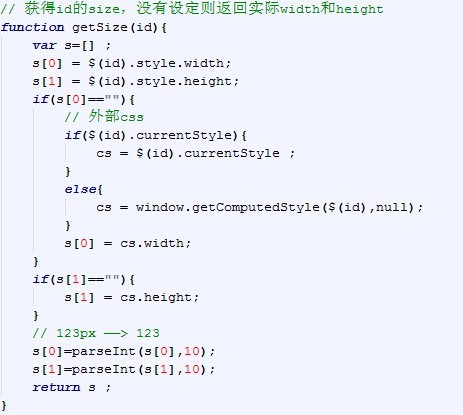
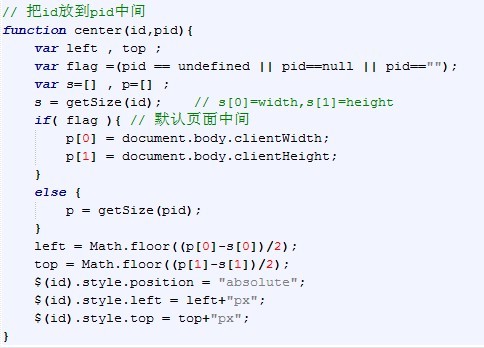
以上就是為大家整理的三種用 JavaScript 實作居中的範例,可以參考看看,希望對你有所幫助。
- 上一篇文章: 動態新增 iframe 的 JavaScript 程式碼
- 下一篇文章: window.onload 使用指南完整解析