面向對象封裝的網頁 TAB 選項卡菜單,支持自動輪播
編輯:關於JavaScript
TAB 選項卡幾乎是每個網站都會用到的組件。這裡分享的方案把整個交互抽象成一個 Tab 類,通過原型鏈封裝初始化、事件綁定與自動播放邏輯,支持鼠標滑過或點擊兩種觸發方式,也能定製自動輪播的間隔與是否暫停。封裝之後,頁面上放幾組選項卡都只需一行 new。
先來看看運行效果截圖:
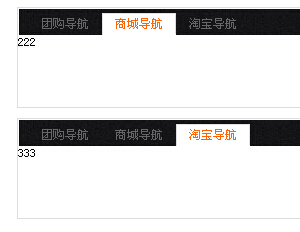
在線演示地址:
https://demo.jb51.net/js/2015/js-mxdx-tab-cha-style-codes/
封裝思路
構造函數 Tab 只做一件事:調用 initialize 完成初始化。initialize 裡依次拿到容器、按鈕列表、內容列表,解析配置項,默認展開第 eq 個面板,然後綁定事件並啟動自動播放。
幾個設計細節值得留意:Object.extend 用來把用戶傳入的 onEnd 配置合併到默認值上,這樣只寫需要覆蓋的屬性即可;display 方法裡用立即執行函數配合 j 變量做閉包,避免循環中 i 被共享導致的經典 bug;autoPlayTab 則在鼠標移入時 clearInterval 暫停、移出時重新啟動,兼顧了自動輪播與用戶操作。
完整代碼如下:
<!DOCTYPE html PUBLIC "-//W3C//DTD XHTML 1.0 Transitional//EN" "https://www.w3.org/TR/xhtml1/DTD/xhtml1-transitional.dtd"> <html xmlns="https://www.w3.org/1999/xhtml"> <head> <meta http-equiv="Content-Type" content="text/html; charset=utf-8" /> <title>選項卡</title> <style type="text/css"> body, h2, p { margin:0px; padding:0px; } ul, li { margin:0px; padding:0px; float:left; list-style-type:none; } body { font-size:12px; } .box { width:722px; height:99px; margin:10px auto; border:1px solid #dedede; } .list { width:711px; height:22px; float:left; padding:4px 0 0 9px; border-top:1px solid #fff; border-left:1px solid #fff; border-right:1px solid #fff; background:url(images/tabbg.jpg) repeat-x; } .list li { width:74px; height:22px; float:left; cursor:pointer; color:#656565; line-height:22px; text-align:center; } .list li.hove { width:72px; height:20px; color:#fc6703; line-height:20px; border-top:1px solid #dedede; border-left:1px solid #dedede; border-right:1px solid #dedede; border-bottom:1px solid #fff; background:#fff; } .content { width:722px; height:72px; float:left; display:none; } </style> <script type="text/javascript"> function $(id){ return typeof id === "string" ? document.getElementById(id) : id; } function $$(oParent, elem){ return (oParent || document).getElementsByTagName(elem); } function $$$(oParent, sClass){ var aElem = $$(oParent, '*'); var aClass = []; var i = 0; for(i=0;i<aElem.length;i++)if(aElem[i].className == sClass)aClass.push(aElem[i]); return aClass; } function addEvent(oElm, strEvent, fuc) { window.addEventListener ? oElm.addEventListener(strEvent, fuc, false) : oElm.attachEvent('on' + strEvent, fuc); }; function Tab(){ this.initialize.apply(this, arguments); } Object.extend = function(destination, source) { for (var property in source) { destination[property] = source[property]; } return destination; }; Tab.prototype = { initialize : function(obj, dis, content, onEnd, eq){ this.obj = $(obj); this.oList = $$$(this.obj, 'list')[0]; this.aCont = $$$(this.obj, content); this.oUl = $$(this.oList, 'ul')[0]; this.aLi = this.oUl.children; this.timer = null; eq ? (this.aLi.length < eq ? eq = 0 : eq) : eq = 0; this.oEve(onEnd); this.onEnd.method == 'mouseover' ? this.method = "mouseover" : this.method = "click"; this.onEnd.autoplay == 'stop' ? this.autoplay = "stop" : this.autoplay = "play"; this.aCont[eq].style.display = 'block'; this.aLi[eq].className = 'hove'; this.display(dis); this.autoPlayTab(eq, dis); }, oEve: function(onEnd){ this.onEnd = { method: 'mouseover', autoplay: 'stop', }; Object.extend(this.onEnd, onEnd || {}); }, display : function(dis){ var _this = this; var i = iNow = 0; for(i=0;i<this.aLi.length;i++){ (function(){ var j = i; addEvent(_this.aLi[j], _this.method, function() { _this.fnClick(j,dis); _this.autoPlayTab(j, dis); }) })() } }, autoPlayTab : function(iNow, dis){ if(this.autoplay == 'play'){ var _this = this; this.iNow = iNow; this.obj.onmouseover = function(){ clearInterval(_this.timer); }; this.obj.onmouseout = function(){ clearInterval(_this.timer); _this.timer = setInterval(playTab,5000); }; clearInterval(_this.timer); _this.timer = setInterval(playTab,5000); function playTab(){ if(_this.iNow == _this.aLi.length)_this.iNow = 0; _this.fnClick(_this.iNow, dis) _this.iNow++ } } }, fnClick : function(oBtn, dis){ var i = 0; for(i=0;i<this.aLi.length;i++)this.aLi[i].className = '',this.aCont[i].style.display = 'none'; this.aLi[oBtn].className = dis; this.aCont[oBtn].style.display = 'block'; } }; window.onload = function(){ new Tab("box", 'hove', 'content', { method : 'mouseover', autoplay : 'play' },0); new Tab("box1", 'hove', 'content', { method : 'click', },0); }; </script> </head> <body> <div id="box" class="box"> <div class="list"> <ul> <li>團購導航</li> <li>商城導航</li> <li>淘寶導航</li> </ul> </div> <div class="content">111</div> <div class="content">222</div> <div class="content">333</div> </div> <div id="box1" class="box"> <div class="list"> <ul> <li>團購導航</li> <li>商城導航</li> <li>淘寶導航</li> </ul> </div> <div class="content">111</div> <div class="content">222</div> <div class="content">333</div> </div> </body> </html>
頁面末尾分別創建了兩個實例:box 采用滑過觸發並開啟自動播放,box1 則是點擊觸發且不輪播,可見配置化程度還是不錯的。若要在正式項目中使用,建議再補上索引越界防護和定時器的銷毀方法。希望本文對大家的 JavaScript 開發有所幫助。
- 上一篇文章: JavaScript 實現 3D 逐張輪播幻燈片特效代碼分享
- 下一篇文章: JS 實現自動輪播切換的菜單效果代碼