下拉選單與輸入框聯動:一鍵把選中值帶入輸入框
編輯:關於JavaScript
有些欄位是由固定選項組出來的,但使用者還可以微調,這時候讓下拉選單把值帶進輸入框,是最省事的互動設計。本文用幾行 JavaScript 示範這個聯動效果。
運行效果如下:
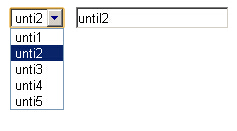
線上演示:https://demo.jb51.net/js/2015/js-select-value-to-input-codes/
程式碼
<html>
<head>
<title>下拉選擇框與輸入框聯動,直接添加選中值到輸入框</title>
</head>
<body>
<select id="uiSel">
<option value="-1">請選擇</option>
<option value="until1">unti1</option>
<option value="until2">unti2</option>
<option value="until3">unti3</option>
<option value="until4">unti4</option>
<option value="until5">unti5</option>
</select>
<input type="text" name="" id="show" />
</body>
<script type="text/javascript">
document.getElementById('uiSel').onchange = function (){
    //第一個選項只是佔位提示,選到它就移除,避免送出無意義的值
    if (this.options[0].value == -1) this.options[0] = null;
    document.getElementById('show').value = this.value;
};
</script>
</html>
幾個可以調整的地方
做法是把 select 的 onchange 指向一個函式,把 this.value 寫進目標輸入框。程式中順手把「請選擇」這個佔位項移除,避免使用者停留在提示值時把 -1 送出後端。
實務上有兩種常見變體。一是改用 text 而非 value:當 option 的 value 是 id、而使用者想看的是顯示文字時,帶入 this.options[this.selectedIndex].text 才對。二是雙向同步:如果希望使用者手動改輸入框後,下拉選單也跟著反查選中項,就需要多寫一段比對迴圈。掌握「change 事件 → 讀值 → 寫值」這個骨架之後,這些變化都只是換一個來源或目標而已。
希望本文所述對你的 JavaScript 程序設計有所幫助。
- 上一篇文章: Radio 切換連動:選項改變時同步替換區塊內容
- 下一篇文章: JavaScript 如何統計多選框被勾選的數量