仿新浪微博搜索框彈出效果的 JS 實現
編輯:關於JavaScript
新浪微博的搜索框有一個貼心設計:點擊搜索框時,會彈出一個上層面板,讓用戶進行更精細的搜索,點擊右上角叉號又能收起。下面我們用原生 JavaScript 模擬這樣一個搜索框彈出效果。
實現思路:頁面上放一個普通搜索框和一個默認隱藏、絕對定位的彈出層 show;當搜索框獲焦(onfocus)時顯示彈出層並把焦點轉移到彈出層的輸入框,點擊叉號時隱藏彈出層並還原提示文字。
<!DOCTYPE html> <html> <head> <meta http-equiv="Content-Type" content="text/html; charset=gb2312" /> <title>仿新浪微博搜索框彈出的效果</title> <style type="text/css"> body{font-size:12px;} .weibo{width:500px; height:200px; position:relative;} .so{width:200px; height:24px; margin:30px;} .so #s_so{width:100px; border:1px solid #ccc; line-height:20px; height:20px;} #show{display:none; position:absolute; top:0px; left:10px; width:200px; height:60px; background:#fff; border:1px solid #ccc; padding:10px;} #show span{margin-left:120px; color:#F00; cursor:pointer;} </style> </head> <body> <script type="text/javascript"> var $=function (id){ return document.getElementById(id); } function s_show(){ $('s_so').value=""; $("show").style.display='block'; $("b_so").focus(); } function closed(){ $("show").style.display='none'; $('s_so').value="搜索他說的話"; } </script> <div class="weibo"> <div class="so"> <form> <input type="text" value="搜索他說的話" onfocus="s_show()" id="s_so"/> <input type="submit" value="查找" /> </form> </div> <div id="show"> <p>搜索他說的話<span onclick="closed()">X</span></p> <form> <input type="text" value="" id="b_so"/><input type="submit" value="查找" /> </form> </div> </div> </body> </html>
運行效果如下:
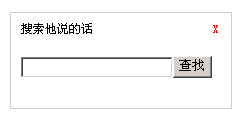
整個示例通過封裝簡易的 $ 函數獲取元素,並用 onfocus、onclick 控制彈出層的顯示與隱藏,邏輯清晰、代碼輕量。讀者可以在此基礎上加入點擊外部區域自動收起、加入動畫等增強體驗。
- 上一篇文章: 用 JavaScript 自動屏蔽頁面敏感詞
- 下一篇文章: 用 JavaScript 動態提示輸入框的字數