需求
1. 輸入 @ 時,彈出符合的好友選單。
2. 游標進入含有「@好友」的標籤時,彈出選單。
3. 按 backspace 刪除時,若游標前方是含「@好友」的標籤,則彈出選單。
4. 相容 IE 與 Firefox。
具體做法
針對需求一,很自然會想到為輸入框綁定事件。這裡要綁定 mousedown 而非 mouseup,因為若是 mouseup,用 event.preventDefault() 無法阻止鍵盤輸入 @,而且事件回調裡用 return false 也起不了作用。
綁定 mousedown 後,接著插入自訂的含「@好友」標籤。新浪微博的輸入框用 textarea 製作,內部如何處理無從得知,於是可以參考百度貼吧的做法。
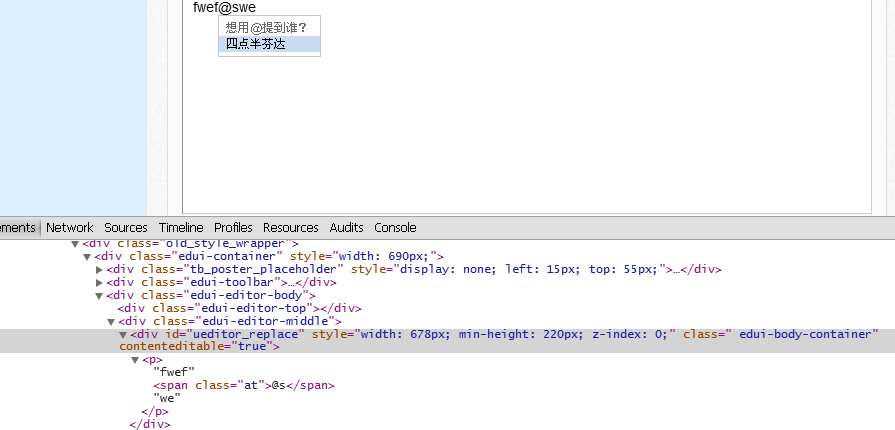
可以看到,貼吧插入了 <span class='at'></span> 標籤,這應該是為了方便後端用正則表達式比對。具體如下:
復制代碼 代碼如下:
vm.check_key=function(e){
var editor=$('editor'),range;
if(e.shiftKey&&e.keyCode==50){
if (document.selection && document.selection.createRange) {
range = document.selection.createRange();
range.pasteHTML(" <span id='at"+at_index+"' class='at_span'>@</span> ");
}else{
document.execCommand("insertHtml", false," <span id='at"+at_index+"' class='at_span'>@</span> ");
}
e.preventDefault();
}
};
這裡需要在游標處插入,因此用到了 range。接著是選單顯示,關鍵在於定位。我的做法是為插入的 span 加上 id,再依 span 的位置為選單定位。若有更好的做法也歡迎分享。
復制代碼 代碼如下:
function at_box_show(at){
var at_pos=avalon($(at)).position();
$('at_box').style.left=at_pos.left+'px';
$('at_box').style.top=at_pos.top+16+'px';
$('at_box').style.display='block';
}
var at_index=0,cur_index=0;
avalon.define('editor', function(vm) {
vm.item_click=function(){
$('at'+cur_index).innerHTML="@"+this.innerHTML;
$('at_box').style.display='none';
at_index++;
};
vm.check_key=function(e){
var editor=$('editor'),a=getCharacterPrecedingCaret(editor),range;
if(e.shiftKey&&e.keyCode==50){
if (document.selection && document.selection.createRange) {
range = document.selection.createRange();
range.pasteHTML(" <span id='at"+at_index+"' class='at_span'>@</span> ");
}else{
document.execCommand("insertHtml", false," <span id='at"+at_index+"' class='at_span'>@</span> ");
}
at_box_show('at'+at_index);
cur_index=at_index;
e.preventDefault();
}
};
});
at_show_box 依新插入的 span id 為 at_box 定位並顯示選單。cur_index 表示游標目前所在的 span id,之所以需要它,是因為使用者可能回頭修改已插入的 span,而 at_index 是一直遞增的。使用者點擊選單中的好友項會觸發 item_click 回調,將好友名稱以 innerHTML 寫入當前 span,然後隱藏選單並 at_index++。
以上是監聽 shift+@,接著是監聽 backspace 刪除:
復制代碼 代碼如下:
function getTextBeforeCursor(containerEl) {
var precedingChar = "", sel, range, precedingRange;
if (window.getSelection) {
sel = window.getSelection();
if (sel.rangeCount > 0) {
range = sel.getRangeAt(0).cloneRange();
range.collapse(true);
range.setStart(containerEl, 0);
precedingChar = range.cloneContents();
}
} else if ( (sel = document.selection)) {
range = sel.createRange();
precedingRange = range.duplicate();
precedingRange.moveToElementText(containerEl);
precedingRange.setEndPoint("EndToStart", range);
precedingChar = precedingRange.htmlText;
}
return precedingChar;
}
getTextBeforeCursor 用來取得游標前的內容。由於相容性問題,此函式在標準瀏覽器中可取得游標前所有內容的 DocumentFragment,而在 IE 中只能取得文字(非 node),不過這個 html 字串可轉為 DocumentFragment:avalon 用 parseHTML、jQuery 用 $(html)[0] 都能得到 node。
有了這個函式,再用 lastChild 就能判斷游標是否位於游標前 html 的 lastChild,且該 lastChild 為 span。具體如下:
復制代碼 代碼如下:
var a=getTextBeforeCursor($('editor'));
if(e.keyCode==8){
if(!-[1,]){
var b=avalon.parseHTML(a).lastChild;
}else{
var b=a.lastChild;
}
if(b.nodeType==1&&b.nodeName=='SPAN'){
var id=b.id;
cur_index=b.id.substring(2);
at_box_show(b.id);
}else
$('at_box').style.display='none';
}
最後是游標進入 span 標籤時顯示選單,這需要綁定滑鼠事件。這裡綁定 mouseup,因為若綁 mousedown,游標在 span 上還需再點一次才會顯示選單,原理與前面類似。
復制代碼 代碼如下:
vm.check_mouse=function(e){
var editor=$('editor'),a=getTextBeforeCursor(editor);
if(!-[1,]){
var b=avalon.parseHTML(getTextBeforeCursor(editor)).lastChild;
}else{
var b=a.lastChild;
}
if(b!=null&&b.nodeType==1&&b.nodeName=='SPAN'){
var id=b.id;
cur_index=b.id.substring(2);
at_box_show(b.id);
}else
$('at_box').style.display='none';
};
注意,若游標在 span 裡面,就要取出它的 id,讓 at_box 依此定位,同時重置 cur_index。至於以 ajax 更新選單與字元比對這裡就不再贅述。
效果如下:
firefox

ie8

ie7

ie6

以上就是本文的全部內容,希望對你了解 JavaScript 有所幫助。
- 上一篇文章: 淺談 JavaScript 閉包:從迴圈綁定變數說起
- 下一篇文章: JavaScript DSL 流暢接口與鏈式調用實例