Bootstrap Table 是一個相當好用的、基於 Bootstrap 的插件,它擴展並豐富了 Bootstrap 表格的操作,例如格式化表格、表格選擇器、表格工具欄、分頁等等。
最近基於 Bootstrap 開發一個開台發布系統,我把開發過程中使用 Bootstrap Table 遇到的一些問題與收穫記錄如下:
開始使用:
需要在自己的頁面中引入以下樣式及腳本:
<link rel="stylesheet" href="bootstrap.min.css"> <link rel="stylesheet" href="bootstrap-table.css"> <script src="jquery.min.js"></script> <script src="bootstrap.min.js"></script> <script src="bootstrap-table.js"></script>
https://github.com/wenzhixin/bootstrap-table/
一、Bootstrap Table 支援超多列,會自動顯示水平捲動條。
我們用 Bootstrap 開發時,經常遇到一個頭疼的問題:如果客戶要求表格中顯示的列較多,無論用 Bootstrap 的哪一種布局方式,顯示效果都不盡人意。Bootstrap Table 很好地處理了這個問題,讓我們能在不改變原有布局方式的情況下,妥善應對超多列的場景,而且支援自定義顯示列名,效果如下:

使用方式很簡單,在一個普通的表格中設定 data-toggle="table",就能在不寫 JavaScript 的情況下啟用 Bootstrap Table。當然也可以透過腳本方式觸發:
$('#table').bootstrapTable({ url: 'data.json' });。
是不是很好用呢?只有我們指定的表格才會套用 Bootstrap Table 的樣式,其他未指定的不受影響。
二、結合 Bootstrap Modal 做彈出表格子頁面,並取得當前選中的資料後更新到父頁面:
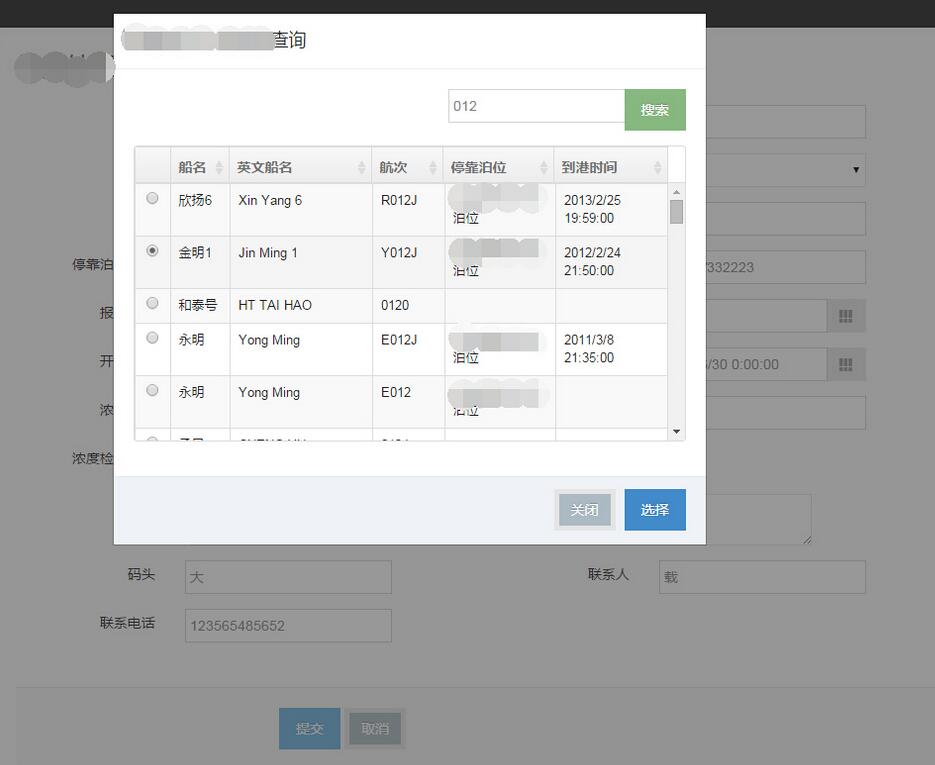
功能說明:
使用者點父頁面中的某個輸入框,系統會彈出一個查詢界面,供使用者檢索選擇相關資料。
頁面布局思路:
首先建立一個 Modal 分部視圖:
<!-- Modal --> <div class="modal fade" role="dialog" aria-labelledby="gridSystemModalLabel" id="gridSystemModal"> <div class="modal-dialog" role="document"> <div class="modal-content"> <div class="modal-header"> <button type="button" class="close" data-dismiss="modal" aria-label="Close"><span aria-hidden="true">×</span></button> <h4 class="modal-title" id="gridSystemModalLabel">xxxx查詢</h4> </div> <div class="modal-body"> <div class="container-fluid" id="fjShipChkList"> @Html.Partial("Modal/FjShipChkList") </div> </div> <div class="modal-footer"> <button type="button" class="btn btn-default" data-dismiss="modal">關閉</button> <button type="button" class="btn btn-primary">選擇</button> </div> </div><!-- /.modal-content --> </div><!-- /.modal-dialog --> </div><!-- /.modal -->
以及我們要顯示業務資料的列表分部視圖,並被 Modal 分部視圖調用:
<div class="row table-toolbar"> <div class="col-md-12"> <div class="pull-right form-inline"> <div class="form-group"> <div class="input-group input-medium"> <input type="text" class="form-control input-search" placeholder="航次" id="fjShipChkList-keyword" name="keyword" value="" /> <span class="input-group-btn"> <button class="btn btn-success btn-search" type="button" id="modal-search">搜索</button> </span> </div> </div> </div> </div> </div> <table class="table table-striped table-bordered table-hover js-table" data-toggle="table" data-url="data1.json" data-height="299" data-click-to-select="true" data-select-item-name="radioName" id="table-ShipChk"> <thead> <tr> <th data-field="state" data-radio="true"></th> <th class="sorting" aria-column="SHIP_NM">船名</th> <th class="sorting" aria-column="SHIP_NM_EN">英文船名</th> <th class="sorting" aria-column="VOY_ID">航次</th> <th class="sorting" aria-column="DOCK_BTH_NM">停靠泊位</th> <th class="sorting" aria-column="ARR_DT">到港時間</th> </tr> </thead> <tbody id="body-fjShipChkList"> @if (Model.GetType() != typeof (QUARANTINE_HANDLE_RESULT)) { int i = 0; foreach (VOYAGE_DYNM item in Model.PageList) { <tr class="odd gradeX"> <td class="bs-checkbox"><input data-index="@(i++)" name="radioName" type="radio"></td> <td> @Html.DisplayFor(it => item.SHIP_NM) </td> <td> @Html.DisplayFor(it => item.SHIP_NM_EN) </td> <td> @Html.DisplayFor(it => item.VOY_ID) </td> <td> @Html.DisplayFor(it => item.DOCK_BTH_NM) </td> <td> @Html.DisplayFor(it => item.ARR_DT) </td> </tr> } } </tbody> </table>
在父頁面中調用 Modal 分部視圖:
@Html.Partial("Modal/CustomModal")
引入 Modal 分部視圖的位置最好與父頁面中的頂層元素為兄弟節點,避免 Modal 調用失敗。
需要在啟動 Modal 彈出層的元素上加上 data-toggle="modal" data-target="#gridSystemModal" 就能啟動 Modal 了。點擊探索時,用 ajax 從後台取資料並返回一個分部視圖,返回成功後直接替換原有的業務資料分部視圖。
說了這麼多都和我們的主角沒多大關係,現在言歸正傳。Modal 登場後,我們會想:怎麼讓這個彈出頁面和父頁面交互資料呢?我採用的是 Bootstrap Table,原因很簡單:Bootstrap Table 天生就是用來處理 bootstrap table 的,功能強悍、使用簡單。
首先,在我們的業務資料分部視圖中:
<table class="table table-striped table-bordered table-hover js-table" data-toggle="table" data-url="data1.json" data-height="299" data-click-to-select="true" data-select-item-name="radioName" id="table-ShipChk"> <thead> <tr> <th data-field="state" data-radio="true"></th> <th class="sorting" aria-column="SHIP_NM">船名</th> <th class="sorting" aria-column="SHIP_NM_EN">英文船名</th> <th class="sorting" aria-column="VOY_ID">航次</th> <th class="sorting" aria-column="DOCK_BTH_NM">停靠泊位</th> <th class="sorting" aria-column="ARR_DT">到港時間</th> </tr> </thead> <tbody id="body-fjShipChkList"> @if (Model.GetType() != typeof (QUARANTINE_HANDLE_RESULT)) { int i = 0; foreach (VOYAGE_DYNM item in Model.PageList) { <tr class="odd gradeX"> <td class="bs-checkbox"><input data-index="@(i++)" name="radioName" type="radio"></td> <td> @Html.DisplayFor(it => item.SHIP_NM) </td> <td> @Html.DisplayFor(it => item.SHIP_NM_EN) </td> <td> @Html.DisplayFor(it => item.VOY_ID) </td> <td> @Html.DisplayFor(it => item.DOCK_BTH_NM) </td> <td> @Html.DisplayFor(it => item.ARR_DT) </td> </tr> } } </tbody> </table>
這裡加入了 data-url="data1.json"、data-height="299"、data-click-to-select="true"、data-select-item-name="radioName",其中 data-select-item-name 指明我們的表格是 radio 方式,只能選擇其中某一行(當然也可以支援多行選擇)。然後按官方文件操作,一切即將搞定:
$("#gridSystemModal .btn-primary").click(function () { var selectRow = $("#table-ShipChk").bootstrapTable('getSelections'); if (selectRow.length < 1) { selectRow = $table.bootstrapTable('getSelections'); if (selectRow.length < 1){ alert("請先選擇船舶!"); return; } } $("#SHIP_NAME").val(selectRow[0][1].trim()); $("#VOYAGE_NO").val(selectRow[0][3].trim()); $("#SHIP_NM_EN").val(selectRow[0][2].trim()); $("#DOCK_BTH_NM").val(selectRow[0][4].trim()); $("#ARR_DT").val(selectRow[0][5].trim()); $("#gridSystemModal").modal('hide'); });
然而意外發生了:就算我把選擇按鈕點破了,也選不中我要的資料。為什麼呢?查官方文件,明明就是一句 $("#table-ShipChk").bootstrapTable('getSelections') 搞定的事,為什麼在我這裡就行不通?到處搜尋也一無所獲。用 Bootstrap Table 的初衷就是它簡單、強大,怎麼會這樣呢?好吧,加班查查看。
問題就出在:每次 ajax 請求資料後,我都會返回一個新的分部視圖去替換原有的分部視圖,替換後沒有把 Bootstrap Table 重新啟動起來,它還在睡大覺呢,你怎麼 getSelections。
好吧,在 ajax success 中補一句 $("#table-ShipChk").bootstrapTable();
好了,Bootstrap Table 醒了,我可以下班了。
如果想進一步深入學習,可以再搭配以下幾個精彩專題:
Bootstrap 學習教程
Bootstrap 實戰教程
Bootstrap 插件使用教程
Bootstrap Table 使用教程
以上就是本文的全部內容,希望對你的學習有所幫助。
- 上一篇文章: js 前端解決跨域問題的 8 種方案(最新最全)
- 下一篇文章: 用原生 JS 做出置中彈跳登入框與半透明遮罩