深入淺出:JavaScript 模擬拖拽的原理與優化
編輯:JavaScript技巧
模擬拖拽的核心原理:
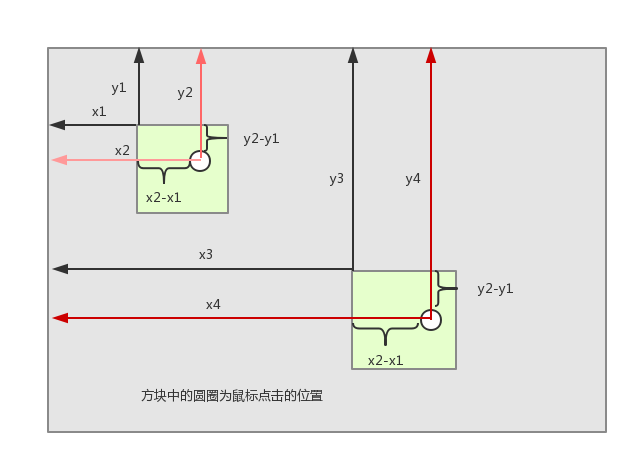
其中 x1 等於 div.offsetLeft,y1 等於 div.offsetTop;x2 等於 ev.clientX(ev 代表 event 事件),y2 等於 ev.clientY。
當我們在方塊上按下滑鼠時,x2 減 x1 的差值即可確定。移動滑鼠後,用滑鼠當前位置 x4、y4 減去 x2 減 x1、y2 減 y1,就能算出方塊目前所在的位置。
程式碼:
<!DOCTYPE html> <html lang="en"> <head> <meta charset="UTF-8"> <title>Document</title> <style> #box{ width: 100px; height: 100px; background: red; position: absolute; } </style> </head> <body> <div id="box"></div> <script type="text/javascript"> var oBox = document.getElementById('box'); oBox.onmousedown = function(ev){ // 滑鼠按下 var ev = ev || event; // 取得滑鼠離 div 的距離 var mouseBoxleft = ev.clientX - this.offsetLeft; var mouseBoxTop = ev.clientY - this.offsetTop; oBox.onmousemove = function(ev){ // 滑鼠按下左鍵並移動 var ev = ev || event; // 設定 div 移動時的位置 oBox.style.left = ev.clientX - mouseBoxleft + 'px'; oBox.style.top = ev.clientY - mouseBoxleft + 'px'; } oBox.onmouseup = function(){ // 滑鼠左鍵抬起 oBox.onmousemove = oBox.onmouseup = null; } } </script> </body> </html>
優化程式碼:
【1】當滑鼠移動過快時,游標會移出方塊,這時方塊就不再跟隨滑鼠移動了。
解法:將 onmousemove 與 onmouseup 掛到 document 物件上。
程式碼:
<!DOCTYPE html> <html lang="en"> <head> <meta charset="UTF-8"> <title>Document</title> <style> #box{ width: 100px; height: 100px; background: red; position: absolute; } </style> </head> <body> <div id="box"></div> <script> var oBox = document.getElementById('box'); oBox.onmousedown = function(ev){ // 滑鼠按下 var ev = ev || event; // 取得滑鼠離 div 的距離 var mouseBoxleft = ev.clientX - this.offsetLeft; var mouseBoxTop = ev.clientY - this.offsetTop; document.onmousemove = function(ev){ // 滑鼠按下左鍵並移動 var ev = ev || event; // 設定 div 移動時的位置 oBox.style.left = ev.clientX - mouseBoxleft + 'px'; oBox.style.top = ev.clientY - mouseBoxleft + 'px'; } document.onmouseup = function(){ // 滑鼠左鍵抬起 document.onmousemove = document.onmouseup = null; } } </script> </body> </html>
【2】當要拖曳的方塊中含有文字時,會觸發瀏覽器的預設行為。
解法:一是在 onmousedown 事件中 return false 以阻止預設行為(IE 除外);二是使用全域捕獲(IE)。
先來看 return false 的寫法:
<!DOCTYPE html> <html lang="en"> <head> <meta charset="UTF-8"> <title>Document</title> <style> #box{ width: 100px; height: 100px; background: red; position: absolute; top: 0; left: 0; } </style> </head> <body> <div id="box">模擬拖拽</div> <script> var oBox = document.getElementById('box'); oBox.onmousedown = function(ev){ // 滑鼠按下 var ev = ev || event; // 取得滑鼠離 div 的距離 var mouseBoxleft = ev.clientX - this.offsetLeft; var mouseBoxTop = ev.clientY - this.offsetTop; document.onmousemove = function(ev){ // 滑鼠按下左鍵並移動 var ev = ev || event; // 設定 div 移動時的位置 oBox.style.left = ev.clientX - mouseBoxleft + 'px'; oBox.style.top = ev.clientY - mouseBoxleft + 'px'; } document.onmouseup = function(){ // 滑鼠左鍵抬起 document.onmousemove = document.onmouseup = null; } // 阻止預設行為 return false; } </script> </body> </html>
再來看全域捕獲(IE)。所謂全域捕獲,是指當你為某元素設定全域捕獲後,該元素會監聽後續發生的所有事件,一旦有事件觸發便會執行該元素的事件。
<!DOCTYPE html> <html lang="en"> <head> <meta charset="UTF-8"> <title>Document</title> </head> <body> <input type="button" id="button1" value="彈出1" /> <input type="button" id="button2" value="彈出2" /> <script type="text/javascript"> window.onload = function(){ var Btn1 = document.getElementById('button1'); var Btn2 = document.getElementById('button2'); Btn1.setCapture(); Btn1.onclick = function(){ alert(1); } Btn2.onclick = function(){ alert(2); } } </script> </body> </html>
為 Btn1 設定全域捕獲後,即使點擊的是 Btn2,仍會觸發 Btn1 的點擊事件。在模擬拖拽中,我們於 onmousedown 時為方塊啟用全域捕獲,再在 onmouseup 時取消即可。
<!DOCTYPE html> <html lang="en"> <head> <meta charset="UTF-8"> <title>Document</title> <style> #box{ width: 100px; height: 100px; background: red; position: absolute; } </style> </head> <body> <div id="box">模擬拖拽</div> <script> var oBox = document.getElementById('box'); oBox.onmousedown = function(ev){ // 滑鼠按下 var ev = ev || event; // 取得滑鼠離 div 的距離 var mouseBoxleft = ev.clientX - this.offsetLeft; var mouseBoxTop = ev.clientY - this.offsetTop; // IE 瀏覽器,全域捕獲 if(oBox.setCapture){ oBox.setCapture(); } document.onmousemove = function(ev){ // 滑鼠按下左鍵並移動 var ev = ev || event; // 設定 div 移動時的位置 oBox.style.left = ev.clientX - mouseBoxleft + 'px'; oBox.style.top = ev.clientY - mouseBoxleft + 'px'; } document.onmouseup = function(){ // 滑鼠左鍵抬起 document.onmousemove = document.onmouseup = null; //IE 下,釋放全域捕獲 releaseCapture(); if ( oBox.releaseCapture ) { oBox.releaseCapture(); } } // 阻止預設行為 return false; } </script> </body> </html>
【3】封裝模擬拖拽函式
程式碼:
<!DOCTYPE html> <html lang="en"> <head> <meta charset="UTF-8"> <title>Document</title> <style> #box{ width: 100px; height: 100px; background: red; position: absolute; } </style> </head> <body> <div id="box">模擬拖拽</div> <script> var oBox = document.getElementById('box'); drag(oBox); function drag(obj){ obj.onmousedown = function(ev){ // 滑鼠按下 var ev = ev || event; // 取得滑鼠離 div 的距離 var mouseBoxleft = ev.clientX - this.offsetLeft; var mouseBoxTop = ev.clientY - this.offsetTop; // IE 瀏覽器,全域捕獲 if(obj.setCapture){ obj.setCapture(); } document.onmousemove = function(ev){ // 滑鼠按下左鍵並移動 var ev = ev || event; // 設定 div 移動時的位置 obj.style.left = ev.clientX - mouseBoxleft + 'px'; obj.style.top = ev.clientY - mouseBoxleft + 'px'; } document.onmouseup = function(){ // 滑鼠左鍵抬起 document.onmousemove = document.onmouseup = null; //IE 下,釋放全域捕獲 releaseCapture(); if ( obj.releaseCapture ) { obj.releaseCapture(); } } // 阻止預設行為 return false; } } </script> </body> </html>
以上就是本文的全部內容,希望對你的學習或工作有所幫助。
- 上一篇文章: Vue.js 綁定 class 與 style 樣式的完整用法(6)
- 下一篇文章: 用 JS 定時器讓數值在 0 到 10 之間來回變動