分享Bootstrap簡單表格、表單、登錄頁面
編輯:JavaScript技巧
1.表格
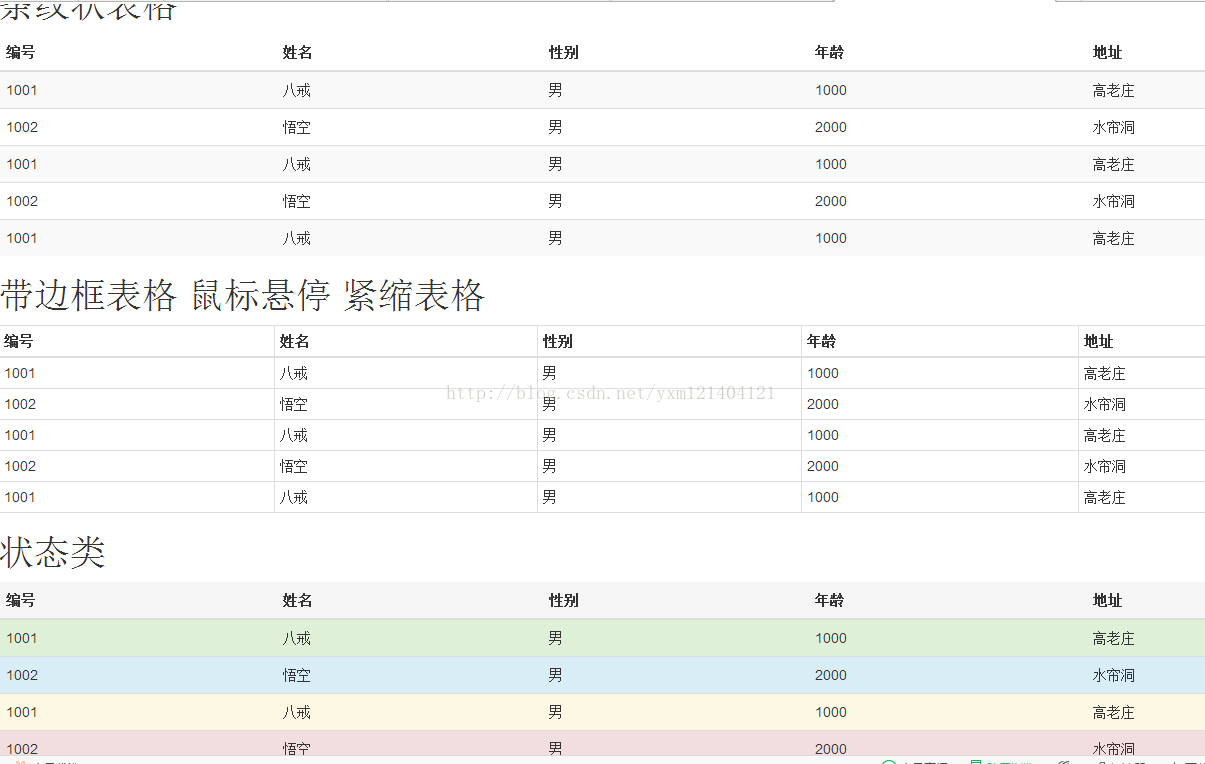
<!doctype html>
<html>
<head>
<meta charset="utf-8">
<title>表格</title>
<meta name="viewport" content="width=device-width, initial-scale=1">
<link href="css/bootstrap.css" rel="external nofollow" rel="external nofollow" rel="external nofollow" rel="external nofollow" rel="external nofollow" rel="external nofollow" rel="stylesheet">
<script src="js/jquery-1.9.0.min.js"></script>
<script src="js/bootstrap.min.js"></script>
</head>
<body>
<h1>條紋狀表格</h1>
<table class="table table-striped">
  <thead>
    <tr>
      <th>編號</th>
      <th>姓名</th>
      <th>性別</th>
      <th>年齡</th>
      <th>地址</th>
    </tr>
  </thead>
  <tbody>
    <tr>
      <td>1001</td>
      <td>八戒</td>
      <td>男</td>
      <td>1000</td>
      <td>高老莊</td>
    </tr>
    <tr>
      <td>1002</td>
      <td>悟空</td>
      <td>男</td>
      <td>2000</td>
      <td>水簾洞</td>
    </tr>   <tr>
      <td>1001</td>
      <td>八戒</td>
      <td>男</td>
      <td>1000</td>
      <td>高老莊</td>
    </tr>
    <tr>
      <td>1002</td>
      <td>悟空</td>
      <td>男</td>
      <td>2000</td>
      <td>水簾洞</td>
    </tr>   <tr>
      <td>1001</td>
      <td>八戒</td>
      <td>男</td>
      <td>1000</td>
      <td>高老莊</td>
    </tr>
  </tbody>
</table>
<h1>帶邊框表格 鼠標懸停 緊縮表格</h1>
<table class="table table-bordered table-hover table-condensed">
  <thead>
    <tr>
      <th>編號</th>
      <th>姓名</th>
      <th>性別</th>
      <th>年齡</th>
      <th>地址</th>
    </tr>
  </thead>
  <tbody>
    <tr>
      <td>1001</td>
      <td>八戒</td>
      <td>男</td>
      <td>1000</td>
      <td>高老莊</td>
    </tr>
    <tr>
      <td>1002</td>
      <td>悟空</td>
      <td>男</td>
      <td>2000</td>
      <td>水簾洞</td>
    </tr>   <tr>
      <td>1001</td>
      <td>八戒</td>
      <td>男</td>
      <td>1000</td>
      <td>高老莊</td>
    </tr>
    <tr>
      <td>1002</td>
      <td>悟空</td>
      <td>男</td>
      <td>2000</td>
      <td>水簾洞</td>
    </tr>   <tr>
      <td>1001</td>
      <td>八戒</td>
      <td>男</td>
      <td>1000</td>
      <td>高老莊</td>
    </tr>
  </tbody>
</table>
<h1>狀態類</h1>
<table class="table ">
  <thead>
    <tr class="active">
      <th>編號</th>
      <th>姓名</th>
      <th>性別</th>
      <th>年齡</th>
      <th>地址</th>
    </tr>
  </thead>
  <tbody>
    <tr class="success">
      <td>1001</td>
      <td>八戒</td>
      <td>男</td>
      <td>1000</td>
      <td>高老莊</td>
    </tr>
    <tr class="info">
      <td>1002</td>
      <td>悟空</td>
      <td>男</td>
      <td>2000</td>
      <td>水簾洞</td>
    </tr>
    <tr class="warning">
      <td>1001</td>
      <td>八戒</td>
      <td>男</td>
      <td>1000</td>
      <td>高老莊</td>
    </tr>
    <tr class="danger">
      <td>1002</td>
      <td>悟空</td>
      <td>男</td>
      <td>2000</td>
      <td>水簾洞</td>
    </tr>   <tr>
      <td>1001</td>
      <td>八戒</td>
      <td>男</td>
      <td>1000</td>
      <td>高老莊</td>
    </tr>
  </tbody>
</table>
</body>
</html>
2.表單
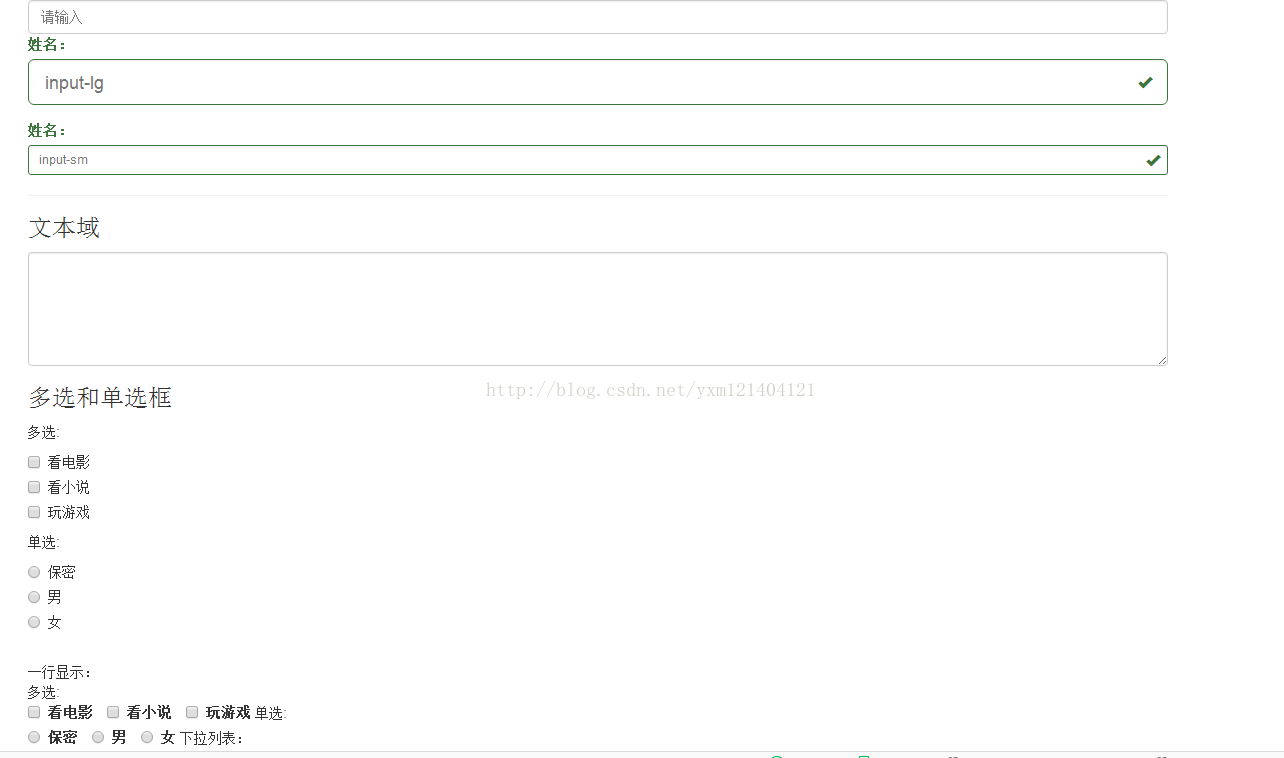
<!doctype html>
<html>
<head>
<meta charset="utf-8">
<title>表單</title>
<meta name="viewport" content="width=device-width, initial-scale=1">
<link href="css/bootstrap.css" rel="external nofollow" rel="external nofollow" rel="external nofollow" rel="external nofollow" rel="external nofollow" rel="external nofollow" rel="stylesheet">
<script src="js/jquery-1.9.0.min.js"></script>
<script src="js/bootstrap.min.js"></script>
</head>
<body>
<div class="container">
<input type="text" name="" class=" form-control" placeholder="請輸入">
<div class="form-group has-success has-feedback ">
<label class="control-label">姓名:</label>
<input type="text" name="" class=" form-control input-lg " placeholder="input-lg">
<span class="glyphicon glyphicon-ok form-control-feedback"></span>
</div>
<div class="form-group has-success has-feedback ">
<label class="control-label">姓名:</label>
<input type="text" name="" class=" form-control input-sm " placeholder="input-sm">
<span class="glyphicon glyphicon-ok form-control-feedback"></span>
</div>
<hr/>
<h3>文本域</h3>
<textarea class="form-control" rows="5" ></textarea>
<h3>多選和單選框</h3>
多選:<br/>
<div class="checkbox">
  <label>
    <input type="checkbox" value=""/>
    看電影
  </label>
</div>
<div class="checkbox">
  <label>
    <input type="checkbox" value=""/>
    看小說
  </label>
</div>
<div class="checkbox">
  <label>
    <input type="checkbox" value=""/>
    玩游戲
  </label>
</div>
單選:<br/>
<div class="radio">
  <label>
    <input type="radio" name="sex" value="保密"/>保密
  </label>
</div>
<div class="radio">
  <label>
    <input type="radio" name="sex" value="男"/>男
  </label>
</div>
<div class="radio">
  <label>
    <input type="radio" name="sex" value="女"/>女
  </label>
</div>
<br/>
一行顯示:<br/>
多選:<br/>
<div class=" checkbox-inline">
  <label>
    <input type="checkbox" value=""/>
    看電影
  </label>
</div>
<div class="checkbox-inline">
  <label>
    <input type="checkbox" value=""/>
    看小說
  </label>
</div>
<div class="checkbox-inline">
  <label>
    <input type="checkbox" value=""/>
    玩游戲
  </label>
</div>
單選:<br/>
<div class="radio-inline">
  <label>
    <input type="radio" name="sex" value="保密"/>保密
  </label>
</div>
<div class="radio-inline">
  <label>
    <input type="radio" name="sex" value="男"/>男
  </label>
</div>
<div class="radio-inline">
  <label>
    <input type="radio" name="sex" value="女"/>女
  </label>
</div>
下拉列表:
<select class="form-control">
  <option>請選擇</option>
  <option>技術部</option>
  <option>研發部</option>
  <option>後勤部</option>
</select>
</div>
</body>
</html>
登錄1

<!doctype html>
<html>
<head>
<meta charset="utf-8">
<title>登錄</title>
<meta name="viewport" content="width=device-width, initial-scale=1">
<link href="css/bootstrap.css" rel="external nofollow" rel="external nofollow" rel="external nofollow" rel="external nofollow" rel="external nofollow" rel="external nofollow" rel="stylesheet">
<script src="js/jQuery-1.9.0.min.js"></script>
<script src="js/bootstrap.min.js"></script>
</head>
<body>
<div class="Container">
<div class="row">
  <div class="col-md-4 col-md-offset-4">
      <h1 class="page-header">用戶登錄</h1>
      <form role="form">
        <div class="form-group">
          <label for="userId">用戶名:</label>
          <input type="text" class="form-control" placeholder="請輸入賬號" id="userId" name="userId">
        </div>
         <div class="form-group">
          <label for="password">密 碼:</label>
          <input type="password" class="form-control" placeholder="請輸入密碼" id="password" name="password">
        </div>
        <div class="checkbox">
        <label>
          <input type="checkbox"/>記住密碼
        </label>
        <br/>
        <input type="submit" value="登錄" class="btn"/>
        </div>
      </form>
    </div>
  </div>
</div>
</body>
</html>

<!doctype html>
<html>
<head>
<meta charset="utf-8">
<title>登錄</title>
<meta name="viewport" content="width=device-width, initial-scale=1">
<link href="css/bootstrap.css" rel="external nofollow" rel="external nofollow" rel="external nofollow" rel="external nofollow" rel="external nofollow" rel="external nofollow" rel="stylesheet">
<script src="js/jquery-1.9.0.min.js"></script>
<script src="js/bootstrap.min.js"></script>
</head>
<body>
<div class="container">
      <h1 class="page-header">用戶登錄</h1>
      <form class="form-inline" role="form">
        <div class="form-group">
          <div class="input-group" >
          <div class="input-group-addon">@</div>
          <input type="text" class="form-control" placeholder="請輸入賬號" id="userId" name="userId">
          </div>
        </div>
         <div class="form-group">
          <label for="password" class="sr-only">密 碼:</label>
          <input type="password" class="form-control" placeholder="請輸入密碼" id="password" name="password">
        </div>
        <div class="checkbox">
        <label>
          <input type="checkbox"/>記住密碼
        </label>
        <input type="submit" value="登錄" class="btn"/>
        </div>
      </form>
</div>
</body>
</html>
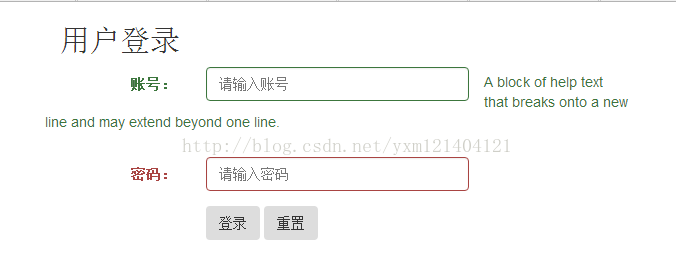
<!doctype html>
<html>
<head>
<meta charset="utf-8">
<title>登錄</title>
<meta name="viewport" content="width=device-width, initial-scale=1">
<link href="css/bootstrap.css" rel="external nofollow" rel="external nofollow" rel="external nofollow" rel="external nofollow" rel="external nofollow" rel="external nofollow" rel="stylesheet">
<script src="js/jquery-1.9.0.min.js"></script>
<script src="js/bootstrap.min.js"></script>
</head>
<body>
<div class=" container">
<div class="row">
  <div class="col-md-6">
    <h2>用戶登錄</h2>
    <form class="form-horizontal" role="form">
         <div class="form-group has-success ">
            <label class="col-md-3 control-label" for="userId">賬號:</label>
            <div class="col-md-6">
            <input type="text" class="form-control" placeholder="請輸入賬號" id="userId" name="userId">
            </div>
            <span class="help-block">A block of help text that breaks onto a new line and may extend beyond one line.</span>
          </div>
            <div class="form-group has-error">
            <label class="col-md-3 control-label" for="password">密碼:</label>
            <div class="col-md-6">
            <input type="password" class="form-control" placeholder="請輸入密碼" id="password" name="password">
            </div>
            </div>
            <div class="form-group">
            <div class="col-md-4 col-md-offset-3">
              <input type="submit" value="登錄" class="btn"/>
                <input type="reset" value="重置" class="btn"/>
              </div>
            </div>
      </form>
    </div>
  </div>
</div>
</body>
</html>
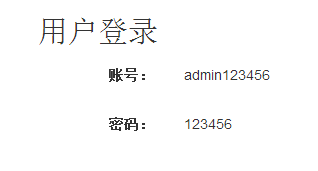
<!doctype html>
<html>
<head>
<meta charset="utf-8">
<title>登錄</title>
<meta name="viewport" content="width=device-width, initial-scale=1">
<link href="css/bootstrap.css" rel="external nofollow" rel="external nofollow" rel="external nofollow" rel="external nofollow" rel="external nofollow" rel="external nofollow" rel="stylesheet">
<script src="js/jquery-1.9.0.min.js"></script>
<script src="js/bootstrap.min.js"></script>
</head>
<body>
<div class=" container">
<div class="row">
  <div class="col-md-6">
    <h2>用戶登錄</h2>
    <form class="form-horizontal" role="form">
         <div class="form-group">
            <label class="col-md-3 control-label" for="userId">賬號:</label>
            <div class="col-md-6">
            <p class=" form-control-static">admin123456</p>
            </div>
          </div>
            <div class="form-group">
            <label class="col-md-3 control-label" for="password">密碼:</label>
            <div class="col-md-6">
            <p class="form-control-static">123456</p>
            </div>
            </div>
      </form>
    </div>
  </div>
</div>
</body>
</html>
總結
以上所述是小編給大家介紹的分享Bootstrap簡單表格、表單、登錄頁面,希望對大家有所幫助,如果大家有任何疑問請給我留言,小編會及時回復大家的。在此也非常感謝大家對網站的支持!
相關文章
- flex-box彈性布局的用法以及兼容性
- JS 組件系列之BootstrapTable的treegrid功能
- ZeroClipboard.js使用一個flash復制多個文本框
- angularjs+bootstrap實現自定義分頁的實例代碼
- 原生ajax瀑布流demo分享(必看篇)
- 基於easyui checkbox 的一些操作處理方法
- 如何將 jQuery 從你的 Bootstrap 項目中移除(取而代之使用Vue.js)
- jQuery Easyui Treegrid實現顯示checkbox功能
- 基於 Bootstrap Datetimepicker 聯動
- React Native第三方平台分享的實例(Android,IOS雙平台)
小編推薦
熱門推薦