bootstrap-table 插件入門 Demo 實作
編輯:JavaScript技巧
最近在研究 Bootstrap。它本身只負責視覺呈現,對於資料列表這類需求並沒有著墨,上網找了一下,發現一個不錯的表格插件 bootstrap-table。
官方範例:https://bootstrap-table.wenzhixin.net.cn/examples/
github:https://github.com/wenzhixin/bootstrap-table
因為英文能力有限,研究了半天做出一個 demo,水準普通但可供參考。
HTML:
<table class="table" id="dataShow" > <thead> <tr> <th data-checkbox="true">選擇</th> <th data-field="rkey">供應商名稱</th> <th data-field="rkey">供應商編碼</th> <th data-field="name">物料編碼</th> <th data-field="sex">申請類型</th> <th data-field="birthdayString">試用申請編碼</th> <th data-field="age">試用狀態</th> <th data-field="age">廠別</th> <th data-field="age">審批狀態</th> <th data-field="birthday">申請時間</th> <th data-field="age">試用結果</th> </tr> </thead> </table>
JS:
var currPageIndex = 0; var currLimit = 10; $(function () { $("#dataShow").bootstrapTable({ url: "TradHandler.ashx?request=getTradList", sortName: "rkey",//排序列 striped: true,//條紋行 sidePagination: "server",//服務器分頁 //showRefresh: true,//刷新功能 //search: true,//搜索功能 clickToSelect: true,//選擇行即選擇checkbox singleSelect: true,//僅允許單選 //searchOnEnterKey: true,//ENTER鍵搜索 pagination: true,//啟用分頁 escape: true,//過濾危險字符 queryParams: getParams,//攜帶參數 pageCount: 10,//每頁行數 pageIndex: 0,//其實頁 method: "get",//請求格式 //toolbar: "#toolBar", onPageChange: function (number, size) { currPageIndex = number; currLimit = size }, onLoadSuccess: function () { $("#searchBtn").button('reset'); } }); //搜索 $("#searchBtn").click(function () { $(this).button('loading'); var nullparamss = {}; $("#dataShow").bootstrapTable("refresh", nullparamss); }); //enter鍵搜索 $("#searchKey").keydown(function (event) { if (event.keyCode == 13) { $("#searchBtn").click(); } }); //阻止enter鍵提交表單 $("#mainForm").submit(function () { return false; }); }); //默認加載時攜帶參數 function getParams(params) { var searchKey = $("#searchKey").val(); return { bysex: 1, limit: params.limit, offset: params.offset, search: searchKey }; }
TradHandler.ashx:
/// <summary> /// 獲取批量數據示例 /// </summary> /// <param name="context"></param> private void getTradList(HttpContext context) { //用於序列化實體類的對象 JavaScriptSerializer jss = new JavaScriptSerializer(); #region 模擬數據獲取 List<SimpleModel> list = new List<SimpleModel>(); for (int i = 0; i < 1000; i++) { list.Add(new SimpleModel() { age = 18, name = "小李" + i, rkey = i + 1, sex = "男" }); } //請求中攜帶的條件 string bysex = context.Request.Params["bysex"]; string searchKey = context.Request.Params["search"]; //請求中攜帶的頁數和下標 int dataIndex = Convert.ToInt32(context.Request.Params["offset"]); int pageCount = Convert.ToInt32(context.Request.Params["limit"]); //查詢滿足條件的數據 List<SimpleModel> getList; if (bysex != null && searchKey != null) { getList = (from p in list where p.sex == (bysex == "0" ? "女" : "男") && p.name.Contains(searchKey.Trim()) select p).ToList(); } else { getList = list; } #endregion //將結果增加一列序號列 Dictionary<int, SimpleModel> testModel = new Dictionary<int, SimpleModel>(); for (int i=0;i< getList.Count;i++) { testModel.Add(i + 1, getList[i]); } //給分頁實體賦值 PageModels<SimpleModel> model = new PageModels<SimpleModel>(); model.total = getList.Count; if (getList.Count % pageCount == 0) model.page = getList.Count / pageCount; else model.page = (getList.Count / pageCount) + 1; //獲取對應頁的數據 model.rows = testModel.Where(t => t.Key > dataIndex && t.Key <= dataIndex + pageCount).Select(t => t.Value).ToList(); //將查詢結果返回 context.Response.Write(jss.Serialize(model)); }
有朋友問到 PageModel 實體類,這裡也一併分享。這是個泛型實體類,該插件需要這些屬性才能正常自動綁定。
[Serializable] public class TablePageModel<T> { /// <summary> /// 總行數 /// </summary> public long total { get; set; } /// <summary> /// 總頁數 /// </summary> public int page { get; set; } private List<T> _rows; /// <summary> /// 數據源 /// </summary> public List<T> rows { get { if (_rows == null) _rows = new List<T>(); return _rows; } set { _rows = value; } } }
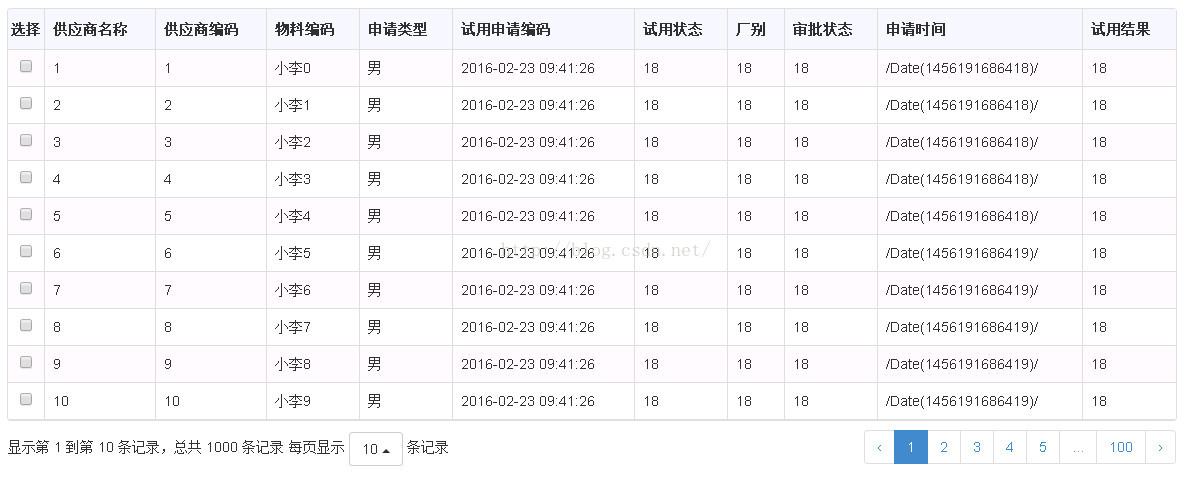
展示結果如下:
以上就是本次整理的內容,希望對你的學習有所幫助。
- 上一篇文章: ES6 新增資料結構 WeakSet 用法詳解
- 下一篇文章: React 進階:三種元件解耦與重構的實用手法