擴充 jQuery 外掛:輸入框即時提示還能打幾個字
編輯:JQuery入門技巧
多行文字輸入框常有字數上限,與其讓使用者送出後才被退件,不如在輸入時就即時提示。這裡把它做成一個可重複使用的 jQuery 外掛,並以位元組而非字元計算——因為中文一個字佔三個位元組,單純數字元長度並不符合後端的實際限制。
一、外掛本體
$(function($){
    // tipWrap: 提示消息的容器
    // maxNumber: 最大輸入位元組數
    $.fn.artTxtCount = function(tipWrap, maxNumber){
        var countClass   = 'js_txtCount',  // 內部容器的 CSS 類名
            fullClass    = 'js_txtFull',   // 超出字元的 CSS 類名
            disabledClass = 'disabled';    // 不可用提交按鈕的 CSS 類名

        // 統計字數
        var count = function(){
            var val = lenFor($.trim($(this).val()));
            if (val <= maxNumber) {
                tipWrap.html('<span class="' + countClass + '">還能輸入 '
                    + '<strong>' + (maxNumber - val) + '</strong> 個字節</span>');
            } else {
                tipWrap.html('<span class="' + countClass + ' ' + fullClass + '">已經超出 '
                    + '<strong>' + (val - maxNumber) + '</strong> 個字節</span>');
            }
        };

        $(this).bind('keyup change', count);
        return this;
    };
});
二、位元組計算函式
var lenFor = function(str){
    var byteLen = 0, len = str.length;
    if (str) {
        for (var i = 0; i < len; i++) {
            if (str.charCodeAt(i) > 255) {
                byteLen += 3;   // 中文等雙位元組字元
            } else {
                byteLen++;      // 英文與數字
            }
        }
        return byteLen;
    } else {
        return 0;
    }
};
判斷依據是 charCodeAt(i) > 255:落在 ASCII 範圍外的一律算三個位元組,這與 UTF-8 的常見編碼長度相符。
三、啟用
$(function($){
    // 批量處理
    $('.autoTxtCount').each(function(){
        $(this).find('.text1').artTxtCount($(this).find('.tips'), 108);
    });
});
四、HTML 結構
<div class="form-group">
    <div class="col-sm-9">
        <label class="col-sm-1 control-label" for="form-field-1">內容:</label>
    </div>
</div>
<div style="padding-left:100px;" id="autoTxtCount" class="autoTxtCount form-group">
    <div>
        <textarea class="text1" name="content" cols="50" rows="3"></textarea>
    </div>
    <div><span class="tips"></span></div>
</div>
五、樣式
#autoTxtCount { width: 500px; }
#autoTxtCount .help, #autoTxtCount .help a { color: #999; }
#autoTxtCount .tips { color: #999; padding: 0 5px; }
#autoTxtCount .tips strong { color: #1E9300; }
#autoTxtCount .tips .js_txtFull strong { color: #F00; }
#autoTxtCount textarea.text1 { width: 474px; }
效果如下:
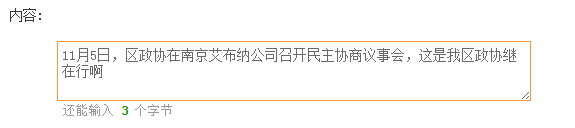
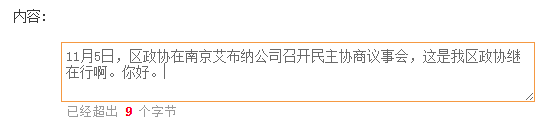
幾點延伸建議
程式中定義了 disabledClass 卻沒使用,原意應該是「超出字數時順便禁用提交按鈕」。若要補上,可在 count 的 else 分支中加上 $(':submit').addClass(disabledClass).prop('disabled', true),並在 if 分支還原。
另外,bind() 在 jQuery 3 中已廢棄,新專案請改用 on('keyup change', count)。若需要支援貼上內容(而非逐字輸入),也可以加上 input 事件,它能涵蓋所有讓輸入框內容變化的操作,是目前最完整的選擇。
最後,前端提示只是引導,真正的長度限制仍須在伺服器端驗證一次。使用者可以禁用 JavaScript,前端檢查並不具約束力。
更多 jQuery 主題可參考本站整理:擴充技巧、字串操作、操作 XML、經典特效匯總、選擇器用法與常用插件。
- 上一篇文章: EasyUI combobox 設定預設值與取得選中文字
- 下一篇文章: 電商左側分類選單實作:jQuery 與原生 JS 兩種寫法
相關文章
-
JS 元件系列:為 BootstrapTable 擴充 treegrid 樹形表格功能 動手寫一個 jQuery 自訂多選下拉框外掛 動手擴充 jQuery:自製外掛的完整流程 用 HoverTreeShow 外掛彈出遮罩層檢視大圖 HoverTree jQuery 菜單外掛使用示例 第15課:jQuery外掛應用【精通JavaScript+jQuery】 jQuery 外掛資源大全:200 多個實用元件分類整理 webdesignledger 選出的年度最佳 jQuery 外掛:輪播與相簿篇 一行 JavaScript 數出輸入框裡到底打了几個字 把遮罩層做成 jQuery 外掛:mask 與 unmask