jQuery + CSS 實作郵箱輸入自動補全
編輯:JQuery入門技巧
電商網站的註冊頁面上,用戶輸入郵箱前綴時如果能即時提示 @qq.com、@163.com 之類的常見域名,能顯著減少因域名打錯而導致的註冊失敗。本文用 jQuery 加一點 CSS 實現這個功能。
HTML:emailAutoComple.html
<!DOCTYPE HTML PUBLIC "-//W3C//DTD HTML 4.01 Transitional//EN">
<html>
<head>
<title>郵箱自動補全</title>
<meta http-equiv="content-type" content="text/html; charset=UTF-8">
<link type="text/css" rel="stylesheet" href="css/emailAutoComple.css">
<script type="text/javascript" src="js/jquery-1.7.2.min.js"></script>
<script type="text/javascript" src="js/emailAutoComple.js"></script>
<script type="text/javascript">
$(function () {
    $.AutoComplete("#email");   // 傳入要補全的文本框選擇器
});
</script>
</head>
<body>
<form action="">
  姓名:<input type="text" name="userName" id="userName"/><br/>
  郵箱:<input type="text" name="email" id="email"/>
</form>
</body>
</html>
JS:emailAutoComple.js
這部分是自動補全的核心,包含候選列表構建、鼠標交互、鍵盤上下選擇與回車確認。
jQuery.AutoComplete = function (selector) {
    var elt = $(selector);

    // 候選域名列表
    var strHtml = '<div class="AutoComplete" id="AutoComplete">'
        + '  <ul class="AutoComplete_ul">'
        + '    <li hz="@163.com"></li>'
        + '    <li hz="@126.com"></li>'
        + '    <li hz="@139.com"></li>'
        + '    <li hz="@189.com"></li>'
        + '    <li hz="@qq.com"></li>'
        + '    <li hz="@vip.sina.com"></li>'
        + '    <li hz="@sina.cn"></li>'
        + '    <li hz="@sina.com"></li>'
        + '    <li hz="@sohu.com"></li>'
        + '    <li hz="@hotmail.com"></li>'
        + '    <li hz="@gmail.com"></li>'
        + '    <li hz="@wo.com.cn"></li>'
        + '    <li hz="@21cn.com"></li>'
        + '    <li hz="@aliyun.com"></li>'
        + '    <li hz="@yahoo.com"></li>'
        + '    <li hz="@foxmail.com"></li>'
        + '  </ul>'
        + '</div>';

    $('body').append(strHtml);

    var autoComplete = $('#AutoComplete');
    autoComplete.data('elt', elt);
    var autoLi = autoComplete.find('li');

    // 鼠標交互
    autoLi.mouseover(function () {
        $(this).siblings().filter('.hover').removeClass('hover');
        $(this).addClass('hover');
    })
    .mouseout(function () {
        $(this).removeClass('hover');
    })
    .mousedown(function () {
        // 用 mousedown 而非 click,避免輸入框先失強掉列表
        autoComplete.data('elt').val($(this).text()).change();
        autoComplete.hide();
    });

    // 鍵盤與輸入事件
    elt.keyup(function (e) {
        // 回車、上下鍵、F5 不做處理
        if (/13|38|40|116/.test(e.keyCode) || this.value == '') {
            return false;
        }

        var username = this.value;
        if (username.indexOf('@') == -1) {
            autoComplete.hide();     // 還沒打到 @ 就不提示
            return false;
        }

        autoLi.each(function () {
            this.innerHTML = username.replace(/\@+.*/, '') + $(this).attr('hz');
            if (this.innerHTML.indexOf(username) >= 0) {
                $(this).show();
            } else {
                $(this).hide();
            }
        }).filter('.hover').removeClass('hover');

        // 定位到輸入框下方
        autoComplete.show().css({
            left: $(this).offset().left,
            top: $(this).offset().top + $(this).outerHeight(true) - 1,
            position: 'absolute',
            zIndex: '99999'
        });

        if (autoLi.filter(':visible').length == 0) {
            autoComplete.hide();
        } else {
            autoLi.filter(':visible').eq(0).addClass('hover');
        }
    })
    .keydown(function (e) {
        if (e.keyCode == 38) {          // 上
            autoLi.filter('.hover').prev().not('.AutoComplete_title')
                  .addClass('hover').next().removeClass('hover');
        } else if (e.keyCode == 40) {   // 下
            autoLi.filter('.hover').next().addClass('hover').prev().removeClass('hover');
        } else if (e.keyCode == 13) {   // 確認
            autoLi.filter('.hover').mousedown();
        }
    })
    .focus(function () {
        autoComplete.data('elt', $(this));
    })
    .blur(function () {
        autoComplete.hide();
    });
};
CSS:emailAutoComple.css
#AutoComplete {
    background: #fff;
    border: 1px solid #4190db;
    display: none;
    width: 150px;
}
#AutoComplete ul { list-style-type: none; margin: 0; padding: 0; }
#AutoComplete li {
    color: #333;
    cursor: pointer;
    font: 12px/22px \5b8b\4f53;   /* 用 CSS 轉義寫「宋體」 */
    text-indent: 5px;
}
#AutoComplete .hover { background: #6eb6fe; color: #fff; }
效果圖:
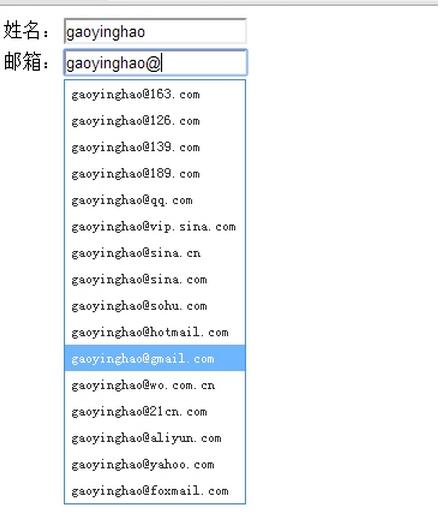
幾個關鍵實現細節
為什麼用 mousedown 而不是 click。若綁 click,鼠標按下時輸入框還未失焦,但 mouseup 時焦點已轉移、blur 先觸發把列表藏了,點擊就落空。mousedown 在焦點轉移之前觸發,能可靠取到值。這是各類自動補全村件的通用技巧。
為什麼要判斷 @ 符號。用戶在打 zhang 時並不需要提示,只有出現 @ 之後才有補全域名之意義,提前提示反而干擾。
innerHTML 拼接有 XSS 風險。示例直接把用戶輸入拼進 HTML,若內容含標籤會被解析。建議改為先 .text() 設置再處理,或對輸入做轉義。
可優化之處。候選列表寫死在 JS 裡不利維護,可提取為配置數組;每次 keyup 都重建全部 li 的 innerHTML 有性能浪費,可只更新文本節點;另外建議加上防抖,避免快速輸入時頻繁重排。
整體思路值得借鑑:監聽輸入 → 匹配候選 → 定位浮層 → 鍵鼠雙通道選擇,這套模式同樣適用於搜索提示、tag 選擇器等場景。