問題背景:專案裡大量彈窗是用 FreeMarker 的標籤直接追加在頁面上的,做法是「把隱藏的 div 顯示出來」。這種寫法在彈窗一多時代價很明顯——所有彈窗的 HTML 都在初次載入時一起下載並解析,頁面預載入變慢,互動反應也跟著遲鈍。
解法:把每個彈窗的 HTML 抽成獨立檔案,改用 layer 在需要時才載入。以下以「分中心管理 → 新增分中心」為例。
一、抽離彈窗的 HTML 與 CSS
子層頁面:html/configure/layer-win/_group-add-layer.html
通用彈窗樣式:css/common/componnentWin.css
<!DOCTYPE html>
<html>
<head>
<meta charset="UTF-8">
<title>group Add</title>
<link rel="stylesheet" type="text/css" href="../../../js/lib/datePicker/skin/WdatePicker.css" />
<link rel="stylesheet" type="text/css" href="../../../css/common/componnentWin.css" />
</head>
<body>
  <!-- 表單內容 -->
</body>
<script type="text/javascript" src="../../../js/jquery-1.9.1.js"></script>
<script type="text/javascript" src="../../../js/lib/layer/layer.js"></script>
<script type="text/javascript" src="../../../js/scooper/scooper.tool.xiacy.js"></script>
<script type="text/javascript" src="../../../js/configure/layer-win/group-new-add.js"></script>
</html>
父層 group-manager.html 只需要引入 layer 與自己的腳本:
<#include "/html/config/configure.html"/>
<@menuConfig likey="stationGroup">
<link rel="stylesheet" type="text/css" href="${contextPath}/css/configure/group-manager.css" />
<script type="text/javascript" src="${contextPath}/js/lib/layer/layer.js"></script>
<script type="text/javascript" src="${contextPath}/js/configure/group-manager.js"></script>
·····
</@menuConfig>
彈窗的通用樣式結構(可重複使用於全站彈窗):
<div id="addNewGroupWin" class="capsule-win show">
  <div class="capsule-win-top" title="添加分中心"><span>添加分中心</span></div>
  <div class="capsule-win-center">
    <div class="capsule-item">
      <div class="item-left input_required">名稱</div>
      <div class="item-right">
        <input id="newGroupName" class="sc_validate" title="分中心名稱" type="text"
               placeholder="請輸入分中心名稱"
               scvalidate='{"required":true,"format":"string"}'/>
      </div>
    </div>
    <div class="capsule-item">
      <div class="item-left input_required">經度</div>
      <div class="item-right">
        <input id="newGroupLng" class="sc_validate" title="分中心經度" type="text"
               placeholder="請輸入0-180的數字"
               scvalidate='{"required":true,"format":"lng"}'/>
      </div>
    </div>
    <!-- 緯度、描述等欄位同理 -->
  </div>
  <div class="capsule-win-bottom">
    <input id="addNewGroupSure" class="btn-bottom centerfix btn-succ" type="button" value="確定"/>
    <input id="addNewGroupCancle" class="btn-bottom btn-cancel" type="button" value="取消"/>
  </div>
</div>
二、子父層都要引入 layer.js
這一步容易漏。子層在 iframe 裡,需要 layer 才能用 layer.tips 顯示驗證提示;父層則負責 layer.open。
三、子層腳本
;(function ($, w, document, undefined) {
    var addGroupValidator = new Validator();
    var contextPath = "/ZJDZYW";

    $(document).ready(function () {
        validatorInit();
        clickEventBind();
    });

    function validatorInit() {
        addGroupValidator.init(function (obj, msg) {
            layer.tips(msg, obj, {
                style: ['background-color:#78BA32; color:#fff', '#78BA32'],
                maxWidth: 185, time: 2000, tips: 1
            });
        });
    }

    function clickEventBind() {
        $("#addNewGroupSure").click(addNewGroupSure);
        $("#addNewGroupCancle").click(closeLayerWin);
    }

    function addNewGroupSure() {
        if (!addGroupValidator.validate("addNewGroupWin")) { return; }

        var paras = {
            "group_name": $("#newGroupName").val(),
            "longitude": $("#newGroupLng").val(),
            "latitude":  $("#newGroupLat").val(),
            "group_desc":$("#newGroupDesc").val()
        };

        $.ajaxSettings.async = false;
        $.getJSON(contextPath + "/stationGroup/add", paras, function (resp) {
            if (resp.code != undefined && resp.code == 0) {
                console.log("分中心列表刷新!");
            }
        });
        $.ajaxSettings.async = true;

        closeLayerWin();
    }

    // 關閉自己所在的 iframe 彈窗
    function closeLayerWin() {
        var index = parent.layer.getFrameIndex(window.name);
        parent.layer.close(index);
    }
})(jQuery, window, document);
四、父層開啟彈窗
$("#addGroup").click(function () {
    layer.config({ path: '${contextPath}/js/lib/layer' });

    index = layer.open({
        type: 2,                          // iframe 型別
        area: ['520px', '400px'],
        fix: false,
        title: '',
        maxmin: false,
        scrollbar: false,
        shade: 0.5,
        shadeClose: true,
        content: capsule.request.path.groupMan.layer.groupManAddLayerShow,
        end: function () {
            loadGroupCenterInfo();        // 關閉後刷新父層列表
        }
    });
});
五、一個容易卡住的 iframe 問題
父層的 layer 彈窗無法直接跳出父頁所嵌套的 iframe。而新增分中心後要呼叫的 loadGroupCenterInfo 裡面又包著需要重新啟用的點擊事件初始化,那個函式並非全域,沒辦法透過 end 傳回父頁面執行。
function loadGroupCenterInfo() {
    $.ajaxSettings.async = false;
    $.getJSON(capsule.request.path.groupMan.getJson.loadCenterGroup, {}, function (data) {
        $("#groupCenterArea").empty();

        $.each(data.list, function (i, obj) {
            groupMap.setKeyValue(obj.id, obj.group_name);
            var count = (obj.c_num == null || obj.c_num == "null") ? 0 : obj.c_num;

            var html = '<div class="groupItemDiv" id=' + obj.id + '>'
                     + '<img class="checkBoxLeftSite" src="' + contextPath + '/image/Checkbox.png"/>'
                     + obj.group_name + "(" + count + ")"
                     + '<li title="編輯" class="editGroup"></li></div>';
            $("#groupCenterArea").append(html);
        });

        clickEventInit();   // 重新綁定事件
    });
    $.ajaxSettings.async = true;
}
結論修正:我原本以為回呼函式牽涉到當前層的函式互調時,就沒辦法用通用的最外層 layer 彈窗實現,只能在當前頁面的 js 裡重新引入 layer。後來發現其實是可以的——只要把回呼函式直接寫在呼叫方法裡(也就是像上面那樣把 loadGroupCenterInfo() 當作 end 的匿名函式內容),就能正常執行。這比重新模組化引入 layer 乾淨得多。
六、通用彈窗樣式
@charset "utf-8";
.capsule-win {
    width: 100%; min-height: 100%; background-color: #fff;
    display: none; position: fixed;
    -moz-border-radius: 5px; -webkit-border-radius: 5px; border-radius: 5px;
}
.capsule-win-top {
    width: 100%; height: 50px; background-color: #4f94e0;
    line-height: 50px; color: #fff; font-size: 16px;
}
.capsule-win-center {
    width: 100%; min-height: 250px; padding: 20px 0; margin: 0 1px;
}
.capsule-win-bottom {
    width: 100%; height: 60px; background-color: #ececec;
    position: fixed; bottom: 1px;
}
.capsule-win-center .capsule-item { height: 50px !important; width: 100%; }
.capsule-win-center .capsule-item .item-left {
    width: 100px; text-align: right; margin-top: 10px; float: left;
}
.capsule-win-center .capsule-item .item-right { width: 400px; float: right; }
.capsule-win-center .capsule-item .item-right input[type=text] {
    width: 75%; height: 35px;
}
.capsule-win-center .capsule-item .item-right textarea {
    width: 75%; height: 50px; overflow-y: auto;
}
.capsule-win .btn-bottom {
    width: 100px; height: 40px; font-size: 16px; border: none; color: #fff;
    cursor: pointer; margin: 10px 10px 0 0;
    -moz-border-radius: 3px; -webkit-border-radius: 3px; border-radius: 3px;
}
.centerfix  { margin-left: 30%; }
.btn-cancel { background-color: #f5f5f5 !important; border: 1px #c2c2c2 solid !important; color: #333 !important; }
.btn-succ   { background-color: #1abd9b; }
.btn-warn   { background-color: #ec962f; }
.hide { display: none; }
.show { display: block; }
最終效果:
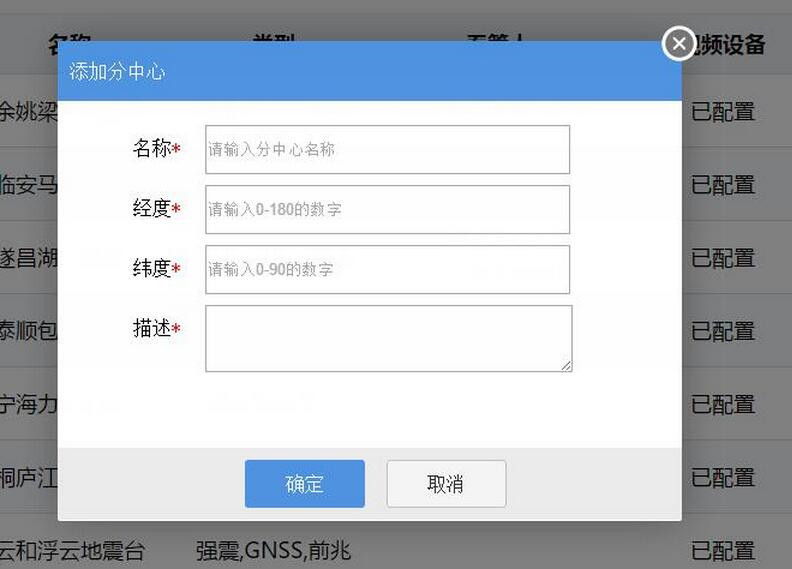
改動的實質收益是:彈窗的 HTML 從「首屏一起下載」變成「點擊才下載」,首屏位元組數與 DOM 解析量都下降。代價是多了一次請求,所以記得在伺服器端對這些片段開啟快取標頭,第二次開啟就不必再走網路。
- 上一篇文章: jQuery 搭配 .NET:勾選資料後一鍵打包下載附件
- 下一篇文章: EasyUI 組合框(combobox)多選的取值與賦值