一、after()和before()方法的區別
after()——其方法是將方法裡面的參數添加到jquery對象後面去;
如:A.after(B)的意思是將B放到A後面去;
before()——其方法是將方法裡面的參數添加到jquery對象前面去。
如:A.before(B)的意思是將A放到B前面去;
二、insertAfter()和insertBefore()的方法的區別
其實是將元素對調位置;
可以是頁面上已有元素;也可以是動態添加進來的元素。
如:A.insertAfter(B);即將A元素調換到B元素後面;
如<span>CC</span><p>HELLO</p>使用$("span").insertAfter($("p"))後,就變為<p>HELLO</p><span>CC</span>了。兩者位置調換了
三、append()和appendTo()方法的區別
append()——其方法是將方法裡面的參數添加到jquery對象中來;
如:A.append(B)的意思是將B放到A中來,後面追加,A的子元素的最後一個位置;
appendTo()——其方法是將jquery對象添加到appendTo指定的參數中去。
如:A.appendTo(B)的意思是將A放到B中去,後面追加,B的子元素的最後一個位置;
四、prepend()和prependTo()方法的區別
append()——其方法是將方法裡面的參數添加到jquery對象中來;
如:A.append(B)的意思是將B放到A中來,插入到A的子元素的第一個位置;
appendTo()——其方法是將jquery對象添加到appendTo指定的參數中去。
如:A.appendTo(B)的意思是將A放到B中去,插入到B的子元素的第一個位置;
例子
1、insert局部方法
/**
 * 在父級元素上操作DOM
 * @param {Object} parent  父級元素,可以是element,也可以是Yquery對象
 * @param {String} position 位置: beforebegin/afterbegin/beforeend/afterend
 * @param {*}   any   任何:string/text/object
 * @param {Number} index  序號,如果大於0則復制節點
 * @return {Undefined}
 * @version 1.0
 * 2013年12月2日17:08:26
 */
function _insert(parent, position, any, index) {
  if ($.isFunction(any)) {
    any = any.call(parent);
  }
  // 字符串
  if ($.isString(any)) {
    if (regTag.test(any)) {
      parent.insertAdjacentHTML(position, any);
    } else {
      parent.insertAdjacentText(position, any);
    }
  }
  // 數字
  else if ($.isNumber(any)) {
    parent.insertAdjacentText(position, any);
  }
  // 元素
  else if ($.isElement(any)) {
    parent.insertAdjacentElement(position, index > 0 ? any.cloneNode(!0) : any);
  }
  // Yquery
  else if (_isYquery(any)) {
    any.each(function() {
      _insert(parent, position, this);
    });
  }
}
2、append、prepend、before、after
$.fn = {
  /**
   * 追插
   * 將元素後插到當前元素(集合)內
   * @param {String/Element/Function} any
   * @return this
   * @version 1.0
   * 2013年12月29日1:44:15
   */
  append: function(any) {
    return this.each(function(index) {
      _insert(this, 'beforeend', any, index);
    });
  },
  /**
   * 補插
   * 將元素前插到當前元素(集合)內
   * @param {String/Element/Function} any
   * @return this
   * @version 1.0
   * 2013年12月29日1:44:15
   */
  prepend: function(any) {
    return this.each(function(index) {
      _insert(this, 'afterbegin', any, index);
    });
  },
  /**
   * 前插
   * 將元素前插到當前元素(集合)前
   * @param {String/Element/Function} any
   * @return this
   * @version 1.0
   * 2013年12月29日1:44:15
   */
  before: function(any) {
    return this.each(function(index) {
      _insert(this, 'beforebegin', any, index);
    });
  },
  /**
   * 後插
   * 將元素後插到當前元素(集合)後
   * @param {String/Element/Function} any
   * @return this
   * @version 1.0
   * 2013年12月29日1:44:15
   */
  after: function(any) {
    return this.each(function(index) {
      _insert(this, 'afterend', any, index);
    });
  }
};
3、prependTo、prependTo、insertBefore、insertAfter
這些帶後綴的與上面的不同的是,返回的結果不一樣。如:
$('#demo').append('<a/>');
// => 返回的是 $('#demo')
$('<a/>').appendTo($('#demo'));
// => 返回的是$('a');
因此兩者的關系只是返回結果不一樣,其他的都一樣,可以這麼解決:
_each({
  appendTo: 'append',
  prependTo: 'prepend',
  insertBefore: 'before',
  insertAfter: 'after'
}, function(key, val) {
  $.fn[key] = function(selector) {
    this.each(function() {
      $(selector)[val](this);
    });
    return this;
  };
});
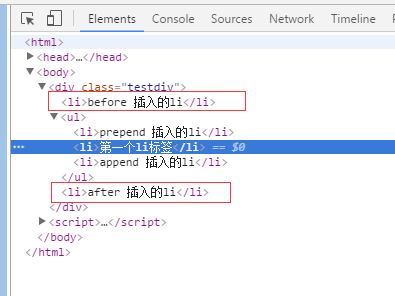
jquery 追加元素的方法(append prepend after before 的區別)
append() 方法在被選元素的結尾插入內容。
prepend() 方法在被選元素的開頭插入內容。
after() 方法在被選元素之後插入內容。
before() 方法在被選元素之前插入內容。
<script type="text/javascript" src="http://common.jb51.net/jslib/jquery/jquery.min.js"></script>
<div class="testdiv">
  <ul>
    <li>第一個li標簽</li>
  </ul>
</div>

<script>

  //append
  $('.testdiv ul').append('<li>append 插入的li</li>');
  //prepend
  $('.testdiv ul').prepend('<li>prepend 插入的li</li>');
  //after
  $('.testdiv ul').after('<li>after 插入的li</li>');
  //before
  $('.testdiv ul').before('<li>before 插入的li</li>');

</script>
效果圖
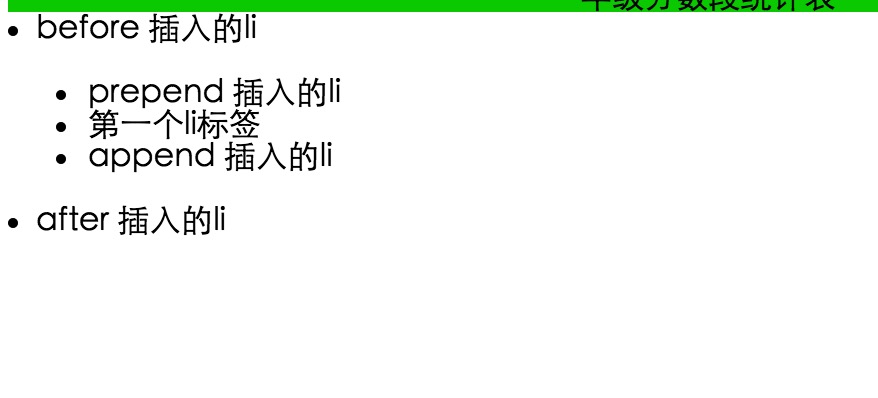
html結構圖