jQuery實現驗證碼功能
編輯:JQuery入門技巧
效果圖:
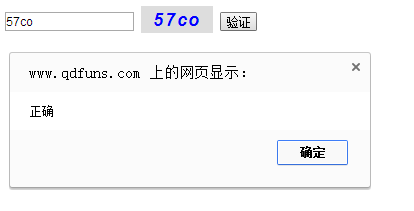
代碼如下:
<!doctype html>
<html lang="en">
 <head>
 <meta charset="UTF-8">
 <title>Document</title>
 <style type="text/css">
 #code{
 width:80px;
 height:30px;
 font-size:20px;
 font-family:Arial;
 font-style:italic;
 font-weight:bold;
 border:0;
 letter-spacing:2px;
 color:blue;
 }
 </style>
 </head>
 <body>
<div>
 <input type = "text" id = "input"/>
 <input type = "button" id="code" />
 <input type = "button" value = "驗證" id="check"/>
   </div>
 <script type="text/javascript" src="http://libs.baidu.com/jquery/2.0.0/jquery.js"></script>
<script type="text/javascript">
  function change(){
    code=$("#code");
  // 驗證碼組成庫
   var arrays=new Array(
       '1','2','3','4','5','6','7','8','9','0',
       'a','b','c','d','e','f','g','h','i','j',
       'k','l','m','n','o','p','q','r','s','t',
       'u','v','w','x','y','z',
       'A','B','C','D','E','F','G','H','I','J',
       'K','L','M','N','O','P','Q','R','S','T',
       'U','V','W','X','Y','Z'
       );
    codes='';// 重新初始化驗證碼
   for(var i = 0; i<4; i++){
   // 隨機獲取一個數組的下標
   var r = parseInt(Math.random()*arrays.length);
   codes += arrays[r];
  }
  // 驗證碼添加到input裡
     code.val(codes);
  }
  change();
 code.click(change);
 //單擊驗證
  $("#check").click(function(){
   var inputCode = $("#input").val().toUpperCase(); //取得輸入的驗證碼並轉化為大寫
   console.log(inputCode);
  if(inputCode.length == 0) { //若輸入的驗證碼長度為0
   alert("請輸入驗證碼!"); //則彈出請輸入驗證碼
  }
  else if(inputCode!=codes.toUpperCase()) { //若輸入的驗證碼與產生的驗證碼不一致時
   alert("驗證碼輸入錯誤!請重新輸入"); //則彈出驗證碼輸入錯誤
   change();//刷新驗證碼
   $("#input").val("");//清空文本框
  }else { //輸入正確時
   alert("正確"); //彈出^-^
  }
  });
</script>
 </body>
</html>
以上就是本文的全部內容,希望本文的內容對大家的學習或者工作能帶來一定的幫助,同時也希望多多支持!
小編推薦
熱門推薦