jquery 手勢密碼插件
編輯:JQuery入門技巧
效果圖:
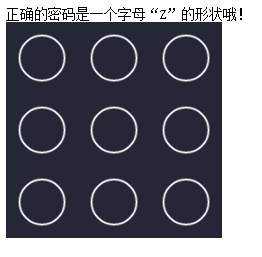
代碼如下:
<!DOCTYPE html>
<html>
<head lang="en">
 <meta charset="UTF-8">
 <title></title>
 <!--<link rel="stylesheet" href="../dist/css/danmuplayer.css" rel="external nofollow" >-->
</head>
<body>
正確的密碼是一個字母“Z”的形狀哦!
<div id="gesturepwd"></div>
</body>
<script src="http://www.jq22.com/demo/jQueryGesturePassword20161102/jquery-2.1.4.min.js"></script>
<script src="http://www.jq22.com/demo/jQueryGesturePassword20161102/src/jquery.gesture.password.js"></script>
<!--<script src="../dist/js/danmuplayer.min.js"></script>-->
<script>
 $("#gesturepwd").GesturePasswd({
backgroundColor:"#252736", //背景色
color:"#FFFFFF", //主要的控件顏色
roundRadii:25, //大圓點的半徑
pointRadii:6, //大圓點被選中時顯示的圓心的半徑
space:30, //大圓點之間的間隙
width:240, //整個組件的寬度
height:240, //整個組件的高度
lineColor:"#00aec7", //用戶劃出線條的顏色
zindex :100 //整個組件的css z-index屬性
});
 $("#gesturepwd").on("hasPasswd",function(e,passwd){
 var result;
 if(passwd == "1235789"){
 result=true;
 }
 else {
 result=false;
 }
 if(result == true){
 $("#gesturepwd").trigger("passwdRight");
 setTimeout(function(){

 //密碼驗證正確後的其他操作,打開新的頁面等。。。
 alert("密碼正確!")
 },500); //延遲半秒以照顧視覺效果
 }
 else{
 $("#gesturepwd").trigger("passwdWrong");
 //密碼驗證錯誤後的其他操作。。。
 }
 });
</script>
</html>
以上就是本文的全部內容,希望本文的內容對大家的學習或者工作能帶來一定的幫助,同時也希望多多支持!
小編推薦
熱門推薦