DIV+CSS佈局教程網 >> 網頁腳本 >> JavaScript入門知識 >> jQuery入門知識 >> JQuery入門技巧 >> jQuery dateRangePicker插件使用方法詳解
jQuery dateRangePicker插件使用方法詳解
編輯:JQuery入門技巧
jQuery dateRangePicker插件使用總結。
版本說明:
當前使用版本:2.1.25
特別說明:版本不同,部分api可能會發生變化,需要引起重點關注
效果圖
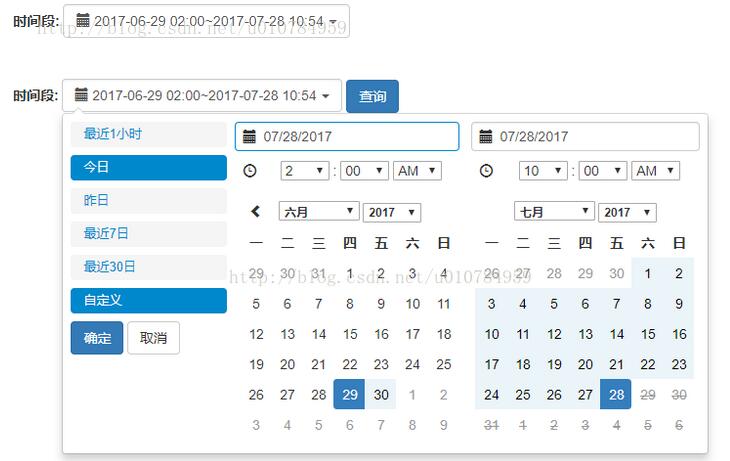
關鍵代碼片段
$("#dateTimeRange span").html(moment().subtract(1, 'hours').format('YYYY-MM-DD HH:mm') + '~' + moment().format('YYYY-MM-DD HH:mm'));
  $("#dateTimeRange").daterangepicker({
    maxDate : moment(), //最大時間
    dateLimit : {
      days : 30
    }, //起止時間的最大間隔
    showDropdowns : true,
    showWeekNumbers : false, //是否顯示第幾周
    timePicker : true, //是否顯示小時和分鐘
    timePickerIncrement : 60, //時間的增量,單位為分鐘
    timePicker12Hour : false, //是否使用12小時制來顯示時間
    ranges : {
      '最近1小時': [moment().subtract(1, 'hours'), moment()],
      '今日': [moment().startOf('day'), moment()],
      '昨日': [moment().subtract(1, 'days').startOf('day'), moment().subtract(1, 'days').endOf('day')],
      '最近7日': [moment().subtract(6, 'days'), moment()],
      '最近30日': [moment().subtract(29, 'days'), moment()]
    },
    opens : 'right', //日期選擇框的彈出位置
    buttonClasses : ['btn btn-default'],
    applyClass : 'btn-small btn-primary blue',
    cancelClass : 'btn-small',
    locale : {
      applyLabel : '確定',
      cancelLabel : '取消',
      fromLabel : '起始時間',
      toLabel : '結束時間',
      customRangeLabel : '自定義',
      daysOfWeek : [ '日', '一', '二', '三', '四', '五', '六' ],
      monthNames : [ '一月', '二月', '三月', '四月', '五月', '六月',
        '七月', '八月', '九月', '十月', '十一月', '十二月' ],
      firstDay : 1
    }
  }, function(start, end, label) {
    // 格式化日期顯示框
    $("#dateTimeRange span").html(start.subtract(1, 'hours').format('YYYY-MM-DD HH:mm') + '~' + end.format('YYYY-MM-DD HH:mm'));
  });
html:
<div class="inline">
      <label>時間段:</label>
      <div class="date-picker form-inline-control" id="dateTimeRange">
        <i class="glyphicon glyphicon-calendar fa fa-calendar"></i>
        <span id="searchDateRange"></span>
        <b class="caret"></b>
      </div>
    </div>
以上就是本文的全部內容,希望對大家的學習有所幫助,也希望大家多多支持。
小編推薦
jQuery實現模擬flash頭像裁切上傳功能示例
jquery控制頁面的展開和隱藏實現方法(推薦)
DataTables+BootStrap組合使用Ajax來獲取數據並且動態加載dom的方法(排序,過濾,分頁等)
jQuery 獲取select選中值及清除選中狀態
jquery.validate.js 多個相同name的處理方式
Jquery給當前頁或者跳轉後頁面的導航欄添加選中後樣式的實例
jQuery之動畫效果大全
淺談jQuery before和insertBefore的區別
jQuery實現的小圖列表,大圖展示效果幻燈片示例
BootStrap網頁中代碼顯示<code><pre>用法詳解
熱門推薦