本篇筆記整理 jQuery 表單域屬性過濾器的用法,搭配程式碼示範,方便開發時參考。
表單中往往包含各種各樣的表單域。透過表單域屬性選擇器,可以輕鬆取得被選中的單選鈕、核取方塊與列表項,也能依據是否可用來查找表單域。
六種表單域屬性過濾器
1. :checked 選擇器
用來選取所有被選中的表單域,格式:$("selector:checked"),可搭配 input、radio 與 checkbox。
2. :enabled 選擇器
用來選取所有可用的表單域,格式:$("selector:enabled")。
3. :disabled 選擇器
用來選取所有被停用的表單域,格式:$("selector:disabled")。
4. :selected 選擇器
用來從列表框中選取所有被選中的 option 元素,格式:$("selector:selected")。
5. :hidden 選擇器
用來選取所有不可見的元素,格式:$("selector:hidden")。
6. :visible 選擇器
用來選取所有可見的元素。
完整示例
以下示範如何針對核取方塊、文字框與下拉列表套用表單域過濾器:
<!DOCTYPE html PUBLIC "-//W3C//DTD XHTML 1.0 Transitional//EN" "https://www.w3.org/TR/xhtml1/DTD/xhtml1-transitional.dtd">
<html xmlns="https://www.w3.org/1999/xhtml">
<head>
<meta http-equiv="Content-Type" content="text/html; charset=utf-8" />
<title>表單域屬性過濾選擇器應用示例</title>
<script type="text/javascript" src="jquery-1.7.min.js"></script>
<script type="text/javascript">
$(document).ready(function(){
$("input:checked").css("border", "1px solid red");
$("input:disabled").css("background", "#FCF");
$("input:enabled").val("可用文本框");
});
</script>
</head>
<body>
<h3 align="center">表單域屬性過濾選擇器應用示例</h3>
<table width="602" height="81" border="1">
<tr>
<td width="118">復選框:</td>
<td width="443"><input type="checkbox" checked="checked" />被選中的復選框
<input type="checkbox" checked="checked" />被選中的復選框
<input type="checkbox" />沒有被選中的復選框
</td>
</tr>
<tr>
<td>可用文本框:</td>
<td><input type="text"/></td>
</tr>
<tr>
<td>不可用文本框:</td>
<td><input type="text" disabled="disabled" /></td>
</tr>
<tr>
<td>下拉列表</td>
<td>
<select name="test" >
<option>浙江</option>
<option>湖南</option>
<option selected="selected">北京</option>
<option selected="selected">天津</option>
<option>廣州</option>
<option>湖北</option>
</select>
</td>
</tr>
</table>
</body>
</html>
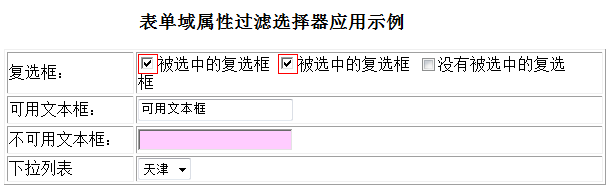
運行後的效果如下圖所示:
希望這份整理能對你的 jQuery 開發有所幫助。
- 上一篇文章: jQuery 子元素過濾選擇器用法詳解
- 下一篇文章: jQuery 搜尋父元素的方法完全解析