jQuery 操作 DOM 十分方便,提供了許多現成的方法。以下整理各類方法的示例與程式碼。
1. 刪除操作
(1)remove()
$(selector).remove([selector])
$("#div3").remove(); //刪除 id 為 div3 的 div 標簽 $("div").remove("#div3"); //刪除 div 標簽中 id 為 "div3" 的標簽(2)detach()
$(selector).detach([selector])
$("#div3").detach(); //刪除 id 為 div3 的 div 標簽 $("div").detach("#div3"); //刪除 div 標簽中 id 為 "div3" 的標簽(3)empty()
$(selector).empty()
$("#div3").empty(); //刪除 id 為 div3 的節點的所有子節點總結:remove 與 detach 的返回值均為被刪除的 jQuery 節點對象,不同的是前者只保留該對象節點本身,其他綁定的事件及附加數據都會被移除;而後者全部保留。empty 則是將指定節點的所有子節點刪除,本身保留。
2. 複製節點 clone()
$(selector).clone([true]);
帶 true 參數則複製出來的節點具備原節點所綁定的事件處理程序。
3. 替換節點
(1)replaceAll()
$(content).replaceAll(selector);
(2)replaceWith()
$(selector).replaceWith(content);
這兩種方法使用時效果完全相同,都是用 content 代替 selector。
4. 內部插入
內部插入是將 content 插入到 selector 節點內部,包括內部的頭部和尾部。插入後的節點與原節點是父子關係。
(1)append() 將 content 添加到 selector 內部。
$(selector).append(content);
$(selector).append(function(index [,html]){...});
若要取得 selector 的元素 index 及 html 內容,則採用第二種方法:
<!DOCTYPE HTML PUBLIC "-//W3C//DTD HTML 4.01 Transitional//EN"> <html> <head> <meta http-equiv="Content-Type" content="text/html; charset=utf-8" /> <script src="../js/jquery-1.7.2.js" type="text/javascript"></script> <title>內部插入應用示例</title> <script language="javascript" type="text/javascript"> $(document).ready(function(){ $("#btn").click(function(){ //方法1 用 eq() 選擇器找到指定節點 //$("div:eq(1)").append("<b>jQuery內部插入測試</b>"); //方法2 用函數的參數index索引值找到指定節點 $("div").append(function(index, html){ if(index == 1){ return "<b>jQuery內部插入測試</b>" + " " + html; } }); }); }); </script> </head> <body bgcolor="#EEEEEE"> <h1>內部插入應用實例</h1> <div> <button id="btn">測試</button> <div id="div1">1.水果</div> <div id="div2">2.蔬菜</div> <div id="div3">3.肉類</div> </div> </body> </html>運行並點擊測試按鈕後的效果如下:
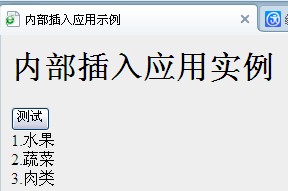
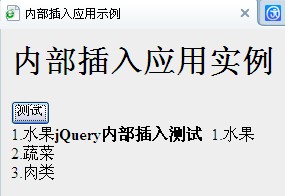
(2)appendTo() $(content).appendTo(selector);
(3)prepend() 將 content 添加到 selector 內部的前面。
$(selector).prepend(content);
$(selector).prepend(function(index [,html]){...});
(4)prependTo() $(content).prependTo(selector);
前兩種方法效果相同,後兩種方法效果相同。
5. 外部插入
外部插入是將 content 插入到 selector 節點外部,包括前面和後面。插入後的節點與原節點是兄弟關係。
(1)after() $(selector).after(content); $(selector).after(function(index [,html]){...});
(2)insertAfter() $(content).insertAfter(selector);
(3)before() $(selector).before(content); $(selector).before(function(index [,html]){...});
(4)insertBefore() $(content).insertBefore(selector);
使用方法與內部插入類似。
6. 包裹操作
(1)wrap()
$(selector).wrap(wrapper);
$(selector).wrap(function(){...});
下面程式碼中的四種方法效果相同:
$(document).ready(function(){ $("#btn").click(function(){ var newNode = $("<b></b>"); //方法1 //$("#div2").wrap(newNode); //方法2 //$("#div2").wrap("<b></b>"); //方法3 //$("#div2").wrap(document.createElement("b")); //方法4 $("#div2").wrap(function(){ return "<b></b>"; }); }); });(2)unwrap() $(selector).unwrap();
(3)wrapAll() $(selector).wrapAll(wrapper);
(4)wrapInner() $(selector).wrapInner(wrapper); $(selector).wrapInner(function(){...});
總結:wrap() 與 wrapInner() 的顯示效果相同,不同的是前者為 selector 添加了父節點,後者則添加了子節點。wrap() 與 wrapAll() 顯示效果也相同,不同的是前者為 selector 中的每一個子元素均添加父節點,後者則為整個 selector 只添加一個父節點。
- 上一篇文章: 用 JS 與 jQuery 取得網址及 URL 參數的方法
- 下一篇文章: jQuery 中單引號與雙引號的區別及使用須知