在註冊或登入頁面中,「點擊獲取驗證碼後 60 秒內禁止重複獲取」是很常見的需求,既能防止使用者狂點,也能避免短信被惡意刷取。透過 jquery.cookie.js 插件,我們可以快速實現這個「防刷新」功能。
效果圖:
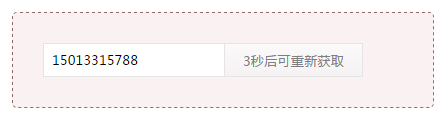
先到官方網站(https://plugins.jquery.com/cookie/)下載 cookie 插件,放到相應的資料夾,然後參考以下程式碼:
程式碼如下:
<!DOCTYPE html>
<html>
<head>
<meta charset="utf-8">
<meta http-equiv="X-UA-Compatible" content="IE=edge,chrome=1">
<title>Examples</title>
<meta name="description" content="">
<meta name="keywords" content="">
<script src="https://apps.bdimg.com/libs/jquery/1.11.1/jquery.min.js" ></script>
<script src="jquery.cookie.js" ></script>
<style type="text/css">
* {margin: 0; padding: 0; font-family: "Microsoft Yahei";}
.captcha-box {width: 360px; height: 34px; margin: 30px; padding: 30px; border: #956E6F 1px dashed; border-radius: 5px; background-color: #FAF2F2;}
#mobile { float: left; width: 180px; height: 32px; border: #e5e5e5 1px solid; line-height: 32px; text-indent: 8px; outline: none;}
#getting {float: left; height: 34px; margin-left: -1px; padding: 0 18px; text-align: center; line-height: 34px; border: #e5e5e5 1px solid; background: linear-gradient(0deg, #f4f2f2 0%,#fbf9f9 100%); cursor: pointer; outline: none;}
</style>
<script>
$(function(){
/*仿刷新:檢測是否存在cookie*/
if($.cookie("captcha")){
var count = $.cookie("captcha");
var btn = $('#getting');
btn.val(count+'秒後可重新獲取').attr('disabled',true).css('cursor','not-allowed');
var resend = setInterval(function(){
count--;
if (count > 0){
btn.val(count+'秒後可重新獲取').attr('disabled',true).css('cursor','not-allowed');
$.cookie("captcha", count, {path: '/', expires: (1/86400)*count});
}else {
clearInterval(resend);
btn.val("獲取驗證碼").removeClass('disabled').removeAttr('disabled style');
}
}, 1000);
}
/*點擊改變按鈕狀態,已經簡略掉ajax發送短信驗證的代碼*/
$('#getting').click(function(){
var btn = $(this);
var count = 60;
var resend = setInterval(function(){
count--;
if (count > 0){
btn.val(count+"秒後可重新獲取");
$.cookie("captcha", count, {path: '/', expires: (1/86400)*count});
}else {
clearInterval(resend);
btn.val("獲取驗證碼").removeAttr('disabled style');
}
}, 1000);
btn.attr('disabled',true).css('cursor','not-allowed');
});
});
</script>
</head>
<body>
<div class="captcha-box">
<input type="text" id="mobile" maxlength="11" placeholder="請輸入手機號碼">
<input type="button" id="getting" value="獲取驗證碼">
</div>
</body>
</html>
這段程式碼的巧妙之處在於運用了 cookie:點擊按鈕後開始 60 秒倒數,同時把剩餘秒數寫入 cookie;萬一使用者重新整理頁面,只要 cookie 還在,倒數就會接著繼續,真正做到了「防刷新」。倒數結束後按鈕會恢復可點擊狀態,並清除 disabled 屬性。
以上就是本文的全部內容,希望能對你在實作驗證碼冷卻功能時有所幫助。