jQuery實現兼容IE的HTML滑動條
編輯:JQuery特效代碼
本文將用 jQuery 打造一個可拖動的 HTML 滑動條,並兼顧 IE 瀏覽器的兼容表現。核心思路是通過 mousedown、mousemove、mouseup 三個事件判斷拖動狀態,實時計算滑塊位置並換算成對應數值。
<html>
<script type="text/javascript" src="jquery.js"></script>
<style>
.d_b{
  height: 20px;
  width: 10px;
  display: inline-block;
  background-color: black;
  position: relative;
  vertical-align: middle;
  top: -15px;
  left: -5px;
}
</style>
<div id="d" style="width:200px;cursor: pointer;" max=100 min=0 value=10 >
<div style="height:10px; width:100%; background-color:green" ></div>
<b class="d_b"></b>
</div>
<b id="text"></b>
<script>
var $dom = $(document);
$dom.on('mousedown','#d',function (argument) {
  $(this).data('mouse','down');
  console.log('down');
})
$dom.on('mouseup',function(){
  $('#d').data('mouse','up');
  console.log('up');
});
$dom.on('mousemove','#d',function(event){
  if($(this).data('mouse') == 'down'){
    var m_x = event.clientX;
    var d_b = $(this).find('.d_b');
    m_x = m_x < 8 ? 8 : m_x;
    m_x = m_x > 208 ? 208: m_x;
    d_b.css('left',m_x-13);
    var max = $(this).attr('max');
    $(this).attr('value', Math.floor((m_x-8)/200 * max))
    console.log($(this).attr('value'));
    $('#text').text($(this).attr('value'))
  }
});
</script>
</html>
效果圖:
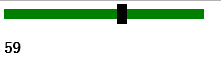
以上就是本文的全部內容,希望能對大家學習使用 jQuery 有所幫助。
- 上一篇文章: 解決jQuery向頁面append新元素後的事件綁定問題
- 下一篇文章: jQuery中attr與prop的區別分析