用 jQuery 實作購物車價格自動計算
編輯:JQuery特效代碼
本文示範如何用 jQuery(搭配原生 JavaScript)實作購物車的金額計算:當你修改某項商品的數量時,該項的小計與整車的總計會即時更新。
目的
在 HTML 介面上修改購物車的商品件數時,對應商品的小計與購物車總價要同步變動。
實現思路
1. 進入頁面(重新整理)時觸發 body 的 onload 方法,跳到初始化程式。由於資料庫通常只存客戶欲購買的商品件數,並不存各項小計與總價,因此初始化的目的就是把這些數字算出來並顯示於前台。
2. 當修改數量輸入框時,整張購物表的小計與總計會依數量重新計算。
成品示意
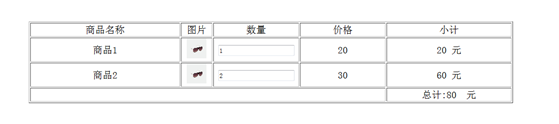
核心計算函式如下:
function total(id) {
  /* 計算單項小計 */
  var quantity = document.getElementById("quantity" + id).value;
  var price = document.getElementById("price" + id).value;
  document.getElementById("smallTotal" + id).innerHTML = quantity * price;
  /* 重新計算總價 */
  var totalPrice = 0;
  for(var a = 1; a < 3; a++){
    var q = document.getElementById("quantity" + a).value;
    var p = document.getElementById("price" + a).value;
    totalPrice += q * p;
  }
  document.getElementById("total").innerHTML = totalPrice;
}
function initialize() {
  var totalPrice = 0;
  for(var a = 1; a < 3; a++){
    var q = document.getElementById("quantity" + a).value;
    var p = document.getElementById("price" + a).value;
    var small = q * p;
    document.getElementById("smallTotal" + a).innerHTML = small;
    totalPrice += small;
  }
  document.getElementById("total").innerHTML = totalPrice;
}
數量輸入框透過 onblur="total(1);" 在失焦時觸發重算,隱藏的價格欄則用 price1、price2 存放單價。頁面載入時呼叫 initialize() 完成首屏初始化,之後每次改動數量就即時刷新小計與總計。希望本文對大家的開發有所幫助。
- 上一篇文章: 用 jQuery 處理彈出層查詢資料的等待動畫
- 下一篇文章: jQuery 延遲載入圖片插件 Lazy Load 使用指南