用 jQuery 實現每日簽到功能(含日曆展示)
編輯:JQuery特效代碼
一直想做一个簽到功能,網上搜到的素材卻都不合心意,於是就以網路上的資料為基礎,結合自己先前寫的 layerModel 外掛整合出一個,純粹娛樂分享,高手輕噴。
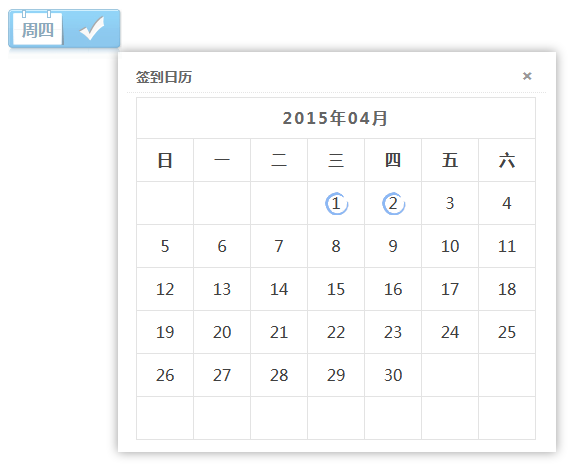
整個功能由日曆工具 calendar.js、樣式 sign.css、頁面 sign.jsp 與後端 SignController.java 組成。點擊簽到後透過 ajax 呼叫後端,成功或重複簽到都會彈出當月日曆,並把已簽到的日期標記出來。
calendar.js
var calUtil = { getDaysInmonth : function(iMonth, iYear){ var dPrevDate = new Date(iYear, iMonth, 0); return dPrevDate.getDate(); }, bulidCal : function(iYear, iMonth) { var aMonth = new Array(); aMonth[0] = new Array(7); aMonth[1] = new Array(7); aMonth[2] = new Array(7); aMonth[3] = new Array(7); aMonth[4] = new Array(7); aMonth[5] = new Array(7); aMonth[6] = new Array(7); var dCalDate = new Date(iYear, iMonth - 1, 1); var iDayOfFirst = dCalDate.getDay(); var iDaysInMonth = calUtil.getDaysInmonth(iMonth, iYear); var iVarDate = 1; var d, w; aMonth[0][0] = "日"; aMonth[0][1] = "一"; aMonth[0][2] = "二"; aMonth[0][3] = "三"; aMonth[0][4] = "四"; aMonth[0][5] = "五"; aMonth[0][6] = "六"; for (d = iDayOfFirst; d < 7; d++) { aMonth[1][d] = iVarDate; iVarDate++; } for (w = 2; w < 7; w++) { for (d = 0; d < 7; d++) { if (iVarDate <= iDaysInMonth) { aMonth[w][d] = iVarDate; iVarDate++; } } } return aMonth; }, ifHasSigned : function(signList,day){ var signed = false; $.each(signList,function(index,item){ if(item.signDay == day) { signed = true; return false; } }); return signed ; }, drawCal : function(iYear, iMonth ,signList) { var myMonth = calUtil.bulidCal(iYear, iMonth); var htmls = new Array(); htmls.push(""); htmls.push(""); htmls.push("2015年04月"); htmls.push(""); htmls.push(""); htmls.push(""); htmls.push(""); htmls.push("" + myMonth[0][0] + " "); htmls.push("" + myMonth[0][1] + " "); htmls.push("" + myMonth[0][2] + " "); htmls.push("" + myMonth[0][3] + " "); htmls.push("" + myMonth[0][4] + " "); htmls.push("" + myMonth[0][5] + " "); htmls.push("" + myMonth[0][6] + " "); htmls.push(" "); var d, w; for (w = 1; w < 7; w++) { htmls.push(""); for (d = 0; d < 7; d++) { var ifHasSigned = calUtil.ifHasSigned(signList,myMonth[w][d]); if(ifHasSigned){ htmls.push("" + (!isNaN(myMonth[w][d]) ? myMonth[w][d] : " ") + " "); } else { htmls.push("" + (!isNaN(myMonth[w][d]) ? myMonth[w][d] : " ") + " "); } } htmls.push(" "); } htmls.push("
"); htmls.push(""); htmls.push(""); return htmls.join(''); } };
sign.css
.singer_r_img{display:block;width:114px;height:52px;line-height:45px;background:url(images/sing_week.gif) right 2px no-repeat;vertical-align:middle;*margin-bottom:-10px;text-decoration:none;} .singer_r_img:hover{background-position:right -53px;text-decoration:none;} .singer_r_img span{margin-left:14px;font-size:16px;font-family:'Hiragino Sans GB','Microsoft YaHei',sans-serif !important;font-weight:700;color:#165379;} .singer_r_img.current{background:url(images/sing_sing.gif) no-repeat 0 2px;border:0;text-decoration:none;} .sign table{border-collapse: collapse;border-spacing: 0;width:100%;} .sign th,.sign td {width: 30px;height: 40px;text-align: center;line-height: 40px;border:1px solid #e3e3e3;} .sign th {font-size: 16px;} .sign td {color: #404040;vertical-align: middle;} .sign .on {background: url(images/sign_have.gif) no-repeat center;} .calendar_month_next,.calendar_month_prev{width: 34px;height: 40px;cursor: pointer;background:url(images/sign_arrow.png) no-repeat;} .calendar_month_next {float: right;background-position:-42px -6px;} .calendar_month_span {display: inline;line-height: 40px;font-size: 16px;color: #656565;letter-spacing: 2px;font-weight: bold;} .calendar_month_prev {float: left;background-position:-5px -6px;} .sign_succ_calendar_title {text-align: center;width:398px;border-left:1px solid #e3e3e3;border-right:1px solid #e3e3e3;background:#fff;} .sign_main {width: 400px;border-top:1px solid #e3e3e3;font-family: "Microsoft YaHei",SimHei;display: none;}
sign.jsp
<%@ page language="java" import="java.util.*" pageEncoding="utf-8"%> <!DOCTYPE html PUBLIC "-//W3C//DTD XHTML 1.0 Transitional//EN" "https://www.w3.org/TR/xhtml1/DTD/xhtml1-transitional.dtd"> <html xmlns="https://www.w3.org/1999/xhtml"> <head> <meta http-equiv="Content-Type" content="text/html; charset=utf-8" /> <title>簽到效果實現</title> <script type="text/javascript" src="${pageContext.request.contextPath}/resources/jquery-1.8.3.min.js"></script> <link rel="stylesheet" type="text/css" href="${pageContext.request.contextPath}/resources/sign/sign.css"/> <script type="text/javascript" src="${pageContext.request.contextPath}/resources/sign/calendar.js"></script> <script type="text/javascript" src="${pageContext.request.contextPath}/resources/layerModel/jquery.layerModel.js"></script> <link type="text/css" rel="stylesheet" href="${pageContext.request.contextPath}/resources/layerModel/layerModel.css"/> <link type="text/css" rel="stylesheet" href="${pageContext.request.contextPath}/resources/layerModel/layerModel.plugin.css"/> <script type="text/javascript"> var ctx = "${pageContext.request.contextPath}"; /*簽到模塊日期捕捉:*/ function week(){ var objDate= new Date(); var week = objDate.getDay(); switch(week) { case 0: week="周日"; break; case 1: week="周一"; break; case 2: week="周二"; break; case 3: week="周三"; break; case 4: week="周四"; break; case 5: week="周五"; break; case 6: week="周六"; break; } $("#sing_for_number").html( week ); } $(function(){ week(); var current = new Date(); $(".singer_r_img").click(function(){ var s = this; showLoading("正在簽到..."); $.ajax({ url : "${pageContext.request.contextPath}/sign/doSign", type : "POST", dataType : "json", success : function(data) { loadingComplete(); var rst = data.result; if(rst == 1) { showError("今天您已經簽到,無須再次簽到!",function(){ var signList = data.signList; $(s).addClass("current"); var str = calUtil.drawCal(current.getFullYear(),current.getMonth() + 1,signList); $(str).layerModel({title:"簽到日歷"}); }); } else { showSuccess("簽到成功!",function(){ var signList = data.signList; $(s).addClass("current"); var str = calUtil.drawCal(current.getFullYear(),current.getMonth() + 1,signList); $(str).layerModel({title:"簽到日歷"}); }); } } }); }); }); </script> <script type="text/javascript" src="${pageContext.request.contextPath}/resources/layerModel/jquery.layerModel.plugin.js"></script> </head> <body> <a class="singer_r_img" href="###"> <span id="sing_for_number">簽到</span> </a> </body> </html>
SignController.java
package com.controller; import java.util.Date; import java.util.List; import javax.servlet.http.HttpServletRequest; import javax.servlet.http.HttpServletResponse; import org.springframework.beans.factory.annotation.Autowired; import org.springframework.stereotype.Controller; import org.springframework.web.bind.annotation.RequestMapping; import org.springframework.web.servlet.ModelAndView; import com.common.framework.controller.BaseController; import com.common.util.RequestUtil; import com.model.entity.SignEntity; import com.model.service.SignService; @Controller @RequestMapping("/sign") public class SignController extends BaseController { @Autowired private SignService signService; @RequestMapping("/doSign") public ModelAndView doSign(HttpServletRequest request, HttpServletResponse response) { ModelAndView view = super.createJsonView(); try { // 先查詢是否已經簽到 boolean ifHasSigned = signService.ifHasSigned(); if(ifHasSigned) { view.addObject("result", "1"); } else { SignEntity signEntity = new SignEntity(); Date signDate = new Date(); signEntity.setSignTime(signDate); signEntity.setSignDay(Long.valueOf(signDate.getDate())); signEntity.setSignIp(RequestUtil.getIpAddr(request)); signEntity.setSigner("zhoukun"); signService.signTX(signEntity); view.addObject("result", "0"); } List<SignEntity> signList = signService.listSign(); view.addObject("signList", signList); } catch (Exception e) { e.printStackTrace(); } return view; } public static void main(String[] args) { System.out.println(new Date().getDate()); } }
後端 doSign 會先判斷當天是否已簽到,回傳 result 標識(1 表示重複、0 表示成功),並附上簽到列表 signList 供前端繪製日曆。整體流程清晰,適合作為小型簽到/打卡功能的參考範本。