JavaScript 最常被使用的場合之一就是表單驗證。jQuery 作為一個優秀的函式庫,也提供了同樣優秀的驗證插件 —— Validation。它是歷史最悠久的 jQuery 插件之一,經過全球無數專案的實際考驗,口碑一直很好。作為一套標準化的驗證方案,它具備以下特點:
1. 內建規則齊全:必填、數字、Email、URL、信用卡號等共 19 類規則。
2. 規則可自訂:能輕鬆擴充自己的驗證邏輯。
3. 提示訊息簡潔強大:預設就有錯誤提示,也允許自訂覆寫。
4. 即時驗證:可透過 keyup 或 blur 事件觸發,不必等到表單送出才檢查。
下載位置:
validate.js:https://plugins.jquery.com/project/validate
metadata.js:https://plugins.jquery.com/project/metadata
基本三步驟
第一步,引入 jQuery 與驗證插件:
<script src="scripts/jquery-1.6.4.js" type="text/javascript"></script>
<script src="scripts/jquery.validate.js" type="text/javascript"></script>
第二步,指定要驗證的表單:
$(document).ready(function(){
$("#commentForm").validate();
});
第三步,為欄位挂上規則。可以直接寫在 class 上:
class="required" // 必填
class="required email" // 必填且符合 Email 格式
class="url" // 符合網址格式
minlength="2" // 最小長度 2
內建的 19 種規則
required:必填欄位。
remote:以 ajax 呼叫後端(如 check.php)驗證輸入值。
email:正確格式的電子郵件。
url:正確格式的網址。
date:正確格式的日期(在 IE6 上有已知問題,建議慎用)。
dateISO:ISO 格式日期,例如 2009-06-23、1998/01/22,只驗格式不驗有效性。
number:合法數字,含負數與小數。
digits:只能輸入整數。
creditcard:合法信用卡號。
equalTo:"#field":必須與指定欄位值相同。
accept:具合法副檔名的字串(上傳檔案用)。
maxlength:5 / minlength:10:最大/最小長度(中文字算一個字元)。
rangelength:[5,10]:長度需介於 5 到 10 之間。
range:[5,10]:數值需介於 5 到 10 之間。
max:5 / min:10:最大值/最小值。
把規則從 HTML 搬到 JavaScript
把驗證規格塞進 class 雖然直觀,卻讓後期維護成本變高,也沒有做到「行為與結構分離」。比較好的做法是把 class 清空,改在 JS 中宣告:
<form class="cmxform" id="commentForm" method="get" action="">
<fieldset>
<legend>一個簡單的 validate 驗證範例</legend>
<p><label for="cusername">姓名</label>
<em>*</em><input id="cusername" name="username" size="25" /></p>
<p><label for="cemail">電子郵件</label>
<em>*</em><input id="cemail" name="email" size="25" /></p>
<p><label for="curl">網址</label>
<em></em><input id="curl" name="url" size="25" /></p>
<p><label for="ccomment">你的評論</label>
<em>*</em><textarea id="ccomment" name="comment" cols="22"></textarea></p>
<p><input class="submit" type="submit" value="提交" /></p>
</fieldset>
</form>
$(document).ready(function(){
$("#commentForm").validate({
rules:{
username:{ required:true, minlength:2 },
email:{ required:true, email:true },
url:"url",
comment:"required",
valcode:{ formula:"7+9" }
}
});
});
把提示訊息中文化
預設訊息是英文,可以統一覆寫成中文,建議另外建立一個 js 檔,並在 validate.js 之後載入:
jQuery.extend(jQuery.validator.messages, {
required: "必選欄位",
remote: "請修正該欄位",
email: "請輸入正確格式的電子郵件",
url: "請輸入合法的網址",
date: "請輸入合法的日期",
dateISO: "請輸入合法的日期 (ISO).",
number: "請輸入合法的數字",
digits: "只能輸入整數",
creditcard: "請輸入合法的信用卡號",
equalTo: "請再次輸入相同的值",
accept: "請輸入擁有合法副檔名的字串",
maxlength: jQuery.format("請輸入一個長度最多是 {0} 的字串"),
minlength: jQuery.format("請輸入一個長度最少是 {0} 的字串"),
rangelength: jQuery.format("請輸入一個長度介於 {0} 和 {1} 之間的字串"),
range: jQuery.format("請輸入一個介於 {0} 和 {1} 之間的值"),
max: jQuery.format("請輸入一個最大為 {0} 的值"),
min: jQuery.format("請輸入一個最小為 {0} 的值")
});
提示樣式美化
用 errorElement 指定提示所用的標籤,再搭配 success 回呼切換 class,就能做出「錯誤紅叉、正確綠勾」的視覺回饋:
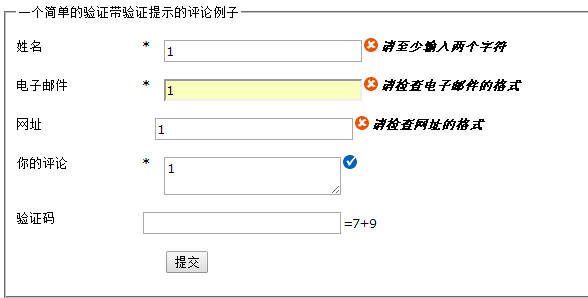
$("#commentForm").validate({
rules:{
username:{ required:true, minlength:2 },
email:{ required:true, email:true },
url:"url",
comment:"required"
},
errorElement:"em",
success:function(label){
label.text(" ").addClass('success');
}
});
這裡的 label 參數指向 errorElement 所建立的元素(本例即 em),清空文字並加上自己的 class 即可。對應的 CSS:
em.error{ background:url("images/unchecked.gif") no-repeat 0px 0px; padding-left:16px; }
em.success{ background:url("images/checked.gif") no-repeat 0px 0px; padding-left:16px; }
實務上也可以只針對單一欄位客製訊息,透過 messages 設定即可:
messages:{
username:{
required:"這個欄位一定要填喔",
minlength:"長度好像不太夠"
}
}
自訂驗證規則
先加上要驗證的欄位:
<p><label for="cvalcode">驗證碼</label>
<input id="valcode" name="valcode" />=7+9</p>
再用 addMethod 註冊規則。formula 是規則名稱,value 是當前 input 的值,param 是規則參數(本例為 "7+9"),透過 eval 讓字串變成可計算的運算式:
$.validator.addMethod("formula", function(value, element, param){
return value == eval(param);
}, "請正確輸入驗證結果");
最後在 rules 中套用 valcode:{ formula:"7+9" },並把前面的 messages、errorElement、success 一併組合起來,就是一個兼具驗證與視覺回饋的完整表單了。
以上只是基礎的一部分,後續我會再往更深入的客製化應用去研究。