前言
最近對 JavaScript 的插件封裝特別感興趣,但以目前的功力想做到完全通用化的封裝仍有難度,於是先基於 jQuery 寫了一個小插件。它是物件層級的開發方式,不添加全域方法;語法上不難,主要用到 return this.each() 來回傳物件實例本身以支援鏈式操作,以及 extend() 用來合併參數物件。
插件特點
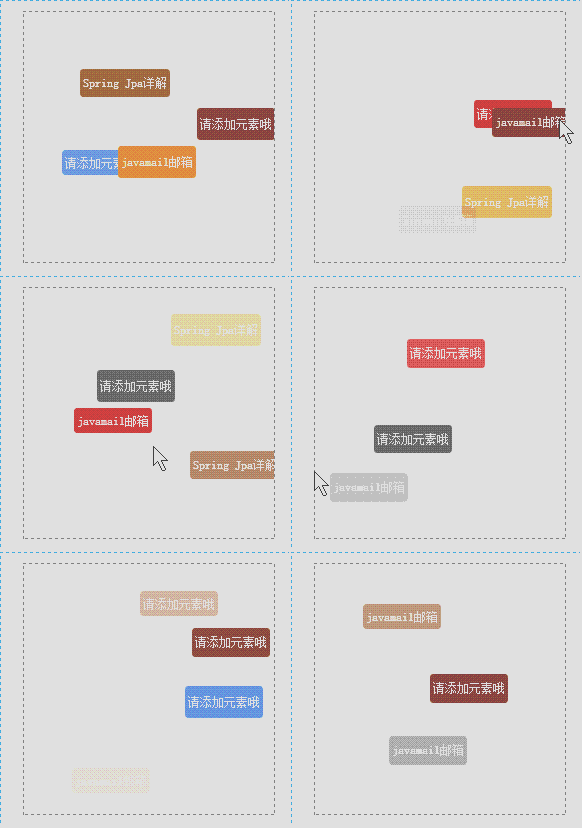
· 在指定區塊元素內動態產生 a 標籤
· 標籤的寬高、位置、層級、背景顏色皆為隨機但可控
· 進場淡入、離場淡出,初始透明度可設定
· 產生速度與移動速度皆可調(計時器)
· 每次循環移動的步長可控制
· 滑鼠移入時停止動畫、透明度最高、層級最上,移出後回復原狀態
動畫預覽
核心程式
(function($){
$.fn.activiTag = function(opts){
opts = $.extend({
move_step: 2, // 移動步長(px)
move_speed: 40, // 移動速度(ms)
init_speed: 1000, // 產生速度(ms)
min_opacity: 0, // 最低透明度 0~1
max_grain: 10, // 同屏最大標籤數
a_List: ["<a href='#'>請添加元素哦</a>",
"<a href='#'>Spring Jpa 詳解</a>",
"<a href='#'>javamail 郵箱</a>"],
color_List: ['#CD2626','#8b4513','#696969','#ff8c00','#6495ED']
}, opts || {});
var aTag = $(this), T_width = aTag.width(), T_height = aTag.height();
return this.each(function(){
function setATagCss(){ // 容器樣式
aTag.css({position:'relative', overflow:'hidden'});
}
function getRandomNum(Min, Max){ // 區間隨機整數
Min = new Number(Min); Max = new Number(Max);
var Range = Max - Min + 1, Rand = Math.random();
return Min + Math.floor(Rand * Range);
}
function getRandomXY(num){ // 隨機正負
num = new Number(num);
if(Math.random() <= 0.5) num = -num;
return num;
}
function createATag(){ // 隨機挑一個標籤放進容器
var i = getRandomNum(0, opts.a_List.length - 1);
var a = $(opts.a_List[i]);
aTag.append(a);
return a;
}
function setCss(a){ // 寬高、層級、透明度
var w = Math.ceil(T_width/3) + getRandomXY(T_width/60);
var h = Math.ceil(w/3) + getRandomXY(w/36);
var zIndex = Math.ceil(Math.random()*400);
var rdmOpcy = getRandomNum(new Number(opts.min_opacity), 0);
a.css({
opacity: rdmOpcy, zIndex: zIndex, lineHeight: h + 'px',
position: 'absolute', textDecoration: 'none',
textAlign: 'center', borderRadius: '3px',
color: '#FFFFFF', whiteSpace: 'nowrap'
});
return a;
}
function setXY(a){ // 初始座標
var x = getRandomNum(0, (T_width - a.width()));
var y = getRandomNum(0, T_height/10);
a.css({left: x + 'px', bottom: y + 'px'});
return a;
}
function setColor(a){ // 隨機背景色
var i = Math.ceil(Math.random()*opts.color_List.length - 1);
a.css({backgroundColor: opts.color_List[i]});
}
function construct(){ // 組裝入口
var a = createATag(); setCss(a); setColor(a); setXY(a);
return a;
}
function interVal(a, s_opcy, botm, n, space, s){ // 移動+透明度變化
var botm_ = a.css('bottom').replace('px','');
var opcy_ = parseFloat(new Number(a.css('opacity'))) + s_opcy;
var _opcy_ = parseFloat(new Number(a.css('opacity'))) - s_opcy;
var fall = botm_ - botm; // 已移動距離
botm_ = new Number(botm_) + new Number(opts.move_step);
a.css({display:'block', bottom: botm_});
if(fall < n) { a.css({opacity: opcy_}) }
else if(2*n < fall) { a.css({opacity: _opcy_}) }
if (botm_ >= space) { // 到達頂端即移除
clearInterval(s);
a.remove();
}
}
function init(){
if(aTag.children('a').length >= new Number(opts.max_grain)) return;
var a = construct();
var opcy = a.css('opacity'), zInx = a.css('zIndex');
var botm = a.css('bottom').replace('px','');
var space = T_height - a.height() - a.css('bottom').replace('px','');
var n = space/3, step = 1 - opcy;
var sec = n/opts.move_step*opts.move_speed/1000;
var s_opcy = opts.move_speed/1000/sec * step;
var speed_ = getRandomNum(new Number(opts.move_speed)-30, new Number(opts.move_speed)+30);
var currOpcy;
var s = setInterval(function(){
interVal(a, s_opcy, botm, n, space, s);
}, speed_);
a.mouseover(function(){ // 移入:暫停並置頂
currOpcy = a.css('opacity');
clearInterval(s);
$(this).css({zIndex: 401, opacity: 1});
});
a.mouseout(function(){ // 移出:回復並續播
$(this).css({zIndex: zInx, opacity: currOpcy});
s = setInterval(function(){
interVal(a, s_opcy, botm, n, space, s);
}, speed_);
});
}
setATagCss();
setInterval(init, opts.init_speed);
});
};
})(jQuery)
HTML 與呼叫
<script src="jquery.min.js" type="text/javascript" charset="utf-8"></script>
<script src="jquery-tag.js" type="text/javascript" charset="utf-8"></script>
<script>
$(function(){
$('#tag').activiTag({});
});
</script>
<style>
#tag{ border:1px dashed gray; width:250px; height:250px; top:50px; left:300px; }
a{ padding:0px 3px; font-size:12px; white-space:nowrap; display:none; }
</style>
<div id='tag'></div>
已知問題
目前插件運作正常,但若切換到同一個瀏覽器的其他分頁、稍後再切回來,會出現短暫卡頓的情形,原因還在追查中。另外透明度與計時器的計算方式仍有優化空間,若有更好的做法歡迎提出。
- 上一篇文章: 插件推薦:用 jquery.cookie 輕鬆處理 Cookie
- 下一篇文章: 用 jQuery 做出仿 Flash 風格的閃光導航列