因為最近要在微信公眾號中推廣產品、提供一些實用功能,於是被迫走上了支持微信這條路。騰訊的產品商業上非常成功,但開發文檔卻不易查找,官方關於 web 開發的說明有限。以下分享我在摸索後寫的 jQuery.wechat——一個提供統一 API、基於 jQuery.promise 的 jQuery 外掛,希望能幫到大家。
安裝與載入
bower install --save jquery-wechat
<script type="text/javascript" src="bower_components/jquery/dist/jquery.min.js"></script>
<script type="text/javascript" src="bower_components/jquery-wechat/dist/jquery-wechat.min.js"></script>
啟用功能
$.wechat.enable(); //So easy!
由於整個外掛基於 jQuery.promise,你也可以給它一個鏈:
$.wechat.enable().done(function(){
alert('已經啟用成功');
}).fail(function(){
alert('啟用失敗');
});
考慮到單頁應用(SPA)的廣泛使用,工具類設計必須考慮啟用/停用機制,否則可能引起未知錯誤。
隱藏/顯示菜單與工具欄
$.wechat.hideMenu(); //隱藏菜單
$.wechat.showMenu(); //顯示菜單
$.wechat.hideToolbar(); //隱藏底部工具欄
$.wechat.showToolbar(); //顯示底部工具欄
啟用 jQuery.wechat 之後即可隨意調用這些方法,無需寫入 enable 的 done 回調中。原理是:若尚未啟用成功,所有操作會進入排隊,一旦啟用成功便依序執行;若啟用失敗則永不執行。
掃碼與圖片預覽
$.wechat.scanQRcode(); //打開掃描二維碼界面
$.wechat.preview({
current: 'https://xxx/img/pic001.jpg', //進入預覽模式後直接顯示的圖片
urls: [
'https://xxx/img/pic001.jpg',
'https://xxx/img/pic002.jpg',
'https://xxx/img/pic003.jpg'
] //所有要在預覽模式下顯示的圖片
});
取得網路狀態
$.wechat.getNetworkType().done(function(response) {
$('#network').text(response.split(':')[1]);
});
response 格式如下:
network_type:wifi wifi 網絡
network_type:edge 非 wifi,包含 3G/2G
network_type:fail 網絡斷開連接
network_type:wwan (2g 或者 3g)
修改分享格式
想讓分享出去的消息帶上精美縮略圖、合適標題與描述?可以這樣設定:
$.wechat.setShareOption({
appid: 'xxxx', //小標 appid
img_width: '60',
img_height: '60',
img_url: window.location.toString() + 'img/demo.jpg', //縮略圖
title: 'DEMO', //標題
desc: 'The description is set from $.wechat.setShareOption', //描述
link: function() {
return window.location.toString(); //點擊消息打開的鏈接地址
},
callback: function(response) {
alert(response); //分享後的回調,常見的有成功和取消
}
});
具體參考如下截圖:
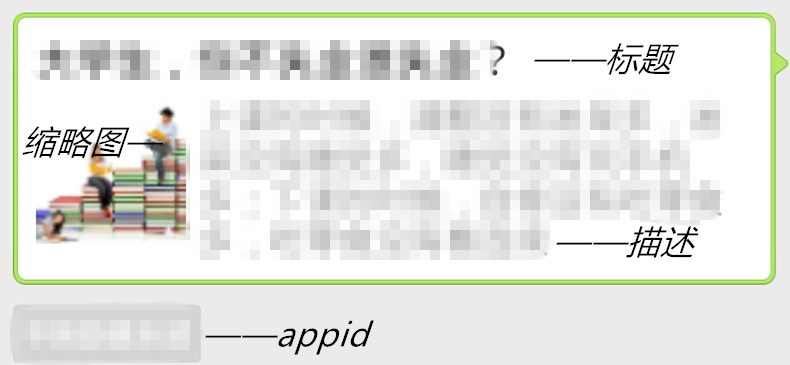
該分享格式變更會影響發送給朋友、分享到朋友圈、分享到微博、發送郵件四項功能。
關閉頁面與停用
$.wechat.closeWindow(); //關閉當前頁
$.wechat.destroy(); //停用 jQuery.wechat 機制
停用後所有功能會自動重置回初始狀態,這在單頁應用(SPA)中相當常用。
- 上一篇文章: 使用 jQuery 將多筆資料動態插入 Bootstrap 模態框
- 下一篇文章: 用 jQuery 打造輕量級線上影片播放插件