jquery.qrcode.js 是一個以 jQuery 為基礎的純前端 QR Code 繪製插件,支援 canvas 與 table 兩種渲染方式。它不需要任何伺服器端服務,也不發出網路請求,很適合用在離線工具或需要即時預覽的場景。
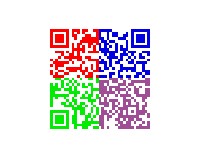
一個渲染方式的坑
當 render 設為 table 時,在 webkit 核心瀏覽器(如 Chrome)下會變形。若你的畫面必須支援這些瀏覽器,請優先使用 canvas;只有在需要極度相容舊環境時才退回 table 模式,並實測確認。
基本用法
$('#output').qrcode({
    width: 100,
    height: 100,
    render: "canvas",
    text: "javascript 生成二維碼",
    background: "#ffffff",
    foreground: "#000000"
});
加上彩色:分區上色
插件本身只有單一前景色設定。要做出四區不同顏色的效果,可以在渲染完成後走訪 table 的 td,把原本的填色替換掉:
<html>
<head>
<title>JS 生成彩色二維碼</title>
<script type="text/javascript" src="jquery-1.4.2.min.js"></script>
<script type="text/javascript" src="jquery.qrcode.min.js"></script>
<style>
#output { margin-left:300px; margin-top:100px; }
</style>
</head>
<body>
<div id="output"></div>
<script>
window.onload = function () {
    var trs = $('#output').qrcode({
        width: 100,
        height: 100,
        render: "table",
        text: utf16to8("javascript生成二維碼"),
        background: "#ffffff",
        foreground: "red"
    }).find('tr');

    var trLen = Math.floor(trs.size() / 2),
        tdLen = Math.floor(trs.eq(0).find('td').size() / 2),
        tds, bgColor;

    var colors = [['#ff0000', '#0100e2'], ['#00ed01', '#9f4d95']];

    trs.each(function (j) {
        tds = $(this).find('td');
        tds.each(function (i) {
            bgColor = this.style.backgroundColor;
            if (bgColor == 'red') {
                this.style.backgroundColor = colors[j < trLen ? 0 : 1][i < tdLen ? 0 : 1];
            }
        });
    });
};

function utf16to8(str) {
    var out, i, len, c;
    out = "";
    len = str.length;
    for (i = 0; i < len; i++) {
        c = str.charCodeAt(i);
        if ((c >= 0x0001) && (c <= 0x007F)) {
            out += str.charAt(i);
        } else if (c > 0x07FF) {
            out += String.fromCharCode(0xE0 | ((c >> 12) & 0x0F));
            out += String.fromCharCode(0x80 | ((c >> 6) & 0x3F));
            out += String.fromCharCode(0x80 | ((c >> 0) & 0x3F));
        } else {
            out += String.fromCharCode(0xC0 | ((c >> 6) & 0x1F));
            out += String.fromCharCode(0x80 | ((c >> 0) & 0x3F));
        }
    }
    return out;
}
</script>
</body>
</html>
注意範例裡有兩處需要留意:上色邏輯只在 render: "table" 時有效(canvas 沒有 td 可走訪),且原範例把 render 寫成 canvas 卻又找 tr,兩者矛盾。要上色就必須是 table 模式。
中文為什麼變成亂碼:utf16to8 的必要性
jquery-qrcode 採用 charCodeAt 取得字元編碼,這個方法回傳的是 Unicode 碼位(UTF-16 思維)。但 QR Code 標準的位元組模式預設以 UTF-8 或 ISO-8859-1 解讀。
英文在兩種編碼下同形,所以從不出問題。中文則不然:UTF-16 一個字佔 2 位元組,UTF-8 佔 3 位元組。長度與位元組序列都不匹配,掃描器自然解不出正確文字。解法就是在編碼前先把字串轉成 UTF-8 位元組序列,這正是 utf16to8 在做的事。
今天的寫法可以更簡潔,用內建的 TextEncoder 取代手寫位元運算:
function utf16to8(str) {
    return Array.from(new TextEncoder().encode(str))
                .map(b => String.fromCharCode(b)).join('');
}
彩色 QR Code 的實用提醒
- 對比度是成敗關鍵。QR Code 靠明暗差辨識,前景與背景的亮度差要足夠。淺色底配深色的格子最安全,反白(深色底、淺色格)在部分掃描器上會失敗。
- 四色隨機上色風險高。範例那種分區配色視覺上活潑,但若相鄰區塊亮度接近,可能壓縮有效對比。正式環境建議只用單一深色,或至多在品牌色上做同亮度替換。
- 務必實測。不同掃描 App 的演算法寬容度差異很大,設計完成後請用 iOS 相機、微信、以及至少一個第三方 App 各掃一次。
- 靜默區要留白。四周需保留至少 4 個模組寬的空白邊界,加了背景圖或外框時特別容易忽略。
若只是要產生一般 QR Code,現今更主流的選擇是 qrcode.js(davidshimjs)或伺服器端的 qrcode-generator,API 更簡潔、對 UTF-8 的處理也已內建,不必自己轉碼。