jQuery 取得下拉選單選中項的文字與值
編輯:JQuery特效代碼
三個最常用的語法
// 取得選中項的索引
$("#selection").get(0).selectedIndex;

// 取得選中項的 value
$("#selection option:selected").val();

// 取得選中項的文字
$("#selection option:selected").text();
完整示例
<!DOCTYPE html PUBLIC "-//W3C//DTD XHTML 1.0 Transitional//EN" "https://www.w3.org/TR/xhtml1/DTD/xhtml1-transitional.dtd">
<html xmlns="https://www.w3.org/1999/xhtml">
<head>
<title>取得 select 選中項</title>
<script type="text/javascript" src="jquery-1.11.0.js"></script>
<script type="text/javascript">
$(function () {
    $("#btn").click(function () {
        var index     = $("#selection").get(0).selectedIndex;      // 索引
        var selectVal = $("#selection option:selected").val();      // 值
        var selectTxt = $("#selection option:selected").text();     // 文字
        alert("索引:" + index + "\n" + "值:" + selectVal + "\n" + "文字:" + selectTxt);
    });
});
</script>
</head>
<body>
<div id="select_val">
  <select id="selection">
    <option selected="selected" value="0">鯉魚</option>
    <option value="1">鳐魚</option>
    <option value="2">鲶魚</option>
    <option value="3">棒棒魚</option>
    <option value="4">小姐魚</option>
    <option value="5">紅金花羅漢魚</option>
    <option value="6">彩虹王羅漢魚</option>
    <option value="7">泰金羅漢魚</option>
  </select>
</div>
<input id="btn" value="取得選中的文字與值" type="button" />
</body>
</html>
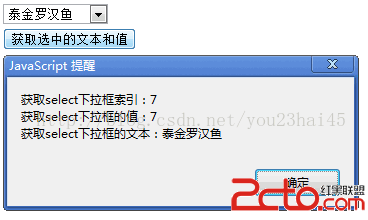
執行結果
選中第一項時:
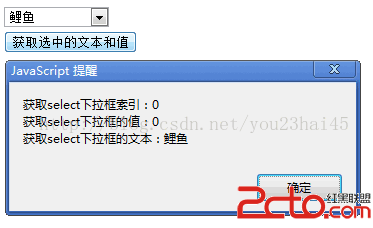
選中最後一項時:
幾個觀念釐清
索引只能透過原生元素取得。jQuery 沒有提供「取得選中索引」的簡便寫法,必須用 .get(0).selectedIndex 或 [0].selectedIndex 拿到原生 select 物件再讀屬性。
:selected 與 :checked 的差別。兩者在 select 上效果相同,但 :checked 同時也能選中 checkbox 與 radio,:selected 只用於 option。針對 select 時建議用 :selected,語意更明確。
多選(multiple)時的行為。上面三個語法在 multiple 的 select 上,.val() 會回傳一個陣列而非單一字串。要逐一取得所有選項,改用:
$("#selection option:selected").each(function () {
    console.log($(this).val(), $(this).text());
});
.text() 會包含前後空白。如果 HTML 裡 option 的文字有縮排或換行,取出來的字串會帶著這些空白。需要精確比對時加上 $.trim():
var txt = $.trim($("#selection option:selected").text());
- 上一篇文章: jQuery 設定與取得 HTML、文字和表單值
- 下一篇文章: jQuery 讀取選中項與設定元素屬性的常用寫法
熱門推薦
用 jQuery 手寫左右切換輪播圖的完整思路
jQuery 實作圖片載入後淡入顯示,告別硬邦邦的跳現
自研 jQuery Autocomplete 插件:加上查詢快取與非 keyup 監聽
用 jQuery 做網頁右下角的展開式浮動廣告(含定時自動收合)
jQuery 的一些實用小技巧收集
使用 jquery.lazyload 插件實現圖片延遲加載詳解
jQuery 無法為 select 設定 selected 的解法:放進 setTimeout
五款值得一試的 jQuery 圖片畫廊外掛推薦
用 jQuery、HTML、CSS 打造 Web IM 即時聊天:串接 Openfire 的完整實作