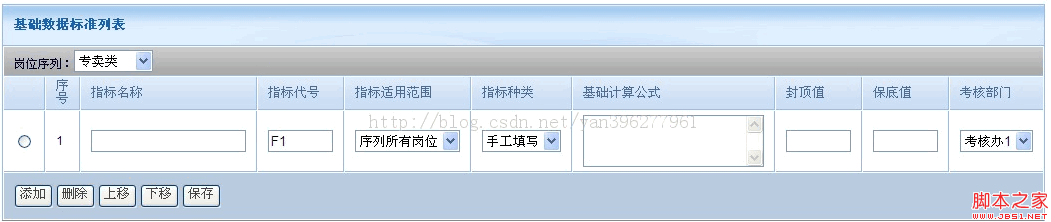
面對表格型態的大量資料時,若每次都靠後台遍歷表單來處理會相當繁瑣。比較好的做法是在前端把資料以物件形式收集成 JSON,再於後台將 JSON 轉為需要的物件直接處理。本文示範如何用 jQuery 完成表格資料的新增、保存、刪除與上下移動。
新增一列
新增按鈕綁定 addRowForPswdBasicFillTemplate 方法,table 的 id 為 pswd_basic_fill_template:
<input name="button" type="button" value="添加" onClick="addRowForPswdBasicFillTemplate('pswd_basic_fill_template')">
方法會動態組出一列 tr,並在每個 td 中塞入 radio、text、select、textarea 等表單元件,最後 append 到 tbody 並重新編號:
function addRowForPswdBasicFillTemplate(tid){
var applyAreaOptionStr = $('#applyAreaOptionStr').val();
did = tid;
var tr = $("<tr></tr>").attr("bgcolor","#FFFFFF");
tr.append($("<td></td>").html("<input type='radio' name='radio' value='checkbox'></td>"));
tr.append($("<td></td>").html(""));
tr.append($("<td></td>").html("<input type='text' name='index_name' id='index_name' />"));
// …其餘 td 依需求 append
tr.appendTo($("#"+tid));
setRowNumber_1(tid);
}
保存資料
保存時先呼叫 getPswdBasicFillTemplate() 把每一列封裝成物件,再用 JSON.stringify 序列化,最後以 $.post 送到後台:
function savePswdBasicFillTemplate(tid){
did = tid;
var result = getPswdBasicFillTemplate();
if(result){
for(var i=0;i<pswd_basic_fill_template.length;i++){
pswd_basic_fill_template[i]=JSON.stringify(pswd_basic_fill_template[i]);
}
$.post("<c:url value='/secbasicFillTemplate/save'/>",{"tempLateList":"["+pswd_basic_fill_template+"]"},
function(data) {
if("false"==data){ showInfo("請先保存基礎信息!"); }
else{ showInfo("保存成功!") }
});
}
}
後台使用 Struts 的 JSonUtil.paserJsonArray 將 JSON 直接轉回物件清單,省下手動遍歷的麻煩。
刪除與上下移動
刪除時先取得選取的 radio 所在列,若有 id 就呼叫後台刪除,再移除該列;上移與下移則透過 clone 該列、插入到前後位置,並重新編號來實現。相關方法包含 delRowForSpacialById、moveBefore、moveAfter 與 setRowNumber_1 等。
透過這套「前端收集成 JSON、後台轉物件」的模式,表格資料的增刪改查都能既直覺又高效。
- 上一篇文章: jQuery 選擇器入門:取得父元素、同級元素與子元素
- 下一篇文章: 用 jquery-syntax 為程式碼動態加上語法著色