用 EasyUI 的 datagrid 顯示後端資料,是 Java 後台開發裡最省力的組合:前端只要宣告幾個欄位,後端回一段 {total, rows} 的 JSON,表格、分頁、排序就都有了。
前端頁面
<%@ page language="java" contentType="text/html; charset=UTF-8" pageEncoding="UTF-8"%>
<!DOCTYPE html PUBLIC "-//W3C//DTD HTML 4.01 Transitional//EN"
  "https://www.w3.org/TR/html4/loose.dtd">
<html>
<head>
<meta http-equiv="Content-Type" content="text/html; charset=UTF-8">
<title>My Users</title>
<link rel="stylesheet" type="text/css" href="easyui/themes/default/easyui.css">
<link rel="stylesheet" type="text/css" href="easyui/themes/icon.css">
<script type="text/javascript" src="easyui/jquery.min.js"></script>
<script type="text/javascript" src="easyui/jquery.easyui.min.js"></script>
</head>
<body>
<table id="dg" title="My Users" class="easyui-datagrid"
       style="width:500px;height:250px"
       url="getUsers.jsp"
       toolbar="#toolbar"
       rownumbers="true"
       fitColumns="true"
       singleSelect="true">
  <thead>
    <tr>
      <th field="firstname" width="50">First Name</th>
      <th field="lastname"  width="50">Last Name</th>
      <th field="phone"     width="50">Phone</th>
      <th field="email"     width="50">Email</th>
    </tr>
  </thead>
</table>
</body>
</html>
幾個關鍵屬性:url 指向資料來源,rownumbers 顯示序號,fitColumns 讓欄寬自動填滿,singleSelect 限制只能選一列。每個 <th> 的 field 對應 JSON 裡每筆物件的屬性名稱。
後端資料來源
<%@page import="net.sf.json.JSONArray"%>
<%@page import="java.util.*"%>
<%@page import="org.codehaus.jackson.map.ObjectMapper"%>
<%@ page language="java" contentType="text/html; charset=UTF-8" pageEncoding="UTF-8"%>
<%
List<Map<String,String>> list = new ArrayList<Map<String,String>>();

Map<String,String> user1 = new HashMap<String,String>();
user1.put("firstname", "name1");
user1.put("lastname",  "name2");
user1.put("phone",     "1234");
user1.put("email",     "281446888@qq.com");
list.add(user1);

Map<String,String> user2 = new HashMap<String,String>();
user2.put("firstname", "name2");
user2.put("lastname",  "name4");
user2.put("phone",     "1234");
user2.put("email",     "281446888@qq.com");
list.add(user2);

JSONArray jsonArray = JSONArray.fromObject(list);

Map<String,Object> map = new HashMap<String,Object>();
map.put("total", 1);          // 總筆數,datagrid 用它算頁數
map.put("rows", jsonArray);   // 目前這頁的資料

ObjectMapper objMap = new ObjectMapper();
objMap.writeValue(response.getWriter(), map);
%>
回傳結構必須是 {"total": 數字, "rows": [ ... ]}。datagrid 靠 total 決定要顯示幾頁,靠 rows 填內容。
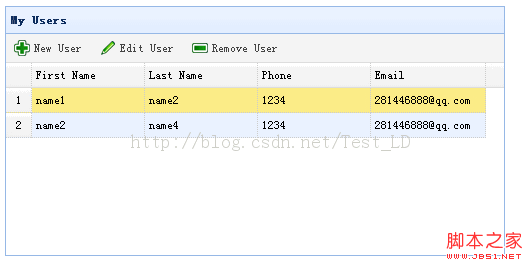
效果如下:
這個範例有幾個不該帶進正式環境的地方
1. 不要在 JSP 裡寫 Java 程式碼。 在 <% %> 之間塞 SQL、組 JSON、處理業務邏輯,是十幾年前的寫法。資料取得應該放在 Servlet 或 Spring 的 Controller,JSP 只負責視圖。請改用 @RestController 回傳物件,並在 contentType 宣告 application/json;charset=UTF-8。
2. 範例裡 total 寫成 1,卻放了兩筆資料。 這會讓分頁元件計算錯誤(顯示只有一頁,但實際有兩列)。真實場景中 total 應該是「符合條件的總筆數」,rows 是「目前這一頁的資料」。
3. 缺少分頁與排序參數。 datagrid 預設會送出 page、rows、sort、order 四個參數,後端必須依這些參數做 limit offset 與 order by。排序欄位名稱切勿直接拼接進 SQL,應先做白名單對照,否則就是 SQL Injection。
4. 用 ObjectMapper 序列化時,記得指定編碼。 response.getWriter() 若未先呼叫 response.setCharacterEncoding("UTF-8"),中文會變成亂碼。
5. EasyUI 的授權與維護狀態。 EasyUI 採用商業授權,商用專案需留意。若偏好開源方案,可以考慮 SheetJS / AG Grid Community / DataTables / ExtJS 的替代品如 FancyGrid,或近年常見的 Tabulator。挑選時除了功能,也建議看社群活躍度與無障礙支援程度。
- 上一篇文章: jQuery 取不到值?當元素 id 裡含有點號時怎麼辦
- 下一篇文章: 讓 jQuery 回應 Enter 鍵:查詢表單的快捷鍵實作