jQuery 插件開發:實作 Google+ 風格的圈子選擇器
編輯:JQuery特效代碼
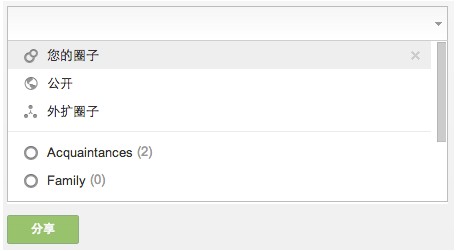
這個插件模仿 Google+ 的圈子(Circle)選擇體驗:點一下輸入框彈出清單,支援鍵盤上下移動、Enter/Tab 確認、Backspace 刪除最後一項、Esc 關閉,也能用拼音即時過濾。以下逐段拆解實作。
一、插件骨架
;(function ($) {
  /**
   * 基於 jQuery 實作類似 Google+ 圈子選擇功能插件(支援鍵盤事件)
   */
  $.fn.iChoose = function (options) {
    var SELF = this;
    var iset = $.extend({}, $.fn.iChoose.defaults, options);   // 使用者設定覆蓋預設值
    var _h, pull = null;

    var main  = $(iset.choMain);          // 載入區域
    var chose = $(iset.choCls, main);     // 已選擇區域
    var input = $(SELF);                 // 輸入框
    var tips  = $(iset.tips, main);       // 預設提示文字
    var cls   = iset.selCls;             // 高亮樣式
    var ids   = $(iset.chsIds);          // 已選 id 的隱藏欄位
    var _l    = iset.limit;              // 一次顯示幾筆

    if(iset.data.length == 0){ return false }    // 無資料則中斷

    // 初始化下拉清單
    var tpl = '<div class="' + iset.pullCls + '"><ul>';
    var tplArr = [];
    $.each(iset.data, function(k, v){
      tplArr.push('<li data-mid="' + v.mid + '" data-name="' + v.filterName.toUpperCase() +
                  '" class="hook_visible hook_' + v.mid + '">' + v.name + '</li>');
    });
    tpl = tpl + tplArr.join('') + '</ul></div>';

    if(pull == null){ main.append(tpl); }
    pull = $('.' + iset.pullCls, main);
    _h = pull.find('li').outerHeight(true);      // 單行高度,用於捲動計算
    pull.width(main.width() - 2);
二、操作物件 Action
把所有行為收進一個 Action 物件,用 this 互相呼叫,結構清楚:
    var Action = {
      init: function(){
        // 滑鼠移過:高亮該列
        pull.delegate('li.hook_visible', 'mouseover', function(){
          $(this).addClass(cls).siblings().removeClass(cls);
        });
        // 點擊:選取
        pull.delegate('li.hook_visible', 'click', function(){
          Action.choose($(this));
        });
        // 點擊已選區:彈出清單
        chose.click(function(){ Action.show(); });
        // 點擊移除鈕
        chose.delegate('.' + iset.removeEl, 'click', function(){
          Action.undock($(this));
        });
      },

      // 上下移動(鍵盤用),並讓清單跟著捲動
      move: function(dir) {
        var index;
        var item = pull.find('li.hook_visible').filter(':visible');
        var cur  = item.filter('.' + cls);
        cur.size() == 0 ? index = -1 : index = item.index(cur);

        item.eq(dir == 'up' ? (index < 1 ? 0 : index - 1) : index + 1)
            .addClass(cls).siblings().removeClass(cls);

        if(item.size() > _l){
          if(dir == 'down'){ pull.scrollTop((index + 2 - _l) * _h); }   // 下翻
          if(dir == 'up')  { pull.scrollTop((index - 1) * _h); }        // 上翻
        }
      },

      // 選取:插入已選標籤、隱藏清單項、回寫 id
      choose: function(el){
        var mid  = el.attr('data-mid');
        var name = el.text();
        tips.before('<div class="' + iset.selItemCls + '"><span>' + name +
                    '</span><a href="javascript:;" class="' + iset.removeEl +
                    '" data-mid="' + mid + '">x</a></div>');
        input.focus();
        el.hide().removeClass('hook_visible');

        ids.val() == '' ? ids.val(mid) : ids.val(ids.val() + ',' + mid);
        pull.find('li.hook_visible:first').addClass(cls).siblings().removeClass(cls);
        this.upstyle();
      },

      // 取消選取:移除標籤、清單項還原
      undock: function(el){
        var mid = el.attr('data-mid');
        var idsArr = ids.val().split(',');
        input.focus();
        el.parent().remove();
        idsArr = $.grep(idsArr, function(v, k){ return v != mid; });
        ids.val(idsArr.join(','));
        pull.find('li.hook_' + mid).show().addClass('hook_visible');
        this.upstyle();
      },

      show: function(){
        pull.slideDown(100, function(){ Action.match('') });
        pull.find('li.hook_visible:first').addClass(cls).siblings().removeClass(cls);
        $(SELF).focus();
        tips.hide();
        input.addClass(iset.inputWCls);
      },

      hide: function(){
        pull.slideUp(100);
        $(SELF).blur();
        tips.show();
        input.removeClass(iset.inputWCls);
      },

      // 依可見筆數調整清單高度
      upstyle: function(type){
        var len = pull.find('li.hook_visible').size();
        if(type == 'match'){ len = pull.find('li:visible').size(); }
        if(len < _l){
          pull.height(_h * len);
          if(len == 0){ this.hide(); }
        } else {
          pull.height(_h * _l);
        }
        pull.css('top', chose.outerHeight());
      },

      // 過濾:以 data-name(含拼音)比對
      match: function(str){
        var visible = pull.find('li.hook_visible');
        visible.each(function(){
          var name = $(this).attr('data-name');
          name.match(str.toUpperCase()) != null ? $(this).show() : $(this).hide();
        });
        if(visible.size() == 0 && $('.' + iset.noResCls).size() == 0){
          pull.find('li:first').before('<li class="' + iset.noResCls + '">暫無可選擇列表</li>');
        }
        this.upstyle('match');
      },

      // 點擊外部:若輸入內容剛好等於某項,視為選取
      blur: function(str){
        pull.find('li.hook_visible').each(function(){
          if($(this).text() == str){ Action.choose($(this)); }
        });
        input.val('');
      }
    };
    Action.init();
三、鍵盤控制
用 on() 一次綁定多個事件,並在 keydown 中攔下特定按鍵:
    $(this).on({
      'keyup change': function(){
        Action.match($.trim(input.val()));
      },
      'blur': function(){
        Action.blur($.trim(input.val()));
      },
      'keydown': function(e){
        switch (e.keyCode) {
          case 8:                       // Backspace:輸入框為空時刪除最後一項
            if($.trim(input.val()) == ''){
              e.preventDefault();
              var last = chose.find('.' + iset.removeEl + ':last');
              if(last.size() > 0){ Action.undock(last); }
            }
            break;
          case 27:                      // Esc:關閉
            e.preventDefault(); Action.hide(); break;
          case 38:                      // 上
            e.preventDefault(); Action.move('up'); break;
          case 40:                      // 下
            e.preventDefault(); Action.move('down'); break;
          case 9: case 13:              // Tab / Enter:確認
            e.preventDefault(); Action.choose(pull.find('.' + cls)); break;
          default:
            $.noop();
        }
      }
    });

    // 點擊非本插件區域時隱藏彈出層
    main.click(function(e){ e.stopPropagation(); });
    $(document).click(function(){ Action.hide(); });
  }
四、可設定參數
  $.fn.iChoose.defaults = {
    data: UDatas,               // 清單資料,可改為即時 AJAX 取得
    limit: 5,                   // 一次顯示幾筆,其餘捲動
    choMain: '#iChooseMain',    // 載入區域
    pullCls: 'icm-list',        // 彈出清單的 class
    choCls: '.icm-box',         // 已選擇區域的外圍 class
    selItemCls: 'icm-item',     // 單個已選元素的 class
    removeEl: 'icm-delete',     // 刪除鈕的 class
    selCls: 'selected',         // 清單高亮的 class
    inputWCls: 'icm-input-w',   // 輸入框的 class
    tips: '.icm-cur-txt',       // 預設提示文字
    noResCls: 'hook_noresult',  // 無結果時的提示 class
    chsIds: '#iChooseIds'       // 已選 id 寫入的隱藏欄位
  }
})(jQuery);
五、幾個值得學的設計手法
- data-* 屬性承載狀態:把
mid與filterName寫進data-屬性,DOM 本身就是資料來源,不必另外維護一份對照表。 - class 當作「可見性旗標」:
hook_visible有沒有掛在 li 上,直接代表「這項還能不能選」。選取後移除、取消選取後加回,邏輯單純。 - 事件委派:清單內容會動態增減,用
delegate(或現代的on(event, selector, fn))綁在容器上,就不必反覆綁定。 - 單行高度快取:
_h存下outerHeight(true),捲動計算用乘法即可,避免每次都觸發 reflow。 - 拼音搜尋:清單項的
data-name存的是大寫拼音,比對時把輸入也轉大寫,就能用英文鍵打出中文結果。
要實際使用,只要依序引入 jQuery、插件檔與資料檔,然後呼叫 $('#iChooseInput').iChoose({...}) 即可。若想調整清單高度、顯示筆數或樣式,直接改 defaults 或傳入自訂 options 就行。