jQuery 製作點擊淡入淡出的彈出提示層
編輯:JQuery特效代碼
彈出層是網頁裡最常出現的互動之一。下面這個例子示範如何用 jQuery 做出一個帶淡入淡出動畫、點擊空白處或自身都能關閉的提示層。
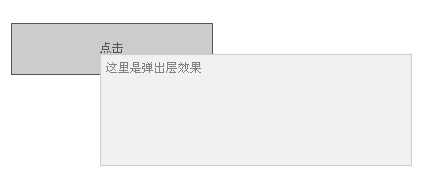
核心邏輯
<script type="text/javascript">
// 漸變彈出層
$(document).ready(function(){
  var speed = 600; // 動畫速度
  $("#race a").click(function(event){          // 綁定事件
    event.stopPropagation();                   // 取消事件冒泡
    var offset = $(event.target).offset();
    $("#racePop").css({                        // 設定彈出層位置
        top:  offset.top + $(event.target).height() + "px",
        left: offset.left });
    $("#racePop").show(speed);                 // 動畫顯示
  });
  $(document).click(function(event) { $("#racePop").hide(speed) }); // 點空白處隱藏
  $("#racePop").click(function(event) { $("#racePop").hide(speed) }); // 點自身隱藏
});
</script>
完整可運行範例
<!-- 漸變彈出層 -->
<div id="race"><a href="#">點擊</a></div>
<div id="racePop" class="raceShow">這裡是彈出層效果</div>

<script type="text/javascript" src="https://ajax.googleapis.com/ajax/libs/jquery/1.7.1/jquery.min.js"></script>
<script type="text/javascript">
$(document).ready(function(){
  var speed = 600;
  $("#race a").click(function(event){
    event.stopPropagation();
    var offset = $(event.target).offset();
    $("#racePop").css({ top: offset.top + $(event.target).height() + "px", left: offset.left });
    $("#racePop").show(speed);
  });
  $(document).click(function(event) { $("#racePop").hide(speed) });
  $("#racePop").click(function(event) { $("#racePop").hide(speed) });
});
</script>

<style>
body{margin:0 auto;font:12px/1.5 tahoma,arial,sans-serif;color:#828282;background:#fff}
body,h1,h2,h3,h4,h5,h6,p,ul,li,dl,dt,dd{padding:0;margin:0;}
li{list-style:none;} img{border:none;} em{font-style:normal;}
a{color:#555;text-decoration:none;outline:none;}
a:hover{color:#000;text-decoration:underline;}
.clear{height:0;overflow:hidden;clear:both;}

/* 漸變彈出層 */
#race{display:block;width:200px;height:50px;line-height:50px;text-align:center;
      background:#CCC;border:#555 1px solid;margin:10px auto}
.raceShow{background-color:#f1f1f1;border:solid 1px #ccc;position:absolute;
          display:none;width:300px;height:100px;padding:5px;font-size:12px;}
</style>
為什麼要 stopPropagation
彈出層內部的點擊會冒泡到 document,而 document 上又掛了「點擊就隱藏」的監聽器。若不阻止冒泡,你點彈窗裡的任何地方都會立刻把它關掉。event.stopPropagation() 就是攔住這條冒泡路徑的關鍵。若改成用 event.target 判斷點擊來源,也能達到同樣效果,而且不必依賴冒泡被截斷。
- 上一篇文章: 讓彈出層永遠乖乖置中的 jQuery 寫法
- 下一篇文章: JavaScript 裡取得 Logger 物件與輸出 debug 訊息的寫法