用 jQuery 搭配 YQL 服務實作天氣預報查詢
編輯:JQuery特效代碼
這個做法完全不需要撰寫任何後端程式(無論 .NET 或 Java),全靠前端加上公開的資料服務完成。
資料來源:中國天氣網
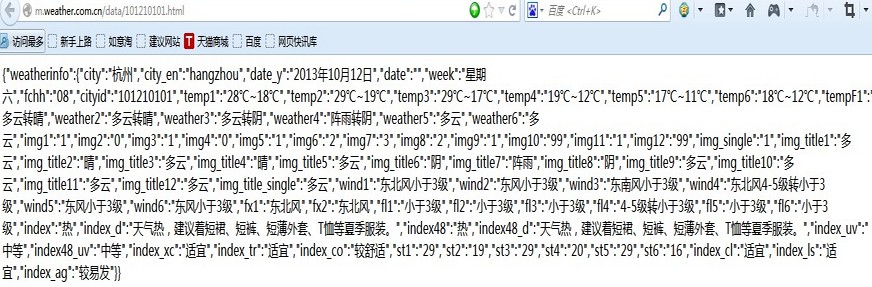
目前較權威的天氣預報資料來自中國天氣網(https://www.weather.com.cn/),這是官方提供的氣象數據。除了商業增值服務之外,它也免費提供以 JSON 格式回傳的資料。以杭州為例(城市代碼 101210101):
https://m.weather.com.cn/data/101210101.html
中介層:Yahoo YQL
YQL(Yahoo! Query Language)能對網路上的各種資料源進行 query、filter、combine 操作,語法近似 SQL,入口在 https://developer.yahoo.com/yql/console/。執行查詢時,YQL 會去訪問網路資料源、抓取並轉換後,以 XML 或 JSON 回傳結果。它支援的資料源類型很多,包含 Yahoo! 的 Web 服務、其他網路服務,以及 HTML、XML、RSS、Atom 等網路資料格式。
它的關鍵價值在於繞過跨域限制:瀏覽器直接請求中國天氣網會被同源政策擋下,但經由 YQL 代理就沒這個問題。
核心程式碼
function getWeather() {
  $.getJSON("https://query.yahooapis.com/v1/public/yql", {
    q: 'select * from json where url="https://m.weather.com.cn/data/101210101.html"',
    format: "json"
  }, function (data) {
    if (data.query.results) {
      var J_data = JSON.parse(JSON.stringify(data.query.results));

      $("#content").append("<p>" + J_data.weatherinfo.city + "天氣預報(資料來源:中國天氣網)</p>");
      $("#content").append("<p>" + J_data.weatherinfo.date_y + " " + J_data.weatherinfo.week
        + " " + J_data.weatherinfo.temp1 + " " + J_data.weatherinfo.weather1
        + " " + J_data.weatherinfo.wind1 + "</p>");

      // 把「2014年08月15日」整理成可解析的日期
      var t = J_data.weatherinfo.date_y.replace("年", "/").replace("月", "/").replace("日", "");
      var tdy = new Date(t);

      // 以今天為基準,逐日推後產生未來幾天的日期
      for (var i = 2; i <= 6; i++) {
        var d = new Date();
        d.setDate(tdy.getDate() + (i - 1));
        $("#content").append("<p>" + d.Format("yyyy年MM月dd日") + " " + getweekdays(d)
          + " " + J_data.weatherinfo["temp" + i] + " "
          + J_data.weatherinfo["weather" + i] + " "
          + J_data.weatherinfo["wind" + i] + "</p>");
      }
    } else {
      $("#content").text('查無資料');
    }
  });
}

function getweekdays(datey) {
  return ["星期日","星期一","星期二","星期三","星期四","星期五","星期六"][datey.getDay()];
}
相較於原範例把 temp1~temp6 各寫一遍,用迴圈搭配屬性名組字(["temp" + i])簡潔得多,之後要改成顯示 10 天也只需調整迴圈上限。
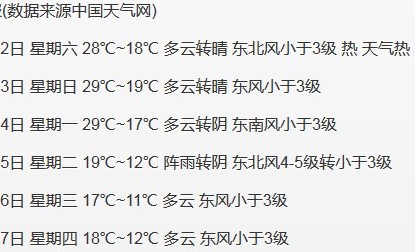
最終效果
重要提醒
這份程式碼在今天已經無法直接運行,原因有兩個:Yahoo YQL 服務已於 2019 年停止提供,query.yahooapis.com 不再可用;中國天氣網的 m.weather.com.cn/data/ 介面也已變更或下線。
若要在新專案中實作類似功能,可考慮:
- 改用目前仍在維護的公開氣象 API,並留意其免費額度與使用條款。
- API 金鑰不要寫在前端,應由自己的後端代理轉發,避免被盜用。
Date.prototype.Format是範例中自訂的擴充方法,使用前需自行實作,或改用toLocaleDateString()。
這個案例真正值得學習的,是「用第三方服務做資料聚合與跨域代理」這個思路——它在今天的 BFF/Serverless 架構下依然通用,只是換了具體的服務與實作方式。
- 上一篇文章: jQuery + Ajax + C# 實作無刷新讀寫資料庫
- 下一篇文章: 七個立刻能用的 jQuery 效能優化技巧