這陣子遇到一個狀況:想透過 Ajax 把 KindEditor 的內容送出來,但用編輯器官方封裝的方法完全取不到值。查了原因才發現,編輯器被放在另一個 JSP 頁面,透過 iframe 載入,而且那個 iframe 是 display:none 的,要等某個事件觸發才會用到。
iframe 的結構大概像這樣:
<iframe src="../common/editor.jsp" frameborder="0" scrolling="no"
        style="margin: 0" width="100%" height="300" name="zwFrame" id="zwFrameId"></iframe>
三次嘗試的過程
既然官方方法行不通,只好自己用 jQuery 挖。第一個直覺是讀 textarea 裡的內容,也就是 $("#editor").html()——失敗。接著想說直接進 iframe 裡面拿——也失敗。最後靠 Firefox 的除錯工具逐步追/elements 才找到答案。
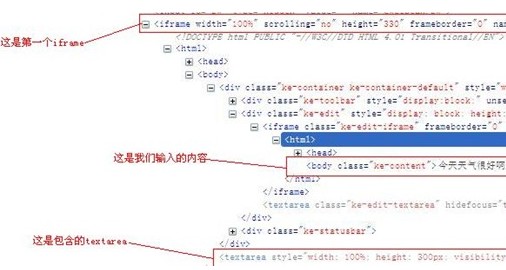
從上圖可以看出,想拿到「今天天氣很好」這段文字,只需要取得指定 body 裡面的內容即可。原來 KindEditor 的實際內容不在 textarea,而是渲染在 iframe 內層的 body 上。
正確的取法:兩層 iframe
處理流程是:先拿到最外層的 iframe,從中找出內層的子 iframe,再進一層取 body。
var editorText = $(window.frames['zwFrame'].document).find("iframe").contents().find("body");
var contents = editorText.html();
這裡的 contents() 是重點:它會找出匹配元素內部所有的子節點(包含文字節點);如果元素本身是 iframe,則會回傳該 iframe 的文檔內容。這正是跨過 iframe 邊界的關鍵 API。
其他取得 iframe 內元素的寫法
如果只需要抓 iframe 中 body 的 HTML:
$(document.getElementsByTagName("iframe")[0].contentWindow.document.body).html();
用 id 定位 iframe 再取 body:
$(document.getElementById("iframeId").contentWindow.document.body).html();
抓取 iframe 中的 textarea:
$(window.frames["iframeName"].document).find("#textareaId").html();
實務提醒
跨 iframe 操作有個前提:必須同來源。若 iframe 指向不同網域,瀏覽器的同源政策會直接擋下,任何 contents() 都拿不到東西,這時候只能改用 postMessage 溝通。
另外,KindEditor 官方其實有 editor.html() 這類 API 專門處理取值,正常使用情境下優先用官方方法;只有像本例這種 iframe 被隱藏、實例無法直接取得的特殊結構,才需要退一步用 DOM 逐層挖掘。
- 上一篇文章: jQuery 打造無縫自動捲動的圖片牆
- 下一篇文章: jQuery Ajax 使用 JSONP 的兩個限制與解法