手寫右下角公告彈層,含倒數自動關閉
編輯:JQuery特效代碼
專案裡常有「右下角跳出公告提示」的需求。要做得簡潔、程式碼精煉、體驗又不惱人,其實需要不少細節。市面上現成的彈層不少,但功能常常不盡合用,所以分享一下自己手寫並持續在用的版本。
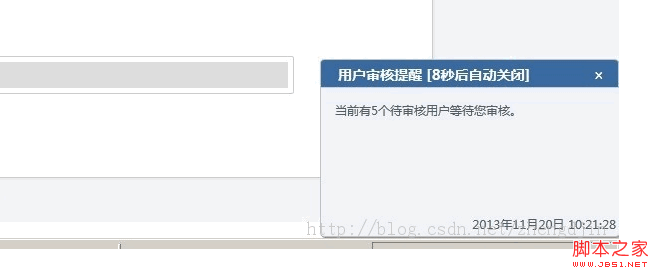
先看實際效果:
CSS:定位與切圖拼出的外框
/* 通知提示層 */
.msg_info{
  font-size:12px; text-align:left; z-index:100;
  position:absolute; display:none;
  bottom:0; right:0; overflow:hidden;
}
.msg_info h3{ float:left; margin:0; width:100%; color:#fff; height:30px; }
.msg_info h3 span, .msg_info h3 b, .msg_info h3 em,
.msg_info small span, .msg_info small b, .msg_info small em{
  background-image:url(/img/msg_bg.png);
}
.msg_info h3 b, .msg_info h3 em,
.msg_info small b, .msg_info small em{
  float:left; font-size:1px; width:6px; height:30px;
}
.msg_info h3 b  { background-position:0px 0px; }
.msg_info h3 em { background-position:0px -32px; }
.msg_info h3 span{ background-position:0px -64px; float:left; line-height:30px; }
.msg_info h3 span font{ float:left; text-align:left; overflow:hidden; margin-left:12px; }
.msg_info h3 span i{ float:right; margin-right:10px; cursor:pointer; font-style:normal; }

.message_content{
  float:left; color:#515F62; overflow:hidden;
  border-left:solid 1px #C2C2C2; background-color:#F1F2F7;
  margin-top:-1px; min-height:145px; height:auto !important; height:145px;
}
.message_content div{ float:left; margin:0; padding:10px 14px; height:100%; position:relative; }
.message_content div p.message_txt{ float:left; width:100%; height:80%; margin:0; padding:0; min-height:60px; }
.message_content div i{ float:left; font-style:normal; margin-top:2px; text-align:right; position:fixed; bottom:2px; right:4px; }
.message_content b.bright{ float:right; width:1px; font-size:1px; background-color:#C2C2C2; border-right:solid 1px #828282; height:100%; }

.msg_info small{ float:left; width:100%; height:5px; font-size:5px; }
.msg_info small span{ background-position:0px -101px; height:5px; float:left; }
.msg_info small b{ height:5px; background-position:0px -96px; }
.msg_info small em{ height:5px; background-position:0px -106px; float:right; }
用一張背景圖搭配 background-position 切出四角與中段的漸層,是十年前常見的 sprite 手法;height:auto !important; height:145px 這組寫法則是為了讓 IE6 也能正確撐開高度。
JS:Messager 建構函式
// 右下角彈層
function Messager() {
  this.layer  = { 'width': 200, 'height': 100 };
  this.title  = '信息提示';
  this.time   = 4000;
  this.anims  = { 'type': 'slide', 'speed': 600 };
  this.timer1 = null;
  this.isTiming = false;
  this.obj_id = "msg_" + $(document.body).find('msg_info').length;

  var _obj, _title, _anims, _time;
  _timer2 = null;

  // 初始化:組出彈層 DOM
  this.inits = function (title, text) {
    _anims = this.anims;
    _title = title;
    var _html = '<div class="msg_info ' + this.obj_id + '">';
    _html += ' <h3><b></b>';
    _html += ' <span class="msg_bg_middle"><font>' + title + '</font>';
    _html += ' <i class="message_close">×</i></span>';
    _html += ' <em></em></h3>';
    _html += ' <div class="message_content">';
    _html += ' <div class="msg_txt">' + text + '</div>';
    _html += ' <b class="bright"></b></div>';
    _html += ' <small><b></b><span class="msg_bg_middle"></span><em></em></small>';
    _html += '</div>';
    $(document.body).prepend(_html);

    _obj = $("." + this.obj_id);
    if ($.browser.msie) { _obj.css('bottom', -5); }
    _obj.css('width', this.layer.width);
    _obj.find('.msg_bg_middle').css('width', this.layer.width - 12);
    _obj.find('.message_content').css('width', this.layer.width - 2);
    _obj.find('.msg_txt').css('width', this.layer.width - 34);

    _obj.find(".message_close").click(function () {
      setTimeout(function () { closeMsg(); }, 1);
    });

    // 滑鼠移入暫停倒數,移出重新計時
    _obj.hover(function () {
      clearTimeout(timer1);
      clearInterval(_timer2);
      _timer2 = timer1 = null;
    }, function () {
      timer1 = setTimeout(function () { closeMsg(); }, _time * 1000);
      timing(_time * 1000);
    });
  };

  // 顯示
  this.show = function (title, text, time) {
    if (title == 0 || !title) title = this.title;
    this.inits(title, text);
    if (time >= 0) this.time = time;

    switch (this.anims.type) {
      case 'slide': _obj.slideDown(this.anims.speed); break;
      case 'fade' : _obj.fadeIn(this.anims.speed);   break;
      case 'show' : _obj.show(this.anims.speed);     break;
      default     : _obj.slideDown(this.anims.speed); break;
    }
    this.rmmessage(this.time);
  };

  // 設定寬高
  this.lays = function (width, height) {
    if (width  != 0 && width)  this.layer.width  = width;
    if (height != 0 && height) this.layer.height = height;
  };

  // 設定動畫呈現方式
  this.anim = function (type, speed) {
    if (type != 0 && type) this.anims.type = type;
    if (speed != 0 && speed) {
      switch (speed) {
        case 'slow'  : break;
        case 'fast'  : this.anims.speed = 200; break;
        case 'normal': this.anims.speed = 400; break;
        default      : this.anims.speed = speed; break;
      }
    }
  };

  // 排定自動移除
  this.rmmessage = function (time) {
    if (time > 0) {
      timer1 = setTimeout(function () { closeMsg(); }, time);
      if (this.isTiming) { timing(time); }
    }
  };

  // 倒數計時,同步更新標題文字
  timing = function (time) {
    _time = time / 1000;
    _timer2 = setInterval(function () {
      _obj.find('.msg_bg_middle').find('font')
          .html(_title + ' [' + (--_time) + '秒後自動關閉]');
    }, 1000);
  };

  // 關閉
  closeMsg = function () {
    switch (_anims.type) {
      case 'slide': _obj.slideUp(_anims.speed);  break;
      case 'fade' : _obj.fadeOut(_anims.speed);  break;
      case 'show' : _obj.hide(_anims.speed);     break;
      default     : _obj.slideUp(_anims.speed);  break;
    }
    setTimeout(function () { _obj.remove(); }, _anims.speed);
  }
}
呼叫方式
var msg = '<p class="message_txt">當前有' + json.total + '個待審核用戶等待您審核。</p>'
        + '<i>' + json.stadate + '</i>';
var msgDiv = new Messager();
msgDiv.isTiming = true;         // 開啟倒數顯示
msgDiv.lays(300, 180);          // 設定尺寸
msgDiv.show("用戶審核提醒", msg, 10000);
設計上值得沿用的地方與該修正的地方
這個元件有幾個不錯的決定:用 obj_id 讓每個彈層有獨立 class,因此同一頁可以並存多個而不互相干擾;滑鼠移入時 clearTimeout 加 clearInterval 一起清掉,讓使用者能安心閱讀,移開後重新計時;關閉動畫結束後才 remove(),避免DOM 殘留。
但要特別提醒兩處必須修正的問題。第一,$.browser 在 jQuery 1.9 已被移除,這段 IE 判斷在新版會直接報錯,請改用 navigator.userAgent 或 feature detection。第二,也是更關鍵的:把 text 直接拼進 HTML 字串,若公告內容來自後端使用者輸入,就構成了 XSS 缺口,應該改用 .text() 填入。另外 closeMsg 與 timing 是全域函式,多實例並存時會互相覆蓋,應改為掛在 prototype 上並用閉包保存狀態。理解了這些,這個元件就更能放心用在真實專案裡。
- 上一篇文章: 用 stop(true) 立刻中止 jQuery 進行中的動畫
- 下一篇文章: jQuery 實作可收合的樹狀二級選單