attribute 與 property
attribute 和 property 都可譯為「屬性」,為了區分,通常分別譯為「屬性」與「特性」。以下面這段 HTML 為例:
<div id="test">Click Here</div>
這段語句裡有三種節點:Element「div」、attribute「id」、Text「click here」。我們最常操作的 attribute 就是這類節點,JavaScript 有專門的 getAttribute(name) / setAttribute(name,value) 來處理;而且 attribute 不限於寫在 HTML 上的那些,我們也能自訂:
<div id="test">123</div>
<script type="text/javascript">
var t=document.getElementById('test');
t.setAttribute('class','active');
t.setAttribute('customizedAttr','customized');
</script>
執行後 div 會變成:
<div id="test" class="active" customizedattr="customized">123</div>
property 則是 DOM 物件上的欄位,取值與設值和一般物件一樣用「物件.欄位」的方式。兩者之所以容易搞混,是因為很多 attribute 都有對應的 property,例如 id:
t.id='test1';
console.log(t.getAttribute('id'));//test1
我們也能自訂 property:
t.customizedProp='customized prop';
主要區別
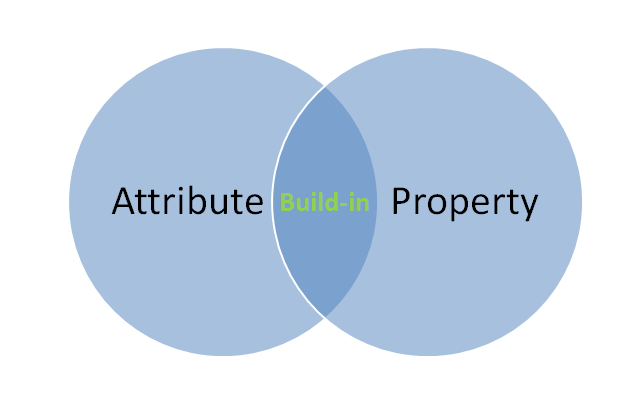
1. 對於內建屬性,attribute 與 property 會共享數據,改動一方會影響另一方;但兩者的「自訂」屬性是各自獨立的,即使名稱相同也互不干擾。(IE6、7 未做區分,仍共享自訂屬性數據)
2. 並非所有 attribute 與對應 property 名稱都一致,例如 class 屬性用 property 操作時要寫成 className:
t.className='active2';
3. 對於值為 true/false 的 property(如 input 的 checked),attribute 取的是 HTML 字面量,property 取的是計算結果;property 改變不影響 attribute 字面量,但 attribute 改變會影響 property 計算:
var t=document.getElementById('test3');
console.log(t.getAttribute('checked'));//null
console.log(t.checked);//false;
t.setAttribute('checked','checked');
console.log(t.getAttribute('checked'));//checked
console.log(t.checked);//true
t.checked=false;
console.log(t.getAttribute('checked'));//checked
console.log(t.checked);//false
4. 對於與路徑相關的屬性(如 href),attribute 取的是字面量,property 取的是計算後的完整路徑:
var t=document.getElementById('test4');
console.log(t.getAttribute('href'));//#
console.log(t.href);//file:///C:/.../anonymous.html#
attr 與 prop
理解上述內容後,就明白 jQuery 為何要新增 prop 方法。官方文件也特別說明:在 jQuery 1.6 之前,.attr() 在獲取某些 attribute 時混用了 property 值,導致行為不一致;1.6 之後,.prop() 提供明確取得 property 的方式,而 .attr() 只回傳 attribute。
像 selectedIndex、tagName、nodeName、nodeType、ownerDocument、defaultChecked、defaultSelected 這些只有 property、沒有對應 attribute 的項目,都應改用 .prop() 取得或設定。
以 checkbox 為例(變數名 elem):
elem.checked → true (Boolean),會隨勾選狀態改變
$( elem ).prop( "checked" ) → true (Boolean),會隨勾選狀態改變
elem.getAttribute( "checked" ) → "checked" (String),初始狀態,不隨之改變
$( elem ).attr( "checked" ) (1.6.1+) → 會隨勾選狀態改變
$( elem ).attr( "checked" ) (pre-1.6) → true (Boolean),會隨勾選狀態改變
依 W3C 規範,checked 是布林值,只要 HTML 中出現 checked 屬性,對應 property 就是 true。但要牢記最重要的一點:checked 屬性與 checked property 並不一致——屬性對應的是 defaultChecked,只用來設定初始值,之後不隨勾選狀態改變;property 則會跟著變。因此跨瀏覽器判斷是否勾選,應使用 property:
if ( elem.checked )
if ( $( elem ).prop( "checked" ) )
if ( $( elem ).is( ":checked" ) )
這對 selected、value 等動態屬性同樣適用。另外在 IE9 之前,若以 .prop() 設定某些物件型別的 property 而未在移除元素前刪除,可能造成記憶體洩漏,這種情況可改用 .data() 來設定值。
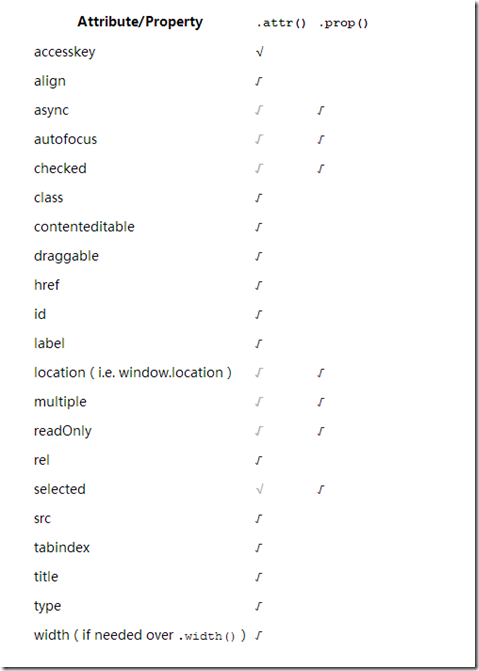
總結一句:判斷「動態狀態」用 prop,讀取「HTML 字面設定」用 attr,分清楚這條界線,大多數混淆都能迎刃而解。