以 jQuery 與 JSON 實作省市區三級聯動
編輯:JQuery特效代碼
三級聯動是表單裡的經典題目。這份實作把省、市、區縣資料各自放在 JSON 檔中,用 $.get 按需載入,並支援表單編輯時回填初始值。
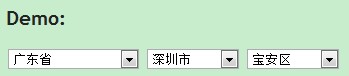
一、HTML 結構
<!DOCTYPE html>
<html>
<head>
<meta charset="utf-8" />
<title>省市區聯動</title>
<script src="/Scripts/jquery.min.js" type="text/javascript"></script>
<script src="/Scripts/script.js" type="text/javascript"></script>
</head>
<body>
<h2>Demo:</h2>
<select id="province">
  <option value="0">請選擇省份</option>
</select>
<select id="city">
  <option value="0">請選擇城市</option>
</select>
<select id="district">
  <option value="0">請選擇區縣</option>
</select>

<!-- 編輯表單時用來回填的初始值(可選) -->
<input type="hidden" value="440000" id="pre_province"/>
<input type="hidden" value="440500" id="pre_city"/>
<input type="hidden" value="440511" id="pre_district"/>
</body>
</html>
二、script.js
/*
author: elycir
description: 省市區三級(二級)聯動
*/
$(function () {
  var citySelector = function () {
    var province     = $("#province");
    var city         = $("#city");
    var district     = $("#district");
    var preProvince  = $("#pre_province");
    var preCity      = $("#pre_city");
    var preDistrict  = $("#pre_district");

    var jsonProvince = "/content/json-array-of-province.js";
    var jsonCity     = "/content/json-array-of-city.js";
    var jsonDistrict = "/content/json-array-of-district.js";

    var hasDistrict  = true;   // 設為 false 即為兩級聯動

    var initProvince = "<option value='0'>請選擇省份</option>";
    var initCity     = "<option value='0'>請選擇城市</option>";
    var initDistrict = "<option value='0'>請選擇區縣</option>";

    return {
      Init: function () {
        var that = this;
        that._LoadOptions(jsonProvince, preProvince, province, null, 0, initProvince);

        province.change(function () {
          that._LoadOptions(jsonCity, preCity, city, province, 2, initCity);
        });

        if (hasDistrict) {
          city.change(function () {
            that._LoadOptions(jsonDistrict, preDistrict, district, city, 4, initDistrict);
          });
          // 省份變動時,連帶觸發城市重載
          province.change(function () { city.change(); });
        }
        province.change();
      },

      _LoadOptions: function (datapath, preobj, targetobj, parentobj, comparelen, initoption) {
        $.get(datapath, function (r) {
          var t = '';   // html 容器
          var s;        // 選中標識
          var pre;      // 初始值
          pre = (preobj === undefined) ? 0 : preobj.val();

          for (var i = 0; i < r.length; i++) {
            s = '';
            if (comparelen === 0) {
              // 第一層:直接比對完整 code
              if (pre !== "" && pre !== 0 && r[i].code === pre) {
                s = ' selected="selected" ';
                pre = '';
              }
              t += '<option value=' + r[i].code + s + '>' + r[i].name + '</option>';
            } else {
              // 子層:以父層 code 的前 N 位比對
              var p = parentobj.val();
              if (p.substring(0, comparelen) === r[i].code.substring(0, comparelen)) {
                if (pre !== "" && pre !== 0 && r[i].code === pre) {
                  s = ' selected="selected" ';
                  pre = '';
                }
                t += '<option value=' + r[i].code + s + '>' + r[i].name + '</option>';
              }
            }
          }
          targetobj.html(initoption !== '' ? initoption + t : t);
        }, "json");
      }
    };
  }();

  citySelector.Init();
});
三、設計重點
- 以行政區代碼前綴分層:省 440000、市 440500、區 440511。子層比對前 2 位(省)或前 4 位(市)即可篩出下級,不需要額外的關聯欄位。
- 初始值回填:載入後比對隱藏欄位的值,命中就加上
selected,因此同一份程式碼同時適用於「新增」與「編輯」兩種場景。 - 事件串接:省份變動時再觸發一次
city.change(),讓三層的更新鏈自然往下傳遞。 - 兩級/三級可切換:把
hasDistrict設為 false,即退化成省市兩級聯動。
省市區的 JSON 資料檔依上述路徑放在 /content/ 目錄即可,每筆資料形如 { code: "440000", name: "廣東省" }。
- 上一篇文章: jQuery 指令大全:選擇器、效果、文件操作與事件速查
- 下一篇文章: jQuery attr() 與 prop() 自訂屬性操作詳解