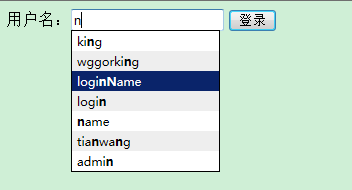
像百度、Google 一樣:為輸入框加上自動完成提示
編輯:JQuery特效代碼
整個實作只需要三個部分:jQuery UI 提供的 autocomplete.js 與 autocomplete.css(可自 jqueryui.com/demos/autocomplete 取得)、一個一般處理程序負責提供資料,以及一個 aspx 頁面。
前端頁面
<script type="text/javascript">
$(document).ready(function () {
    ShowUserList($("#TextBox1"), "LoginTest.ashx");

    function ShowUserList(obj, url) {
        $.getJSON(url, function (msg) {
            msg = msg.Table;
            var names = new Array();
            for (var i = 0; i < msg.length; i++) {
                names.push(msg[i].loginName);
            }
            obj.focus().autocomplete(names);
        });
    }
});
</script>

<form id="form1" runat="server">
<div>
  用戶名:<asp:TextBox ID="TextBox1" runat="server"></asp:TextBox>
  <asp:Button ID="Button1" runat="server" Text="登錄" />
</div>
</form>
流程是:先用 $.getJSON 把資料抓回來,整理成字串陣列,再交給 autocomplete() 掛上去。
後端一般處理程序
public class LoginTest : IHttpHandler
{
    string str;
    public void ProcessRequest(HttpContext context)
    {
        getUserName();
        context.Response.Write(str);
    }
    public bool IsReusable
    {
        get { return false; }
    }
    private void getUserName()
    {
        DataSet ds = SqlHelper.BuildDataSet("select * from login", CommandType.Text);
        str = ConvertJson.ToJson(ds);
    }
}
後端只要把查詢結果序列化成 JSON 吐回即可,前端完全不必自己拼字串。
執行結果
- 上一篇文章: Ajax 搜尋結果頁的分頁按鈕怎麼寫:完整函數解析
- 下一篇文章: jQuery 操作 DOM 基本用法大整理(選擇、增刪、樣式、偏移)